
Key takeaways
- Best balance of price and features: TP-Link Tapo C120. A small, weather-resistant plug-in camera with a magnetic base, local microSD recording, motion detection, and optional cloud service. It suits renters who can use a shelf, metal surface, or removable adhesive mount and want to avoid a required subscription.
- Best for a simple indoor setup: Eufy Indoor Cam C220. Its pan-and-tilt design can cover more of a room from one shelf or counter, and it supports local microSD storage. It’s a practical choice when a fixed camera would leave a blind spot, though moving the lens to follow activity may not suit everyone’s privacy preferences.
- Best for a compact, privacy-conscious setup: Aqara Camera E1. This plug-in pan-and-tilt camera supports microSD recording and privacy modes. It makes sense for renters already using compatible Aqara or Apple smart-home equipment, but check platform compatibility before buying.
- Best when you need a battery: Blink Mini 2 with the compatible battery power accessory. The camera itself is compact, but battery operation requires a separate accessory. Factor that into the total cost, and check the recording plan and storage options available in your region before choosing it.
Best Apartment Security Cameras for Renters
The best apartment security camera for most renters is a compact, plug-in indoor camera with a magnetic or adhesive mount, a physical privacy shutter, and local recording that still works without a monthly subscription. Choose a battery model if you need to place it away from outlets, or a doorbell camera only if your building permits one and the existing wiring or door setup is compatible.
Quick picks by renter situation
- Best balance of price and features: TP-Link Tapo C120. A small, weather-resistant plug-in camera with a magnetic base, local microSD recording, motion detection, and optional cloud service. It suits renters who can use a shelf, metal surface, or removable adhesive mount and want to avoid a required subscription.
- Best for a simple indoor setup: Eufy Indoor Cam C220. Its pan-and-tilt design can cover more of a room from one shelf or counter, and it supports local microSD storage. It’s a practical choice when a fixed camera would leave a blind spot, though moving the lens to follow activity may not suit everyone’s privacy preferences.
- Best for a compact, privacy-conscious setup: Aqara Camera E1. This plug-in pan-and-tilt camera supports microSD recording and privacy modes. It makes sense for renters already using compatible Aqara or Apple smart-home equipment, but check platform compatibility before buying.
- Best when you need a battery: Blink Mini 2 with the compatible battery power accessory. The camera itself is compact, but battery operation requires a separate accessory. Factor that into the total cost, and check the recording plan and storage options available in your region before choosing it.
Product features and app plans can change. Confirm current storage, compatibility, and subscription terms on the manufacturer’s site before purchase.
Our top picks
 INFIYA 2.4/5GHz WiFi No-Drill Window Cameras for
- 2K 105° Wide‑Angle Through‑Glass View: Capture sharp glare‑free…
- Clear 2K Vision Day and Night: Equipped with…
- Flexible Storage
 Blink Battery Doorbell 2K+
- 2K video, battery-powered convenience
- See who's there in 2K clarity
- Talk like you're there
 JOOAN 2K No-Drill Window Camera Color Night
- Built for Renters—No Drilling, No Damage: Designed for…
- Beyond the Window—Protect Every Space: More than just…
- Flexible Installation for Any Setup: Choose the mounting…
| Product | Key specs | |
|---|---|---|
| INFIYA 2.4/5GHz WiFi No-Drill Window Cameras for | 2K 105° Wide‑Angle Through‑Glass View: Capture sharp glare‑free… Clear 2K Vision Day and Night: Equipped with… Flexible Storage | Check price |
| Blink Battery Doorbell 2K+ | 2K video, battery-powered convenience See who's there in 2K clarity Talk like you're there | Check price |
| JOOAN 2K No-Drill Window Camera Color Night | Built for Renters—No Drilling, No Damage: Designed for… Beyond the Window—Protect Every Space: More than just… Flexible Installation for Any Setup: Choose the mounting… | Check price |
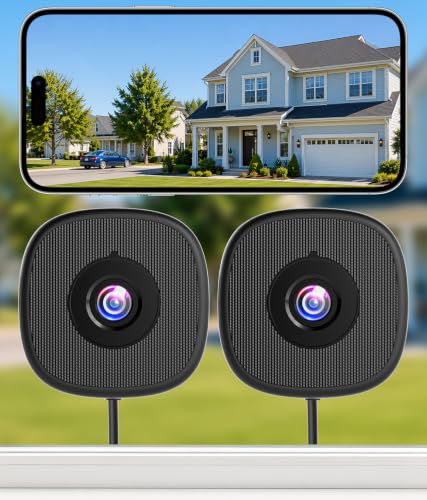 MISECU 2K No Drill Window Camera MISECU 2K No Drill Window Camera | 【Install in Minutes—No Drilling, No Outdoor Mounting】Transform almost… 【2K Clarity with Starlight Color Night Vision】See every… 【Smarter Alerts & Instant Protection】This smart 2k window… | Check price |
As an Amazon Associate we earn from qualifying purchases at no extra cost to you.
Compare the practical details
The figures below are approximate published dimensions or capacities for the named models; accessories, regional versions, and firmware updates can change what’s included. A camera’s field of view and app settings matter as much as its body size when deciding whether one placement will cover your entryway.
| Camera | Approx. body size | Power and placement | Local storage | Subscription consideration |
|---|---|---|---|---|
| TP-Link Tapo C120 | About 6.7 × 4.4 × 5.8 cm; about 110 g | Plug-in; magnetic base; adhesive or shelf placement | microSD, up to 512 GB | Optional cloud plan; local recording can avoid a recurring fee |
| Eufy Indoor Cam C220 | About 7.5 × 7.5 × 10.8 cm; about 250 g | Plug-in; tabletop or compatible mounted placement | microSD, up to 128 GB | Cloud service is optional; check which features require a plan |
| Aqara Camera E1 | About 5.8 × 5.8 × 10.4 cm; about 170 g | USB-powered; tabletop or mounted placement | microSD, up to 512 GB | Cloud availability and smart-home features vary by service and region |
| Blink Mini 2 | About 5.1 × 5.1 × 3.8 cm; about 48 g | Plug-in by default; battery use requires a separate compatible accessory | Optional Sync Module 2 with USB storage, sold separately | Some recording and cloud features depend on plan or included trial terms |
MicroSD cards and storage modules are usually additional purchases. For continuous recording, estimate storage needs from the manufacturer’s guidance: motion-only clips generally use less space than round-the-clock video, and card capacity alone does not guarantee a particular number of saved days.
Choose by room, budget, and how often you’ll check in
| Your situation | Best fit | Why | Trade-off |
|---|---|---|---|
| Tight budget; occasional checks | Plug-in camera with local microSD | Lower upfront cost than a battery system and no required cloud plan for basic local clips | You must buy and manage the card; camera needs a nearby outlet |
| Small studio; one camera must cover several angles | Pan-and-tilt indoor camera | Can turn toward different parts of the room without moving the base | It cannot see every direction at once; motorized movement adds another privacy consideration |
| No convenient outlet; frequent placement changes | Battery camera or a plug-in model with a suitable power accessory | More flexibility in placement | Higher initial cost and periodic charging; check whether all features work in battery mode |
| New to cameras; want the fewest ongoing decisions | Plug-in camera with local recording and a physical privacy control | Simple power routine and fewer subscription decisions | Requires a stable Wi-Fi signal and a discreet spot for the cable |
What matters more than the headline feature
No-drill mounting that won’t damage the apartment
Start with a shelf, bookcase, or countertop near the entry rather than drilling into a wall or ceiling. A magnetic base is convenient only if there is a suitable metal surface; it does not attach to every wall. For adhesive mounts, use a product rated for the camera’s weight, follow its surface-preparation and curing instructions, and test removal in an inconspicuous place. Avoid attaching a camera to a door that moves or to a surface where a fall could damage the device or injure someone.
Local storage versus cloud
Local microSD recording can reduce recurring costs and keep clips available if a cloud plan is not active, but the card is physically in the camera and may be lost or damaged if the camera is taken. Cloud storage can preserve clips away from the apartment, but usually involves a subscription and an internet connection. Some brands also limit notifications, event history, or advanced detection by plan, so compare the features you’ll actually use—not just the advertised storage option.
For a rough cost comparison, if a cloud plan costs $4 per month, it adds $48 per year or $144 over three years, before any price changes. Compare that with the one-time cost of a compatible memory card, then decide whether remote backup is worth the ongoing charge.
Privacy and shared Wi-Fi
Place the camera to view your own entry or belongings, not a roommate’s private space, a neighbor’s window, or a shared hallway where recording may violate building rules or local law. Tell housemates about cameras in shared areas. Prefer a model with a physical shutter or a clear privacy mode, enable two-factor authentication when offered, use a unique password, and keep camera firmware updated. If you use a pan-and-tilt model, set privacy positions or schedules for times when recording is not appropriate.
Wi-Fi reliability in apartment buildings
Congested networks and thick walls can cause missed alerts or delayed live video. Many indoor cameras require 2.4 GHz Wi-Fi; check the exact model’s requirements, especially if your router combines 2.4 and 5 GHz under one network name. Place the camera where it can reach the router without being hidden behind a television, metal appliance, or dense wall. Before mounting, stream live video from the intended spot and trigger a test notification. If the connection is weak, moving the camera a few feet or repositioning the router may help more than buying a higher-resolution model.
Set it up without making a renter headache
- Check permissions first. Review your lease and building rules before aiming a camera at an entry door, fitting a doorbell, or recording shared space.
- Choose the view from a shelf. Aim at the apartment entrance while minimizing views of private areas and neighboring doors. Check the image from standing and seated height.
- Test Wi-Fi and alerts before mounting. Confirm live view works and that motion alerts arrive promptly at the final position.
- Set recording and privacy zones. Reduce unnecessary notifications by masking busy areas, adjusting motion sensitivity, and scheduling privacy mode where available.
- Review storage and power monthly. Check that clips are saving, the memory card is recognized, and the cable or battery is secure. Replace a failing card rather than relying on it indefinitely.
Bottom line
For most renters, a plug-in camera with a removable placement option, local microSD storage, and a physical privacy control is the most balanced choice. The Tapo C120 is a strong starting point if its fixed view covers your entry; choose a pan-and-tilt option such as the Eufy Indoor Cam C220 or Aqara Camera E1 when one camera needs to cover multiple angles. Pick battery power only when outlet placement is genuinely impractical, and include accessories and subscription costs in the total before deciding.




Write Your Review
No reviews yet. Be the first to share your experience!