
Our Top Picks
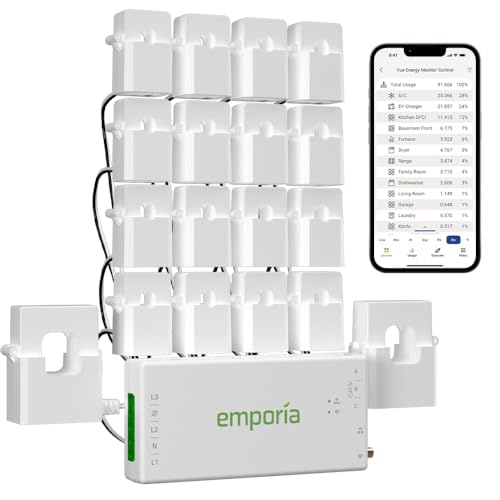


If you want one answer: the Emporia Vue 3 is the best smart home energy monitor for most households in 2026. It reads your whole-home consumption through main-leg CT clamps, accepts branch-circuit CTs so you can add circuit-level detail as your curiosity grows, and its app turns kilowatt-hours into an estimated bill you can hold up against your utility statement. It suits homeowners with panel access who want both a single whole-home number and the ability to find out which circuit is running at 2 a.m. If you rent, or your panel is not something you are willing to open, skip the panel hardware entirely and start with a metered smart plug — the Tapo P115 4-pack or the single-outlet Emporia Energy Monitoring Smart Plug — because plug-level data covers the loads you actually control. If you have solar with net metering, or you want a wired Ethernet path instead of Wi-Fi, the Eyedro 200A is the more appropriate tool. And if you want maximum circuit coverage out of one box, the Siemens Inhab and the Emporia 16-sensor bundle are the premium routes. Everything below is compared on the six things that actually change your experience: circuit-level accuracy, installation requirements, app features, solar compatibility, real-time alerts, and utility-bill tracking.
Top 3 Picks
Best overall: Emporia Vue 3. The Vue 3 hits the balance point most buyers are looking for — whole-home main-leg monitoring out of the box, expandable branch-circuit channels, solar/net-metering configuration in the app, and a rate-based bill estimate that makes the data feel like money instead of charts. It suits the homeowner with panel access who wants a platform to grow into rather than a one-time gadget.
Best budget: Tapo P115 4-pack. For a fraction of the cost of any panel-mounted system, four 15 A metered plugs give you honest per-device data on the appliances that dominate most homes — space heaters, window AC units, dehumidifiers, game consoles, and always-on entertainment stacks. No electrician, no panel, no risk. You just cannot see your water heater, dryer, or HVAC, because those are hardwired or 240 V.
Best premium: Siemens Inhab. The Inhab ships with 16 branch-circuit sensors rated to 50 A plus two 200 A main sensors, which is enough channels to map a large modern panel circuit by circuit instead of guessing. It is the pick when you want the ceiling of circuit-level detail and you are prepared for the install labor that comes with it.
Quick Comparison
| Product | Best for | Key specs | Price tier |
|---|---|---|---|
| Emporia Vue 3 | Whole-home monitoring you can expand circuit by circuit | Main-leg CTs plus expandable branch CT channels; 2.4 GHz Wi-Fi class; app bill estimate and solar configuration | Premium |
| Refoss Smart Home Energy Monitor | Local-only setups with no cloud dependency | Open API; Home Assistant integration; CT-based multi-channel monitoring; local data path | Mid-range |
| Meross 18-Circuit Monitor | Large panels that need many branch channels | 18 circuit monitoring channels; Home Assistant support; real-time usage tracking | Mid-range |
| Eyedro 200A Net Metering Monitor | Solar homes and wired network installs | 200 A class main CTs; 2.4 GHz Wi-Fi and Ethernet; net metering support | Mid-range |
| Emporia Energy Monitoring Smart Plug | Plug-level audits with no electrician | 15 A single-outlet plug; Wi-Fi; Alexa and Google Home; per-plug metering | Budget |
| Siemens Inhab Monitor | Maximum circuit-level detail in one purchase | 16 × 50 A branch sensors + 2 × 200 A main sensors; real-time circuit data | Premium |
| Nestool WiFi Energy Monitor | Cheapest whole-home entry point | 3 × 80 A CT clamps; Wi-Fi; app-based usage view | Budget |
| Leviton LWHEM-2R | Households already inside the Leviton ecosystem | One pair of CTs; whole-home only; My Leviton app integration | Premium |
| Eve Energy Strip | Apple Home users who want three metered outlets | 3 outlets with energy metering; built-in surge protection; schedules and switches; Apple Home native | Mid-range |
| Tapo P110M (4-Pack) | Matter-first smart homes | 4 plugs; 15 A; Matter compatible; energy monitoring; 2.4 GHz Wi-Fi | Budget |
| Emporia 16-Sensor + 4 Plug Bundle | Complete coverage in a single order | 16 circuit sensors plus 4 smart plugs plus main monitoring; one app | Premium |
| Tapo P115 (4-Pack) | Budget plug metering at scale | 4 plugs; 15 A; Wi-Fi; energy monitoring; schedules and timers | Budget |
How We Chose
This roundup is built from published specification sheets, manufacturer documentation, and the practical realities of how these systems behave in a real electrical panel — not from bench testing. We started with channel architecture, because that is the single biggest divider in this category: a device that only reads main legs answers “how much,” while a device with branch CTs answers “which circuit.” From there we weighed installation burden, since a monitor that needs a dedicated 240 V breaker tap and a dozen CTs around crowded conductors is a very different commitment than a plug you push into a wall socket.
App behavior came next: history retention, data export, whether the platform works locally or insists on the cloud, and how honestly it converts kilowatt-hours into a bill estimate. Solar and net metering capability was treated as a hard requirement for any household with panels, because a monitor that cannot separate import from export will misread your solar home all day. Finally we looked at alerts, ecosystem fit, and upgrade path — whether the product is a dead end or a platform you can add to in stages. Price tiers reflect general market positioning, not daily pricing, because listings move constantly. Every product named here is a real, currently listed item; where a listing does not state an exact figure, we describe the spec class rather than inventing a number.
1. Emporia Vue 3 – Best for Whole-Home Monitoring You Can Expand Circuit by Circuit
As an Amazon Associate we earn from qualifying purchases at no extra cost to you.

The Vue 3 is the monitor to buy if you want a whole-home number today and circuit-level answers later. It is a panel-mounted system: a pair of main-leg CT clamps around your service conductors gives you total consumption, and the platform accepts additional branch CTs sold in multi-packs so you can progressively wrap individual breakers. That staged approach matters, because buying 16 branch CTs on day one is the fastest way to spend a lot of money on circuits you will never think about again.
Emporia’s app is the reason this product sits at the top rather than simply in the middle. It presents live usage, historical patterns, and — with your rate entered — an estimated bill that turns abstract kilowatt-hours into a monthly figure you can sanity-check against your utility statement. The app also handles solar and net-metering configuration, which is unusual at this price tier and makes the Vue 3 a reasonable choice for a home with panels even though it is not a dedicated solar monitor. Alerts are configurable, so a threshold breach on a branch circuit can push a notification instead of waiting for you to open the app.
Key specs at a glance
- Type: panel-mounted whole-home monitor with main-leg CT clamps
- Circuit expansion: additional branch CTs sold in multi-packs (commonly 2, 6, 8, and larger configurations)
- Power: draws from a 240 V source inside the panel, so plan for breaker space and a 2-pole position
- Connectivity: 2.4 GHz Wi-Fi class — no Ethernet, no 5 GHz
- Refresh: second-scale real-time reporting on mains, with per-circuit history
- Solar: net-metering/solar configuration supported in-app
- App: iOS and Android, rate-based bill estimate, alert thresholds, data history
What it does well
The Vue 3’s strongest trait is that it does not force a decision up front. You can install the mains, watch for a month, and then buy branch CTs only for the circuits that actually look interesting — usually HVAC, water heating, EV charging, and whatever mystery load is running overnight. That is a genuinely better ownership experience than a fixed-channel system where unused channels sit idle forever.
Accuracy is what you would expect from a quality CT-based system: main-leg readings track closely with utility billing over time, and branch readings are directionally reliable for identifying big loads, though they are not revenue-grade instruments. The bill estimate depends on you entering the right rate, including tiers or time-of-use windows, and it will always differ slightly from the utility’s own number because it cannot see taxes, fixed charges, or demand components.
Notifications are useful but need tuning. A single low threshold will either spam you or never fire; most owners end up setting a few circuit-specific rules rather than one global alert.
Pros
- Whole-home monitoring plus optional per-circuit detail from one hub
- Rate-based bill estimate in the app, not just raw charts
- Solar and net-metering configuration without buying a second product
- Expandable in stages, so cost scales with your actual interest
- Strong community documentation and Home Assistant integration paths
Cons
- Requires opening the electrical panel — not a job for everyone
- Needs a 240 V tap and breaker space, which some full panels lack
- 2.4 GHz Wi-Fi only; a metal panel enclosure can weaken the signal
- Branch CTs are sold separately, so full coverage adds up quickly
Compared with the nearest alternative: the Emporia 16-sensor bundle is the same platform with all the circuit CTs and four smart plugs included in one order. If you already know you want whole-home plus most of your panel mapped, the bundle is the cleaner purchase; the standalone Vue 3 is the better fit if you would rather buy coverage in stages.
2. Refoss Smart Home Energy Monitor – Best for Local-First, No-Cloud Monitoring

Refoss takes the opposite philosophical position to most of this category. Its listing leads with an open API, Home Assistant support, and “no cloud,” which means the data path stays on your network instead of round-tripping through a manufacturer’s servers. That is the right answer for anyone who has already built a local smart home and does not want an energy monitor to be the one device that phones home.
It is a CT-clamp system in the same architectural family as the Emporia Vue: main-leg clamps for total consumption plus branch channels for individual circuits. The difference is where the intelligence lives. Instead of a polished consumer app doing the analysis, the value proposition is exposing measurements through an open interface so your own automation platform can log, graph, and act on them. For a Home Assistant user, that is not a compromise — it is the point.
Key specs at a glance
- Type: panel-mounted CT-clamp energy monitor
- Integration: open API plus Home Assistant support
- Cloud dependency: designed to run without one
- Connectivity: 2.4 GHz Wi-Fi class
- Data: multi-channel circuit monitoring with real-time usage values
- Setup: app-assisted configuration, then local control
What it does well
The headline benefit is continuity. Cloud-dependent monitors become paperweights if a vendor shuts down a service, changes a subscription model, or simply stops maintaining an app on the newest phone OS. A local-first device keeps reporting to your own system regardless. For anyone who has watched a smart-home company sunset a product, that is worth real money.
The second benefit is automation. Once energy data lands in a local platform, you can build rules that no consumer app offers: cut a space heater if the dryer is running, notify when a specific circuit exceeds a threshold for more than ten minutes, or log a monthly baseline and flag deviation. Real-time alerts in a local setup are only as good as the rules you write, which is a trade — more power, more configuration.
Where it asks more of you is in polish. Consumer-grade apps tend to have friendlier charts and simpler onboarding. A local-first product assumes you are comfortable with integrations, entity naming, and dashboards. If that describes you, the trade is heavily in your favor.
Pros
- No cloud dependency, so the product cannot be bricked by a service shutdown
- Open API and Home Assistant support unlock automations consumer apps cannot match
- CT-based whole-home and circuit-level measurement in the same architecture as premium rivals
- Data stays on your own network, which suits privacy-conscious households
- Mid-range pricing for a capability set usually found at higher tiers
Cons
- Requires panel access and comfort with a local integration stack
- No consumer-grade bill-tracking dashboard out of the box
- You are responsible for your own history retention and backups
- Setup is more technical than a plug-and-play plug or a mainstream app
Compared with the nearest alternative: the Emporia Vue 3 gives you a friendlier app, a built-in bill estimate, and solar configuration, but it lives in Emporia’s cloud. The Refoss is the pick if local ownership of the data matters more than a polished monthly bill screen — and for a Home Assistant household, it usually does.
3. Meross Smart Home Energy Monitor (18-Circuit) – Best for Large Panels Needing Many Branch Channels

Eighteen circuit monitoring channels is a lot, and that number is the entire reason to consider this unit. Most homes have between 20 and 40 breaker positions, with a meaningful chunk taken up by lighting and outlets that you will never investigate individually. Eighteen channels lets you cover the high-value half of a large panel — HVAC, water heater, range, dryer, EV charger, well pump, subpanel feed, and the always-on circuits you actually want to police — without buying a second device.
The listing also names Home Assistant support, which puts the Meross in the same local-integration camp as the Refoss rather than the closed-app camp. Real-time energy usage tracking is the core function, and the channel count is what separates it from the two-channel-and-done crowd.
Key specs at a glance
- Type: panel-mounted CT-clamp monitor
- Channels: 18 circuit monitoring channels
- Integration: Home Assistant support
- Function: real-time energy usage tracking with history
- Connectivity: 2.4 GHz Wi-Fi class
- Best fit: 200 A panels with many 240 V and high-draw circuits
What it does well
Channel density is the value. A 16-to-18-channel system changes the diagnostic experience from “the house is using 3.2 kW, somewhere” to “the water heater is using 3.1 kW right now.” That specificity is what turns a monitor from a novelty dashboard into a tool. If your goal is a genuine circuit-by-circuit map, this is the mid-range way to get there without stepping into premium pricing.
The Home Assistant path matters for alerts. Threshold automations you write yourself tend to be more useful than the one-size-fits-all push notifications many consumer apps ship, because you can build in duration filters — alert only if a circuit stays above a level for fifteen minutes, not the two seconds a compressor draws on startup.
The practical caution with 18 channels is install time, not capability. Routing and clipping eighteen CTs inside a crowded panel is fiddly, and the more conductors you clamp, the more careful you need to be about identifying the right ones. Label your breakers before you start; it turns a frustrating afternoon into a manageable one.
Pros
- 18 channels covers the important half of a large panel in one unit
- Home Assistant support for local dashboards and custom automations
- Real-time tracking per circuit, not just whole-home totals
- Mid-range price tier for a channel count usually associated with premium gear
- Particularly useful for homes with EV charging, heat pumps, or multiple 240 V loads
Cons
- Panel install with many clamps is a genuine time commitment
- Overkill for a small panel with a dozen circuits
- Requires breaker-space planning for the monitor’s own power feed
- Consumer-facing app experience is secondary to the integration path
Compared with the nearest alternative: the Siemens Inhab offers a comparable channel count with stated 50 A branch sensors and 200 A mains, at a premium tier and with more ecosystem weight. The Meross gets you similar coverage for less, while the Inhab targets buyers who want the higher-end hardware and a broader building-automation story.
4. Eyedro Smart Home Energy Monitor 200A – Best for Solar and Net Metering Households

Eyedro is the pick for two specific situations: a home with solar and net metering, and a home where Wi-Fi is not good enough. The listing pairs 200 A class main monitoring with both 2.4 GHz Wi-Fi and Ethernet, and it explicitly names net metering — the ability to track power flowing out to the grid, not just power drawn in. That bidirectional view is the difference between understanding your solar system and guessing at it.
Most general-purpose monitors treat export as a curiosity. On a net-metered home, export is the whole game: you want to know how much you sent back, when you sent it, and how it lines up against your utility’s credit structure. A monitor that only measures import will make a solar array look like it is doing less than it is.
Key specs at a glance
- Type: panel-mounted whole-home monitor
- Main CT rating: 200 A class
- Networking: 2.4 GHz Wi-Fi and Ethernet — the wired option is the standout
- Solar: net metering support for import and export tracking
- Data: cloud dashboard with historical usage views
- Best fit: solar homes, detached buildings, and installs where Wi-Fi is unreliable
What it does well
The Ethernet port is quietly the most valuable spec here. Panel enclosures are metal boxes, often in garages or on exterior walls, which is close to a worst-case Wi-Fi environment. A wired connection removes an entire category of “why did my monitor go offline” troubleshooting. If you have a run available, use it.
Net metering support is the second differentiator. With import and export separated, you can see whether your production is being consumed on site or pushed to the grid, and whether your behavior — running the dishwasher at noon versus 7 p.m. — actually changes your bill. On time-of-use rate plans, that insight is often worth more than the monitor costs.
The trade is that Eyedro’s orientation is closer to monitoring than to consumer gadgetry. Expect solid data and a functional dashboard rather than the gamified, bill-centric presentation some competitors favor. Some monitoring platforms in this class also gate extended data history behind a subscription, so check the current terms before you buy if long-term retention matters to you.
Pros
- Ethernet option eliminates the most common failure mode in this category
- Explicit net metering support for solar import and export
- 200 A class main CTs suit typical modern residential services
- Solid choice for detached shops, garages, and outbuildings
- Straightforward whole-home data without unnecessary channel complexity
Cons
- Whole-home focus means circuit-level detail is limited compared with multi-channel rivals
- Dashboard experience is functional rather than polished
- Extended history terms are worth verifying before purchase
- Still a panel install requiring 240 V power and breaker space
Compared with the nearest alternative: the Emporia Vue 3 can be configured for solar and costs less at the platform level, but it is Wi-Fi only and leans on a consumer app. Choose the Eyedro when you want a wired connection and a monitoring-first tool, and the Vue 3 when you want branch-circuit expansion and a bill-estimate view.
5. Emporia Energy Monitoring Smart Plug – Best for Plug-Level Audits Without an Electrician

This is the zero-risk entry into energy monitoring. It is a single 15 A smart outlet that measures whatever is plugged into it, reports usage in the Emporia app, and works with Alexa and Google Home for voice control. No panel, no clamps, no electrician, no permit question — you push it into a wall socket and you are monitoring within a minute.
The catch is inherent to the form factor, and it is worth stating plainly: a plug can only measure what you plug into it. It will never see your water heater, your dryer, your HVAC, or your EV charger if those are hardwired or on 240 V circuits. What it will see is the long tail of loads that quietly drive a large share of many bills — the dehumidifier in the basement, the space heater under the desk, the aging chest freezer in the garage, the entertainment center that never fully sleeps.
Key specs at a glance
- Type: single-outlet metered smart plug
- Rating: 15 A, standard 120 V household circuits
- Connectivity: 2.4 GHz Wi-Fi class, no hub required
- Voice: works with Alexa and Google Home
- Features: energy monitoring, schedules, remote on/off
- App: Emporia app — same ecosystem as the Vue monitors
What it does well
The strongest argument for this plug is ecosystem continuity. If you later add an Emporia Vue 3 or the 16-sensor bundle, your plug data lands in the same app, on the same timeline, under the same account. That means you can compare plug-level detail against whole-home totals without reconciling two dashboards — a small thing that becomes surprisingly important once you own more than one monitoring device.
Switching is the second benefit. Metering tells you a space heater costs a certain amount per hour; a schedule or voice command lets you do something about it. A plug that only measures is a diagnostic tool. A plug that measures and switches is a control.
One limitation to plan around: 15 A is a real ceiling. Resistive loads like heaters and irons at full draw sit close to that limit, and high-inrush motor loads — a large compressor, for example — can trip a plug’s internal protection. Read the listing’s load guidance before putting a plug on anything with a big motor.
Pros
- No panel work, no electrician, no risk to your home’s wiring
- Works with Alexa and Google Home for voice and routine control
- Shares the Emporia app with the brand’s whole-home monitors
- Inexpensive way to test whether energy monitoring is useful to you at all
- Remote switching and schedules turn data into action
Cons
- Cannot measure hardwired or 240 V appliances
- 15 A limit rules out the biggest single loads in most homes
- One plug covers one device, so whole-home visibility requires many units
- Blocking a wall outlet is a real inconvenience in tight kitchens
Compared with the nearest alternative: the Tapo P115 four-pack delivers the same core idea — metered 15 A plugs — at a lower cost per outlet, but inside the Tapo app rather than Emporia’s. Buy the Emporia plug if you want one app for plugs and panel monitors; buy the Tapo packs if you are monitoring purely at the plug level and want more outlets per dollar.
6. SIEMENS Inhab Smart Home Energy Monitor – Best for Maximum Circuit-Level Detail

The Inhab is the most explicitly specified monitor in this roundup: 16 branch-circuit sensors rated to 50 A, plus two main sensors rated to 200 A. That is a complete circuit-level mapping out of the box, with no expansion purchase required and no ambiguity about whether a channel is rated high enough for a particular breaker. Siemens is also a name most homeowners recognize from the panel itself, which matters to buyers who prefer a brand with industrial pedigree behind a device that lives inside their electrical service.
This is a premium purchase aimed at a specific buyer: someone with a large panel, an interest in granular data, and the willingness to spend an afternoon clipping sensors. It is not the right first monitor for a casual user, and it is not the right monitor for a small panel where 16 channels is more than the number of circuits worth tracking.
Key specs at a glance
- Branch sensors: 16 × 50 A circuit-level sensors
- Main sensors: 2 × 200 A
- Function: real-time circuit-level and whole-home energy monitoring
- Installation: panel-mounted, requires breaker space and careful conductor routing
- Best fit: 200 A panels with many 240 V loads and a desire for full mapping
- Tier: premium
What it does well
The 50 A branch rating is the quiet advantage. Many multi-channel systems use lower-rated branch CTs, which is fine for lighting and outlet circuits but marginal on a range, a dryer, an EV charger, or a heat pump circuit. Sensors rated to 50 A comfortably cover typical residential 240 V branch circuits, so you are not rationing your best channels for the loads you most want to watch.
Channel count plus rating equals a genuinely complete picture: mains for the total, sixteen branch channels for the loads that matter, and enough headroom that no single circuit is a compromise. For diagnosing a high bill — is it the pool pump, the second fridge, the heat pump in aux mode — that resolution is the difference between a theory and an answer.
The honest trade is cost and labor. You are paying premium pricing and installing sixteen sensors in an enclosure that is rarely as roomy as the product photos suggest. Plan the physical routing before you start, and if your panel is already dense with wiring, budget more time than you expect.
Pros
- 16 branch sensors plus 2 main sensors in one purchase — no expansion needed
- 50 A branch rating covers typical 240 V residential circuits
- 200 A mains suit standard modern residential service
- Siemens brand recognition for buyers who value established electrical manufacturers
- Circuit-level resolution that answers “which load is costing me money” directly
Cons
- Premium pricing puts it well above mid-range multi-channel rivals
- Sixteen CTs is a substantial installation job in a crowded panel
- Overkill for small panels or households with modest loads
- Requires panel access and comfort with electrical work
Compared with the nearest alternative: the Meross 18-circuit monitor offers a comparable channel count at a mid-range tier, which makes it the value play for large panels. The Inhab justifies its premium with higher-stated sensor ratings, brand pedigree, and a fixed, fully specified hardware set — the choice is coverage-per-dollar versus coverage-with-headroom.
7. Nestool WiFi Home Energy Monitor – Best Budget Whole-Home Entry Point
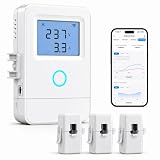
Nestool is the cheapest way to get whole-home monitoring rather than plug-level monitoring. Three 80 A CT clamps and a Wi-Fi connection give you a total-consumption view without the cost of a multi-channel system. For a household that just wants to see the shape of its usage — when the big loads run, how the baseload compares day to night — that is genuinely enough.
The 80 A clamp rating deserves a careful note, because it is the single most important spec on this listing. CT clamps are most accurate within their rated range; a clamp rated well below your service capacity will spend most of its life comfortably in range but can lose accuracy or clip during high-demand events, such as a simultaneous EV charge, electric range, and AC startup. If your service is a large one and you routinely stack big loads, this is the compromise you are accepting at the budget tier. If your service is modest or your big loads rarely coincide, 80 A clamps are perfectly serviceable.
Key specs at a glance
- Type: budget whole-home CT-clamp monitor
- Clamps: 3 × 80 A CT clamps
- Connectivity: 2.4 GHz Wi-Fi class
- App: usage monitoring with historical views
- Circuit detail: none — whole-home and multi-point totals only
- Best fit: renters-to-owners on a tight budget, small homes, first-time monitoring
What it does well
It removes the price barrier. The jump from a metered plug to a panel-mounted monitor is usually the biggest cost step in this category, and a budget three-clamp unit shortens it considerably. You get the thing that actually changes behavior: seeing your whole-home draw in real time and watching what happens when you turn something on.
Three clamps also give you a modest amount of flexibility. Two clamps on the main legs plus a third on a specific high-interest circuit — a subpanel feed, a large dedicated load — is a reasonable configuration for a budget device, and it gets you closer to the circuit-level question without paying for sixteen channels.
Manage expectations on the app. Budget monitors tend to offer basic charts and limited history rather than sophisticated bill modeling. You will get usage over time; you may not get a polished monthly bill projection or a rich alert engine. That is the trade at this tier, and it is a fair one for the price.
Pros
- Lowest-cost route to whole-home consumption data
- Three clamps allow a main-plus-one-circuit configuration
- Simple Wi-Fi setup with no hub required
- Good way to test whether you will actually use energy data
- Reasonable fit for smaller homes and modest service sizes
Cons
- 80 A clamp rating is a real limitation on large services with coincident heavy loads
- No meaningful circuit-level coverage at this price
- App and history depth are basic compared with premium platforms
- Still requires panel access, despite the budget positioning
Compared with the nearest alternative: the Emporia Vue 3 costs more but adds expandable branch CTs, a rate-based bill estimate, and solar configuration. The Nestool is the right call if the budget is firm and whole-home totals are all you need; the Vue 3 is the right call if you suspect you will want circuit detail within a year.
8. Leviton LWHEM-2R Whole Home Energy Monitor – Best for Leviton Smart-Home Households

Leviton’s whole-home monitor is a deliberately focused product: one pair of CTs, whole-home measurement, and integration with the My Leviton app. There is no branch-circuit expansion and no pretense of being a diagnostic instrument for individual breakers. What it offers instead is ecosystem fit — if your home already runs on Leviton smart devices, dimmers, or a Leviton load center, the monitor’s data appears alongside everything else you control rather than in yet another app.
That consolidation is worth more than it sounds. The failure mode of smart homes is app sprawl: one app for lights, another for locks, another for energy. A monitor that lives inside the app you already open daily gets used; a monitor with its own separate app often gets checked for a week and then forgotten.
Key specs at a glance
- Type: panel-mounted whole-home monitor
- Sensors: one pair of CTs — main-leg measurement only
- App: My Leviton ecosystem integration
- Circuit detail: none — whole-home totals
- Installation: panel-mounted with a power feed from the panel
- Tier: premium
What it does well
The integration story is the product. In a Leviton home, whole-home consumption can sit next to lighting scenes and device status, which makes energy a first-class part of the system rather than a bolt-on. For homeowners who have standardized on one brand specifically to avoid fragmentation, that coherence is the entire reason to pay premium pricing for a two-clamp monitor.
It is also a clean, low-complexity install. Two clamps, a power connection, done. There is no sixteen-sensor routing exercise and no risk of mislabeling a branch circuit. For someone who wants a whole-home number and genuinely does not care about per-circuit attribution, the reduced install burden is a legitimate advantage, not a shortcoming.
The limitation is equally clear: with only main-leg measurement, you learn that the house is drawing 4 kW, not what is drawing it. Identifying the culprit requires either additional hardware or old-fashioned detective work — flipping breakers and watching the total drop.
Pros
- Native integration with the My Leviton app and ecosystem
- Simple two-clamp install with minimal panel disruption
- Premium build and a recognizable electrical manufacturer behind it
- Clean whole-home view without channel-management overhead
- Good fit for households already standardized on Leviton hardware
Cons
- No circuit-level channels at all, at a premium price
- Value depends heavily on already owning Leviton devices
- Whole-home totals alone make load hunting slow
- Less attractive to buyers outside the Leviton ecosystem
Compared with the nearest alternative: the Eyedro 200A monitor also focuses on whole-home data but adds Ethernet and explicit net metering support. If you have solar or a difficult Wi-Fi environment, the Eyedro is the stronger whole-home choice; if you are deep in Leviton hardware, the LWHEM-2R’s integration advantage outweighs the narrower feature set.
9. Eve Energy Strip – Best for Apple Home Users Who Want Three Metered Outlets

The Eve Energy Strip solves a problem that single smart plugs handle poorly: three devices in one place, all drawing power, all needing both metering and independent switching. It is a power strip with three controllable, metered outlets, built-in surge protection, and native Apple Home support — schedules, scenes, and Siri control included. For a media console, a home office desk, or a workbench, it replaces three separate plugs with one clean device.
The Apple Home orientation is both the selling point and the constraint. If your household runs on Apple Home, the strip’s controls and automation live exactly where you expect them. If you are an Alexa or Google household, this is the wrong product — it is not the multi-ecosystem device that the Matter-compatible plugs in this roundup are.
Key specs at a glance
- Type: three-outlet smart power strip with energy metering
- Ecosystem: Apple Home native, with Siri, scenes, and schedules
- Protection: built-in surge protection
- Control: per-outlet switching plus built-in schedules
- Connectivity: Wi-Fi class, no separate hub required
- Best fit: entertainment centers, desks, and clusters of always-on electronics
What it does well
Consolidation is the main advantage. Metering three devices








Write Your Review
No reviews yet. Be the first to share your experience!