
Our Top Picks
 roborock Q7 L5 Robot Vacuum and Mop ComboQ7 L5 (Black)13.8 x 13.8 x 3.89 inches7.27 poundsCheck on Amazon


Top 3 Picks
Best overall: The roborock 2026 Qrevo S Pro is the strongest all-rounder here because its 18,500Pa suction pairs with a genuine mopping system, serious obstacle avoidance and a full-featured dock that washes and dries the mop pad for you. It suits large mixed-floor homes where vacuuming and mopping both need to happen automatically every day.
Best budget: The Tikom Robot Vacuum and Mop Combo is the value pick, offering 5000Pa suction, up to 150 minutes of runtime and app plus remote control for the price of a mid-tier manual vacuum. It fits apartments and single-room use where you do not need self-emptying or mop washing.
Best premium: The dreame L40 Ultra Gen 2 is the top-tier option, with 25,000Pa suction and the most capable dock in this roundup, including self-emptying and mop maintenance. It is aimed at large homes with pets and heavy daily debris loads.
Quick Comparison
The table below covers every product in this article. Price tiers are relative bands only, because listing prices change daily and vary by promotion.
| Product | Best for | Key specs (as listed) | Price tier |
|---|---|---|---|
| ROPVACNIC Robot Vacuum and Mop Combo | Entry-level all-in-one for small homes | 5200Pa suction, vacuum and mop combo | Budget |
| roborock 2026 New Qrevo S Pro | Best overall for mixed floors | 18,500Pa suction, vacuum and mop, advanced dock | Premium |
| iRobot Roomba 415X | Hands-off emptying and dock self-cleaning | 20,000Pa, 90-day self-emptying, multifunction self-cleaning dock | Premium |
| Tikom Robot Vacuum and Mop Combo | Best budget apartment pick | 5000Pa, 150 min max runtime, app and remote control | Budget |
| roborock Robot Vacuum Mop with LiDAR | Mid-range navigation and anti-tangle | 10000Pa, LiDAR mapping, anti-tangle, 7–9 weeks between empties | Mid-range |
| roborock Q7 L5 | Lowest-cost roborock entry point | 8,000Pa suction, vacuum and mop combo | Budget |
| Kilgone Robot Vacuum and Mop | Mid-range hands-free emptying | Self-emptying dock, up to 90 days hands-free | Mid-range |
| iMartine Robot Vacuum and Mop Combo | Voice-control basics on a budget | Strong suction, 2-in-1 vacuum and mop, Alexa/Google compatible | Budget |
| Lefant Robot Vacuum and Mop Combo M2 Plus | Long runtime with mid-range emptying | 75-day self-emptying, 140 min runtime, 2-in-1 | Mid-range |
| LVKANGDA Robot Vacuum and Mop Combo | Multi-map households and multi-floor homes | 12,000Pa, dToF laser navigation, 5 maps, 90-day self-emptying | Premium |
| dreame L40 Ultra Gen 2 | Highest suction and premium dock | 25,000Pa suction, vacuum and mop, premium dock | Premium |
| wrydao Robot Vacuum and Mop Combo | Mid-range LiDAR mapping with emptying | 6000Pa, LiDAR navigation, self-emptying | Mid-range |
How We Chose
This roundup is built from product listings, published specifications and well-established category knowledge about how robot vacuums and mops behave in real homes. We did not test, benchmark or own any of these units; nothing here is a hands-on claim. Instead, we compared the criteria that actually change daily ownership: rated suction in Pascals, whether the mopping system is a static pad, a vibrating pad or a rotating mop, whether navigation is LiDAR, dToF laser or camera-based, how the robot handles obstacles like cables and pet bowls, what the dock actually does (empty only, or empty plus wash plus dry), which floor types each design suits, and the ongoing cost of bags, pads, filters and brushes.
Category fit drove the shortlist. We included at least one credible option at each price tier so the list works whether your ceiling is budget or premium, and we kept the field to models that are currently listed rather than discontinued generations. Use case mattered as much as raw specs: a 90-day self-emptying dock is worth far more in a pet household than in a studio apartment, and a 25,000Pa flagship is wasted on a single carpeted bedroom. Finally, we considered the upgrade path. Several picks here are deliberate stepping stones — if you start with a budget combo and later want mop washing and self-emptying, the mid-range and premium entries show exactly what that extra spend buys you.
1. ROPVACNIC Robot Vacuum and Mop Combo – Best for Entry-Level All-in-One Coverage
As an Amazon Associate we earn from qualifying purchases at no extra cost to you.

This is the model to look at if you want both vacuuming and mopping from one machine without paying for a premium dock. The ROPVACNIC Robot Vacuum and Mop Combo carries 5200Pa of rated suction, which puts it in the same class as several mid-priced competitors, and it ships as a true 2-in-1 with a mop function rather than vacuum-only hardware. It suits renters, small apartments, dorm rooms and anyone buying their first robot vacuum who wants to see whether the category fits their routine before spending flagship money.
Key specs at a glance
- Rated suction: 5200Pa — entry-to-mid suction class
- Function: vacuum and mop combo in one chassis
- Price tier: budget
- Best floor match: hard flooring (tile, laminate, sealed wood) with low-pile rugs
- Typical use case: 1–2 rooms, daily or every-other-day runs
Strengths
Suction in the 5000Pa range is genuinely useful. On hard floors it lifts crumbs, dust, hair and light pet fur without complaint, and it has enough pull to tick over low-pile rugs in a hallway or under a desk. Because the machine handles both tasks, you do not need to store a separate mop and bucket, which matters in a small space. Maintenance is also simple and cheap: this class of robot generally uses a washable or replaceable flat mop pad, a standard filter and a single main brush, all of which are inexpensive and easy to source. There is no dock automation to break, no bag subscription to maintain, and the whole unit takes up a fraction of the floor space a self-emptying tower demands.
Trade-offs to accept
Without a self-emptying base, you empty the dustbin yourself — typically every few days in a busy home rather than every few months. Mopping is pad-based, meaning it wipes rather than scrubs; dried-on kitchen spills need a second pass or a manual touch-up. Navigation in this tier is usually simpler than LiDAR mapping, so the robot may bump its way around the first few runs before it settles into a routine.
Pros
- True vacuum-and-mop combo at the lowest price tier in this roundup
- 5200Pa suction handles everyday hard-floor debris well
- No dock footprint — ideal for tight apartments
- Low consumable costs: pads and filters are cheap and widely available
Cons
- Manual dustbin emptying every few days
- Pad mopping will not scrub dried stains
- Basic navigation compared with LiDAR models like the wrydao or roborock LiDAR unit
Compared with the nearest alternative: The Tikom Robot Vacuum and Mop Combo sits in the same budget tier with a nearly identical suction figure (5000Pa) but lists a longer 150-minute maximum runtime. If your priority is covering more floor on one charge, the Tikom has the edge; if you want the slightly higher suction rating and a marginally simpler setup, the ROPVACNIC is the closer match. Both are stepping stones toward the mid-range models later in this list.
2. roborock 2026 New Qrevo S Pro – Best Overall for Mixed-Floor Homes
The Qrevo S Pro is the pick most households should aim for if the budget allows. Its 18,500Pa suction rating is among the highest in this article, and roborock’s Qrevo line is built around a full mop-maintenance dock rather than a bare charging base. This is the model that turns robot cleaning from a chore you supervise into something that runs while you are out. It suits family homes with a mix of tile, wood and low-to-medium pile carpet, and anyone who wants mopping handled automatically rather than as a separate weekend task.
Key specs at a glance
- Rated suction: 18,500Pa — flagship suction class
- Function: vacuum and mop in one unit with a maintenance dock
- Brand pedigree: roborock, one of the most established names in the category
- Price tier: premium
- Best floor match: mixed hard floors plus low-to-medium pile carpet
- Typical use case: 3–5 room homes, daily automated runs
Strengths
The jump from 5000Pa to 18,500Pa is not marketing arithmetic — it is the difference between a robot that skims hard floors and one that pulls embedded grit out of carpet pile. That matters if you have rugs, a shedding pet, or children tracking crumbs into every room. The Qrevo S Pro’s dock is the other half of the value: it handles mop pad washing and drying so the pad does not sit damp and start smelling between runs. roborock’s navigation and app ecosystem are mature, which shows up as reliable room-by-room cleaning, no-go zones and scheduling that actually sticks.
Mopping here is a rotating-pad system rather than a static wipe. That translates to real scrubbing action on kitchen tile and entryway grime, not just a damp pass. For a home that gets a daily run, the practical result is a floor that stays visibly clean without you ever filling a bucket.
Trade-offs to accept
Premium hardware means premium consumables and a larger dock footprint. You need roughly the floor area of a small side table for the base station, plus clearance in front for the robot to dock. Mop pads, filters and bags are more expensive per unit than budget-tier equivalents, though they last longer under normal use. Finally, 18,500Pa is more machine than a studio apartment needs — if that describes your home, the mid-range options below deliver most of the daily benefit for less.
Pros
- 18,500Pa suction is genuinely carpet-capable
- Dock washes and dries the mop pad, reducing odor and manual handling
- Mature roborock navigation, mapping and app controls
- Rotating mop design scrubs rather than just wipes
Cons
- Premium price tier and higher consumable costs
- Large dock requires dedicated floor space and front clearance
- Overkill for very small, hard-floor-only apartments
Compared with the nearest alternative: The dreame L40 Ultra Gen 2 outranks it on paper with 25,000Pa suction and an equally full-featured premium dock, so if maximum raw power and pet-hair pickup are the deciding factors, the dreame leads. The Qrevo S Pro’s counterargument is ecosystem maturity — roborock’s navigation and app experience are exceptionally well established, and for many buyers that reliability is worth more than an extra suction increment they will rarely notice on hard floors.
3. iRobot Roomba 415X – Best for Truly Hands-Off Emptying

The Roomba 415X is aimed at the buyer whose single biggest frustration is emptying the dustbin. It lists 20,000Pa of suction, a 90-day self-emptying claim, and a multifunction dock that includes self-cleaning. That combination puts it at the top of this list for autonomy: fewer touchpoints, longer stretches between maintenance, and a dock that handles more of the dirty work itself. It suits busy households, allergy-sensitive homes where you want dust sealed away rather than tipped into a bin, and anyone who genuinely will not maintain a robot that needs frequent attention.
Key specs at a glance
- Rated suction: 20,000Pa — flagship suction class
- Emptying: 90 days self-emptying claim
- Dock: multifunction with self-cleaning
- Function: vacuum and mop combo
- Price tier: premium
- Best floor match: mixed floors, carpet-capable
- Typical use case: 3–5 room homes, daily or twice-daily runs
Strengths
Ninety days between bin empties changes the ownership experience. Instead of a chore every few days, you handle the base station roughly once a quarter — and because dust goes into a sealed bag inside the dock, there is far less of it in the air when you do. The 20,000Pa suction figure sits above the Qrevo S Pro and comfortably above every mid-range and budget model here, so carpet pickup is strong. iRobot’s floor-tracking and navigation heritage is decades deep at this point, and that shows in how confidently the robot handles transitions between tile, wood and rugs without stalling.
The self-cleaning dock element is the quiet differentiator. It reduces the amount of grime you personally handle, which is exactly the point of buying a robot in the first place.
Trade-offs to accept
All of that automation requires a substantial base station, and that base station needs power and clearance year-round. Replacement bags are a recurring cost that budget robots do not have — though in exchange, you are not shaking out a dustbin. In a 90-day cycle, budget for several bags per year as a running cost rather than a one-time purchase. And if your home is small and hard-floored, the 90-day emptying interval is a convenience you may not fully use, because the robot will not generate enough debris to fill the bag that fast.
Pros
- 20,000Pa suction — among the highest in this roundup
- 90-day self-emptying means quarterly maintenance, not daily
- Self-cleaning dock reduces how much dirt you handle
- Sealed bag system is a real benefit in allergy-conscious homes
Cons
- Premium tier with ongoing bag costs
- Large dock footprint and siting requirements
- Autonomy you may not need in a small, low-debris home
Compared with the nearest alternative: The ROPVACNIC at the budget end offers the same core vacuum-and-mop concept but with manual emptying and 5200Pa suction — a fundamentally different ownership model. The honest comparison is the roborock Qrevo S Pro: similar premium positioning and similar daily capability, with the Roomba pulling ahead on the length of its emptying interval and the Qrevo S Pro pulling ahead on mop-pad washing and drying. Choose the Roomba if emptying is your pain point; choose the Qrevo S Pro if mop maintenance is.
4. Tikom Robot Vacuum and Mop Combo – Best Budget Pick for Apartments

Tikom’s combo unit is the value benchmark in this roundup: 5000Pa suction, up to 150 minutes of maximum runtime, and both app and remote control, at a budget price tier. The long runtime is the headline figure, because it is roughly 50% longer than many similarly priced competitors list. It suits studio and one-bedroom apartments, renters, and buyers who want app scheduling and voice-free remote control without paying for navigation hardware they will not use in a small, uncluttered space.
Key specs at a glance
- Rated suction: 5000Pa — entry suction class
- Runtime: up to 150 minutes maximum
- Controls: app and physical remote
- Function: vacuum and mop combo
- Price tier: budget
- Best floor match: hard floors and low-pile rugs
- Typical use case: 1–2 rooms, daily runs
Strengths
Runtime is where budget robots usually fall down, and 150 minutes is enough to cover a small apartment’s hard floors several times over on one charge. In practice that means the robot finishes the job instead of returning mid-clean to recharge. The dual app-and-remote control is a nice touch at this tier: the app gives you schedules and mode selection, while the remote is a low-friction fallback for guests or anyone who does not want to install anything. Suction at 5000Pa is the same class as the ROPVACNIC and adequate for crumbs, dust, hair and light pet fur on hard surfaces.
Because there is no self-emptying tower, the unit stays compact and the consumables stay cheap. Replacement pads, filters and brushes for this class typically cost a fraction of premium-brand equivalents, which keeps the total cost of ownership low over several years.
Trade-offs to accept
You will empty the bin yourself, typically every two to four days depending on floor area and pet situation. Mopping is a pad-wipe rather than a scrub, so sticky kitchen residue needs a manual assist. Navigation is basic: expect some bumping and repeated coverage in the first sessions rather than clean room-by-room mapping. On carpet, 5000Pa will surface-clean but not deep-clean pile.
Pros
- Up to 150 minutes runtime — unusually generous for the tier
- App and remote control both included
- Compact footprint, no dock tower
- Very low consumable costs
Cons
- Manual emptying every few days
- Pad mopping only, no scrubbing action
- Basic navigation without LiDAR mapping
Compared with the nearest alternative: The ROPVACNIC is its closest rival, with 5200Pa suction versus Tikom’s 5000Pa. That 200Pa difference is not meaningful in daily use; the runtime gap is. If you have a larger single-floor apartment and want one charge to cover it, the Tikom is the better budget buy. If you are comparing against the iMartine, the deciding factor is the same — the Tikom lists a specific runtime figure, which is easier to plan around.
5. roborock Robot Vacuum Mop with LiDAR – Best Mid-Range for Navigation and Anti-Tangle

This roborock is the mid-range sweet spot for two reasons the listing makes explicit: LiDAR navigation and anti-tangle brush design, plus a 7-to-9-week window between empties. It lists 10000Pa suction, which is double the budget class and half the flagship class — a genuinely useful middle ground. It suits homes with long hair or pet fur (where tangled brushes are the number-one maintenance annoyance), open-plan layouts that benefit from real mapping, and buyers who want self-emptying without flagship pricing.
Key specs at a glance
- Rated suction: 10000Pa — mid-to-high suction class
- Navigation: LiDAR mapping
- Brush: anti-tangle design
- Emptying interval: 7–9 weeks as listed
- Function: vacuum and mop
- Price tier: mid-range
- Best floor match: mixed hard floors and low-to-medium pile carpet
Strengths
LiDAR is the single biggest quality-of-life upgrade in this category. Instead of bumping around, the robot builds a map, cleans in structured passes, and lets you set no-go zones and room-specific schedules. In an open-plan home that is the difference between a toy and a tool. The 7-to-9-week emptying interval means roughly monthly-to-six-weekly maintenance, which is a reasonable middle ground between budget daily emptying and premium quarterly emptying.
Anti-tangle matters more than most buyers expect. Long hair and pet fur wrap around traditional roller brushes, and unwrapping them with scissors becomes a weekly chore that quietly kills enthusiasm for the whole product. An anti-tangle design reduces that dramatically, which is why this model is the standout here for shedding households. At 10000Pa, it will also pull debris out of low-to-medium pile carpet, not just skim it.
Trade-offs to accept
The emptying interval is weeks, not months, so you are still doing periodic maintenance — just far less of it than a budget bin. Mopping is present but not the focus of this listing, so treat it as a maintenance wipe rather than a deep mop. And while 10000Pa is strong, it will not match the 20,000–25,000Pa flagships on deep carpet in a heavy-pet home.
Pros
- LiDAR mapping enables real schedules, zones and structured coverage
- Anti-tangle brush design cuts the most annoying maintenance task
- 7–9 weeks between empties — mid-range convenience
- 10000Pa suction is a meaningful step up from budget models
Cons
- Shorter emptying interval than premium 90-day docks
- Mopping is secondary to vacuuming in this design
- Not a match for flagship suction on deep carpet
Compared with the nearest alternative: The wrydao Robot Vacuum and Mop Combo occupies almost the same position — LiDAR navigation plus self-emptying — but lists 6000Pa suction versus this roborock’s 10000Pa. If carpet is part of your floor plan, the 4000Pa gap favors roborock. If your home is hard-floor only, the wrydao delivers the same navigation benefit at a lower mid-range outlay. Against the Kilgone, the roborock wins on listed suction and brush design.
6. roborock Q7 L5 – Best Budget Entry into a Premium Brand

The Q7 L5 is the cheapest way into roborock’s ecosystem in this roundup. It lists 8,000Pa of suction and vacuum-and-mop combo function at a budget price tier. It suits buyers who want a known brand, established spare-part availability and reliable firmware support, but who cannot justify mid-range or premium pricing. It is also a sensible second robot for a basement, garage conversion or upstairs floor where full automation would be wasted.
Key specs at a glance
- Rated suction: 8,000Pa — upper-budget suction class
- Brand: roborock (established ecosystem, widely available parts)
- Function: vacuum and mop combo
- Price tier: budget
- Best floor match: hard floors, low-pile rugs
- Typical use case: apartments, secondary floors, budget-conscious homes
Strengths
The 8,000Pa rating is notably higher than the 5000–5200Pa typical of the cheapest tier, which makes this a genuinely capable hard-floor cleaner and a passable low-pile carpet one. More importantly, buying from an established brand means replacement filters, brushes and mop pads stay available for years, app support continues, and troubleshooting information is easy to find. That long-term support is worth real money and is the most common thing budget no-name robots get wrong.
As a second or third unit, the Q7 L5 is efficient: no dock tower to site, simple operation, and enough suction to handle a lightly trafficked floor without daily intervention.
Trade-offs to accept
There is no self-emptying dock at this tier, so you empty the bin manually. Navigation is a step below the LiDAR model above, meaning less precise mapping and fewer zone controls. Mopping is a basic pad function. And 8,000Pa, while strong for budget, is less than half the flagship figures — on thick carpet you will notice the difference.
Pros
- 8,000Pa suction leads the budget tier
- Established brand with long-term parts and app support
- No dock footprint — easy to place anywhere
- Strong value as a secondary-floor unit
Cons
- No self-emptying — manual bin maintenance
- Navigation below LiDAR-mapped models
- Basic pad mopping
Compared with the nearest alternative: The iMartine Robot Vacuum and Mop Combo is the direct budget rival, with voice-assistant compatibility via Alexa and Google as its differentiator. The Q7 L5 wins clearly on listed suction — 8,000Pa versus an unspecified “strong suction” — and on the certainty of a long-supported ecosystem. If smart-home voice control is a hard requirement, the iMartine has the edge; for everything else at this price, the Q7 L5 is the safer long-term buy.
7. Kilgone Robot Vacuum and Mop with Self-Emptying Dock – Best Mid-Range for Hands-Free Simplicity

Kilgone’s entry is built around one promise: a self-emptying dock that delivers up to 90 days of hands-free operation. That is premium-tier autonomy at a mid-range price, and it is the model’s whole reason for being on this list. It suits buyers who want the “set it and forget it” experience — the thing that made robot vacuums popular in the first place — without stepping into the premium tier, and particularly households where nobody wants to think about the robot between cleanings.
Key specs at a glance
- Dock: self-emptying
- Hands-free window: up to 90 days as listed
- Function: vacuum and mop
- Price tier: mid-range
- Best floor match: hard floors and low-to-medium pile carpet
- Typical use case: 2–4 room homes, daily automated runs
Strengths
The 90-day figure is the headline. Where the roborock LiDAR model asks for attention every 7 to 9 weeks and budget units ask every few days, Kilgone targets quarterly maintenance. For a household that wants the robot to be invisible, that is the single most valuable spec on the page. The self-emptying dock also keeps dust contained rather than tipped into an open bin, which is a small but real benefit for allergy-sensitive homes.
At the mid-range tier, the dock footprint is the trade-off you are accepting, and the model is otherwise a straightforward vacuum-and-mop combo suited to mixed flooring. It represents a clean upgrade path: if you started with a budget unit like the Tikom or ROPVACNIC and found manual emptying was the part you hated, this is the fix.
Trade-offs to accept
Mid-range suction in this class will not match the 18,000–25,000Pa flagships on deep carpet, so treat carpet performance as adequate rather than outstanding. You also take on recurring bag costs that budget owners do not have. And a dock-based robot needs a permanent home with power and clearance — less flexible than a bare charging base in a cramped apartment.
Pros
- Up to 90 days hands-free — premium-style autonomy at mid-range pricing
- Sealed emptying reduces dust handling
- Clear upgrade path from budget manual-empty models
- Vacuum and mop in one unit
Cons
- Recurring bag costs
- Dock needs dedicated space and power
- Carpet performance below flagship suction classes
Compared with the nearest alternative: The Lefant M2 Plus lists a shorter 75-day self-emptying window but a specific 140-minute runtime, making it the better pick if long single-charge coverage matters more than the length of the emptying interval. If you want the longest possible gap between maintenance at mid-range pricing, the Kilgone’s 90 days is the stronger claim. Against the wrydao, the Kilgone leads on emptying interval; the wrydao leads on navigation specificity with LiDAR.
8. iMartine Robot Vacuum and Mop Combo – Best Budget Option with Voice Control

The iMartine combo’s defining feature is smart-home integration: the listing states it works with Alexa and Google Assistant. It is a 2-in-1 vacuum and mop with strong suction, positioned at the budget tier. It suits buyers already living in a voice-controlled home who want to say “start vacuuming” rather than open an app, and anyone who wants basic combo cleaning at the lowest possible cost with smart-home compatibility included.
Key specs at a glance
- Assistants: works with Alexa and Google Assistant
- Function: 2-in-1 vacuum and mop
- Suction: listed as strong suction (budget class)
- Price tier: budget
- Best floor match: hard floors and low-pile rugs
- Typical use case: apartments, daily or every-other-day runs
Strengths
Voice control at a budget price is the point here. If your home already runs on Alexa or Google routines, adding the robot to those routines costs nothing extra and removes the friction of finding your phone. That small convenience is often what determines whether a budget robot actually gets used daily or slowly gets forgotten. The 2-in-1 design means one machine covers both tasks, and budget-tier consumables keep running costs low.
For a first robot vacuum, this is a low-risk entry: the outlay is small, setup is straightforward, and if the routine sticks you can upgrade later to something like the Kilgone or Qrevo S Pro with a clear idea of what you actually want.
Trade-offs to accept
The listing describes suction as “strong” rather than giving a Pascal figure, so treat performance as budget-class rather than directly comparable to the 8,000Pa Q7 L5. Navigation is basic, meaning bumping and less efficient coverage patterns. There is no self-emptying, so expect to handle the bin every few days, and mopping is a pad wipe rather than a scrub.
Pros
- Alexa and Google Assistant compatibility at budget pricing
- 2-in-1 vacuum and mop in a single compact unit
- Low entry cost and cheap consumables
- Easy to add to existing smart-home routines
Cons
- No published suction figure to compare directly
- Basic navigation without LiDAR mapping
- Manual emptying and pad-only mopping
Compared with the nearest alternative: The roborock Q7 L5 is the direct competitor at the same budget tier and offers a published 8,000Pa rating plus a long-supported brand ecosystem, which is the safer bet for most buyers. The iMartine’s advantage is narrow but real: if voice control is non-negotiable and you want it without paying for a premium brand, this is the budget pick that delivers it.
9. Lefant M2 Plus – Best Mid-Range for Long Runtime
The Lefant M2 Plus pairs two specific figures: 75 days of self-emptying and 140 minutes of runtime. That combination makes it the mid-range choice for larger single-floor homes, where coverage on one charge matters as much as how often you empty the bin. It suits open-plan apartments, long ground floors and buyers who want self-emptying without premium pricing but who also do not want the robot returning to recharge halfway through the job.
Key specs at a glance
- Emptying window: 75 days self-emptying
- Runtime: 140 minutes
- Function: 2-in-1 vacuum and mop
- Price tier: mid-range
- Best floor match: hard floors and low-to-medium pile carpet
- Typical use case: larger apartments and open-plan layouts
Strengths
Runtime and emptying interval are the two specs that determine whether a robot finishes the job unattended. At 140 minutes, the M2 Plus has enough charge to cover a substantially larger floor area in one pass than most budget units, and 75 days between empties means maintenance roughly every two and a half months. Together, that is a genuinely hands-off setup for a mid-range price. The self-emptying dock also means the unit is best suited to a permanent siting, which is fine for a home where the robot has a designated corner.
At this tier you also get a meaningful step up from budget navigation and cleaning patterns, so coverage is more systematic and fewer spots get missed repeatedly.
Trade-offs to accept
The 75-day emptying window is shorter than the 90-day claims of the Kilgone and the Roomba 415X, so if minimizing maintenance is your top priority, those models edge ahead. You inherit recurring bag costs, and the dock takes up floor space. Deep-carpet performance will not match the 18,000–25,000Pa flagships.
Pros
- 140 minutes runtime covers large single-floor layouts on one charge
- 75-day self-emptying for low-frequency maintenance
- 2-in-1 vacuum and mop
- Mid-range pricing for near-premium autonomy
Cons
- Shorter emptying interval than 90-day competitors
- Recurring bag costs and permanent dock footprint
- Not a deep-carpet specialist
Compared with the nearest alternative: The Kilgone offers 90 days of hands-free operation versus Lefant’s 75, so Kilgone wins on time between maintenance. Lefant wins on the one thing Kilgone does not quantify: a specific 140-minute runtime. In a large open-plan home that closes the gap considerably, because a robot that runs out of charge mid-job will not deliver its emptying benefit anyway.
10. LVKANGDA Robot Vacuum and Mop Combo – Best for Multi-Floor and Multi-Map Homes

The LVKANGDA combo lists three things that separate it from most of this roundup: 12,000Pa suction, dToF laser navigation with support for 5 maps, and 90 days of self-emptying. The multi-map capability is the standout. It suits houses with more than one floor, homes with distinctly separated zones, and buyers who want the robot to know which map it is on without re-exploring every time you carry it upstairs.
Key specs at a glance
- Rated suction: 12,000Pa — upper-mid suction class
- Navigation: dToF laser with 5-map storage
- Emptying: 90 days self-emptying
- Function: vacuum and mop combo
- Price tier: premium
- Best floor match: mixed hard floors and low-to-medium pile carpet
Strengths
Five stored maps is a genuine structural advantage in a multi-storey home. LiDAR and dToF systems that only retain one or two maps force you to re-map or accept sloppy coverage when you move the robot to another floor. With five, each level effectively gets its own persistent plan, complete with its own no-go zones and room names — a feature that is much harder to work around than a suction gap.
dToF laser navigation is a strong mapping technology, generally offering good accuracy and fast map construction. At 12,000Pa, suction sits comfortably above the mid-range and close enough to flagship figures that hard floors and low-to-medium pile carpet are handled without compromise. The 90-day self-emptying window matches the best in this roundup, so maintenance is quarterly.
Trade-offs to accept
It sits in the premium tier, and premium pricing brings premium consumable costs plus a large dock. On deep, high-pile carpet, 12,000Pa is still below the 20,000–25,000Pa flagships. And if you live in a single-storey home, the five-map capability is largely unused — a case where a cheaper mid-range model delivers most of the everyday benefit.
Pros
- 5 stored maps — rare and genuinely useful in multi-floor homes
- dToF laser navigation for accurate, fast mapping
- 12,000Pa suction is comfortably above mid-range
- 90-day self-emptying matches the longest intervals here
Cons
- Premium price tier with premium consumables
- Multi-map capability wasted in single-storey homes
- Below flagship suction on deep carpet
Compared with the nearest alternative: The roborock Qrevo S Pro has 18,500Pa suction to LVKANGDA’s 12,000Pa and a mop-washing dock, which makes it stronger for single-floor mixed homes with heavy carpet. LVKANGDA’s counter is mapping structure: five persistent maps versus the typical single- or dual-map setups, plus an equivalent 90-day emptying window. If your home has stairs, that structure is worth more than the suction difference.
11. dreame L40 Ultra Gen 2 – Best Premium for Maximum Suction and Dock Capability
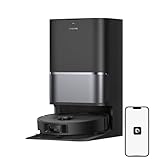
The L40 Ultra Gen 2 is the most powerful machine in this roundup, listing 25,000Pa of suction alongside dreame’s premium dock. That combination targets the hardest possible home: multiple shedding pets, wall-to-wall carpet, high-traffic family floors and a preference for near-zero manual involvement. If you want the highest rated pickup in this article and a dock that handles the unpleasant parts, this is the model to beat on paper.
Key specs at a glance
- Rated suction: 25,000Pa — highest in this roundup
- Dock: premium full-featured base station
- Function: vacuum and mop
- Price tier: premium
- Best floor match: mixed floors including medium-pile carpet
- Typical use case: large family homes with pets, daily runs
Strengths
At 25,000Pa, this is the only unit here rated above the Roomba 415X’s 20,000Pa and the Qrevo S Pro’s 18,500Pa. That matters most on carpet, where suction is the limiting factor for embedded hair and grit. For a home with two or more pets, it is the difference between a robot that maintains the surface and one that genuinely resets it. dreame’s premium dock handles emptying and mop maintenance, so the day-to-day experience is close to fully automatic.
A high-powered flagship also runs fewer passes to achieve the same result, which partly offsets the shorter battery life that higher power draw can bring. And because the dock manages the mop pad, you avoid the damp-pad odor problem that plagues budget mopping systems.
Trade-offs to accept
This is the most expensive tier in the article, and premium consumables, bags and pads add up over years. The dock is large and needs a dedicated, well-ventilated position. Perhaps the most important caveat: on hard floors only, you will not feel the benefit of 25,000Pa. The Roomba 415X at 20,000Pa or the Qrevo S Pro at 18,500Pa will look and feel identical in a hard-floor apartment while costing less.
Pros
- 25,000Pa — the highest suction rating in this roundup
- Full-featured premium dock with mop maintenance
- Best choice for heavy pet hair and medium-pile carpet
- Fewer passes needed, offsetting higher power draw
Cons
- Top premium tier with expensive consumables
- Large dock footprint and siting needs
- Excess capability for hard-floor-only homes
Compared with the nearest alternative: The roborock 2026 Qrevo S Pro is the closest premium rival: 18,500Pa versus 25,000Pa, both with capable docks. If carpet and pet hair dominate your floor plan, the dreame’s extra 6,500Pa is worth paying for. If your home is mostly hard floor with one or two rugs, the Qrevo S Pro delivers a very similar daily experience and its mature software ecosystem may tip the decision.
12. wrydao Robot Vacuum and Mop Combo – Best Mid-Range for LiDAR Mapping on a Budget

The wrydao combo lists 6000Pa suction, LiDAR navigation and self-emptying in a mid-range package. The combination is unusual: LiDAR mapping plus a self-emptying dock at this price point is where the value sits, not in raw suction. It suits hard-floor apartments and smaller homes where structured, mapped cleaning and infrequent emptying matter more than deep carpet power.
Key specs at a glance
- Rated suction: 6000Pa — entry-to-mid suction class
- Navigation: LiDAR mapping
- Dock: self-emptying
- Function: vacuum and mop combo
- Price tier: mid-range
- Best floor match: hard floors and low-pile rugs
Strengths
LiDAR at this price is the main draw. It means real maps, structured coverage and no-go zones — features you normally pay much more for. Combined with self-emptying, the wrydao gives a hard-floor home most of the daily convenience of far more expensive machines. The app experience that comes with LiDAR also typically allows room-by-room cleaning, so you can send the robot to the kitchen after cooking without running a full-house cycle.
For a hard-floor apartment, 6000Pa is entirely sufficient. Most debris on tile and laminate is light — crumbs, dust, hair, tracked-in grit — and does not require flagship suction. This is the model where the spec sheet is best matched to a specific home type rather than being a compromise.
Trade-offs to accept
At 6000Pa, this is the lowest suction among the mid-range entries and well below the roborock LiDAR model’s 10000Pa. On low-to-medium pile carpet it will surface-clean but not deep-clean. Mopping is a basic pad function. And you take on bag costs plus a dock footprint — the same trade-offs every self-emptying model carries.
Pros
- LiDAR navigation and mapping at mid-range pricing
- Self-emptying dock reduces manual maintenance
- Room-by-room cleaning via app
- Well matched to hard-floor apartments
Cons
- Lowest suction in the mid-range group
- Carpet performance is surface-level only
- Bag costs and dock space required
Compared with the nearest alternative: The roborock LiDAR model has 10000Pa to wrydao’s 6000Pa and lists anti-tangle brush design, which makes it the better pick if you have carpet or shedding pets. The wrydao’s case rests on navigation value: for a hard-floor home, LiDAR plus self-emptying at a lower mid-range outlay is a sensible allocation of money toward the features you will actually notice. Against the Kilgone, the wrydao wins on navigation specificity.
How to Choose
Choosing a robot vacuum with a mop comes down to matching six variables to your home. Below is how each one actually behaves in practice, with numbers you can compare against your own situation.
1. Suction: what each Pascal band really delivers
Suction ratings have become a spec war, but the practical bands are clear. Under 5,000–5,200Pa is entry class: fine for hard floors and light debris, marginal on carpet. The 6,000–8,000Pa band (wrydao, roborock Q7 L5) handles hard floors confidently and low-pile rugs acceptably. The 10,000–12,000Pa band (roborock LiDAR, LVKANGDA) is the first range that pulls debris out of low-to-medium pile carpet rather than skimming it. Above 18,000Pa (Qrevo S Pro, Roomba 415X) you are in flagship territory where medium-pile carpet and heavy pet hair are handled properly, and 25,000Pa (dreame L40 Ultra Gen 2) is the top of this list.
The practical rule: if your floors are 90% hard surface, anything from 6,000Pa upward will satisfy you, and paying for 25,000Pa is money spent on a benefit you will not see. If you have carpet in bedrooms or a shedding pet, the 10,000Pa threshold is the one worth crossing, and 18,000Pa+ is worth it for medium pile.
2. Mopping systems: pad-wipe versus scrubbing
There are three tiers of mopping here. Basic pad mopping (ROPVACNIC, Tikom, roborock Q7 L5, iMartine, wrydao, Lefant) drags a damp cloth across the floor. It removes dust film and light spills and is fine as a maintenance wipe, but it will not remove dried-on stains. Rotating or vibrating mop systems (Qrevo S Pro, and the flagships generally) apply agitation, which scrubs — the difference is noticeable on kitchen tile and entryways. Dock-based mop maintenance is the third tier: the dock washes and dries the pad, which prevents the damp-pad odor problem that develops when a wet mop sits in a chassis for days.
If you mop weekly by hand and want the robot to maintain that between sessions, a pad-wipe system is enough. If you want to stop mopping altogether, choose a rotating mop with a washing dock.
3. Obstacle avoidance and navigation: LiDAR, dToF or basic
Basic navigation bumps and repeats. It works in an uncluttered apartment but struggles with cables, pet bowls and chair legs. LiDAR (roborock LiDAR, wrydao) builds a map, cleans in structured passes and supports no-go zones. dToF laser (LVKANGDA) is a related laser-mapping technology with fast map construction and good accuracy. The practical difference to you: mapped robots finish faster, miss less, and let you send them to a single room. In an open-plan home, mapping is the upgrade that matters most; in a studio, it matters least.
One more navigation feature worth checking: multi-map storage. LVKANGDA’s five maps is the standout here. If you have stairs, a robot with one or two map slots means re-mapping or messy coverage each time you move it. Five maps means each floor keeps its own plan, zones and room names.
4. Dock features: the real dividing line
Docks come in four levels. No dock (charging base only) means emptying the bin every few days. Self-emptying docks extend that to roughly 75 days (Lefant) or 90 days (Kilgone, Roomba 415X, LVKANGDA). Self-emptying plus mop washing and drying is the premium tier (Qrevo S Pro, dreame L40 Ultra Gen 2, and the Roomba 415X’s self-cleaning dock). And dock footprint is a real constraint: a self-emptying tower needs roughly the floor area of a small side table plus front clearance for docking, and it must sit near power.
Work out your tolerance honestly. If emptying a bin every three days does not bother you, a dockless budget unit saves a lot of money and floor space. If the bin is the reason your previous robot ended up in a closet, pay for the 90-day dock.
5. Floor compatibility: the mismatch nobody warns you about
Robot vacuums are optimized for hard floors. Tile, laminate, vinyl and sealed hardwood are where they excel. Carpet is where suction ratings start to matter, and where high-pile or frieze carpet can genuinely defeat a lower-powered robot, which may stall or leave visible tracks. Rugs with tassels and long fringes are a common failure point for any robot, regardless of price — the brush catches them. Thresholds above roughly 2cm can block many models, so measure your doorways if your home has raised sills.
A sensible floor-by-floor rule: hard floors need 6,000Pa and mapping; low-pile carpet pushes you to 10,000Pa; medium pile needs 18,000Pa or more; high pile is a case for a corded upright plus a robot for hard floors.
6. Maintenance costs: the part listings leave out
Consumables vary enormously by tier. Budget units use washable or cheap replaceable pads, standard filters and simple brushes — replacement costs are low and parts are widely available. Premium units use proprietary bags, higher-grade pads and specialized filters, and these recur.
Here is a worked two-year estimate for two contrasting models, using typical market ranges. For a budget pad-mop unit like the Tikom at roughly the budget tier: mop pads replaced every 2–3 months at a low unit cost, filters every 3 months, and brushes annually — total consumables over two years are modest, and the biggest “cost” is your time spent emptying the bin every few days. For a premium self-emptying model like the Roomba 415X: bags changed several times a year, mop pads at a higher unit price, premium filters, plus dock maintenance. The consumable spend over two years is several times higher.
That gap is not a reason to avoid premium docks — it is the price of the convenience. But it should be budgeted, not discovered. The maintenance mistake most owners make is skipping filter cleaning: a clogged filter reduces suction long before the motor shows any problem, and it is the single most common cause of “my robot got weaker.” Rinse or replace filters on schedule, cut hair off the brush weekly (or choose an anti-tangle design like the roborock LiDAR model), and keep the drop sensors on the underside wiped clean, since dust on those causes erratic behavior that owners often misdiagnose as a navigation fault.
Decision matrix: match your situation to a model
| Your situation | What matters most | Suggested model |
|---|---|---|
| Small apartment, all hard floors, tight budget | Low cost, compact, long runtime | Tikom or ROPVACNIC |
| Want a trusted brand at budget price | Parts availability, published suction | roborock Q7 L5 (8,000Pa) |
| Already use Alexa or Google routines | Voice control at low cost | iMartine |
| Hard floors, want mapping and infrequent emptying | LiDAR plus self-emptying | wrydao |
| Long hair or shedding pets, mixed floors | Anti-tangle brush, 10,000Pa+ | roborock LiDAR model |
| Large open-plan single floor | 140 min runtime plus 75-day emptying | Lefant M2 Plus |
| Want quarterly maintenance, mid-range price | 90-day self-emptying | Kilgone |
| Multi-storey home with stairs | Multiple stored maps, laser navigation | LVKANGDA (5 maps) |
| Carpet plus pets, single floor | Flagship suction plus mop washing dock | roborock Qrevo S Pro (18,500Pa) |
| Maximum power, maximum automation | Highest suction and full dock | dreame L40 Ultra Gen 2 (25,000Pa) |
| Main pain point is emptying the bin | Longest hands-free interval, sealed dust | iRobot Roomba 415X (90 days) |
Frequently Asked Questions
Do robot vacuum mops actually clean floors, or are they just a damp wipe?
It depends on the mopping system, and the difference is bigger than the marketing suggests. Pad-based mopping drags a damp cloth and effectively removes dust film, light crumbs and fresh spills — it maintains a floor you already keep reasonably clean. Rotating or vibrating mop systems apply agitation and will lift dried-on kitchen residue, though even these benefit from a pre-treat on stubborn stains. A fair expectation: a robot mop replaces routine mopping, not deep cleaning. If the dock also washes and dries the pad, you avoid the damp-pad smell that develops in chassis-mounted pads.
How much suction do I actually need for carpet?
Use the floor type as your guide. Hard floors are adequately served by 6,000Pa and above. Low-pile rugs sit comfortably in the 8,000–12,000Pa band. Low-to-medium pile carpet benefits from 18,000Pa or more, which is where the Qrevo S Pro (18,500Pa) and Roomba 415X (20,000Pa) sit. Medium pile with pets is best served by the highest rating you can afford, up to 25,000Pa. High-pile or frieze carpet is difficult for any robot vacuum and is usually better handled by a corded upright, with the robot maintaining hard floors between deep cleans.
Is a 90-day self-emptying dock worth the extra cost?
It is worth it if bin emptying is the task that would otherwise stop you using the robot. Ninety days means roughly quarterly maintenance instead of emptying every two to four days, and because the dust goes into a sealed bag, far less of it enters the air when you deal with it. The costs are a larger dock footprint, a permanent power location, and recurring bag purchases. If you clean a small hard-floor apartment, you may never generate enough debris in 90 days to fill the bag, in which case a dockless budget model is the better allocation of money. In a pet household, the dock pays for itself in convenience.
What wears out first on a robot vacuum, and what does maintenance cost?
Consumables wear long before the robot does. The filter is usually first to degrade, and a clogged filter reduces suction with no error message — rinse or replace it on the manufacturer’s schedule. Mop pads lose absorbency and pick up odor, typically needing replacement every couple of months. Brushes fray and collect hair; anti-tangle designs reduce but do not eliminate this. Side brushes deform against furniture. Then there are the drop sensors on the underside, which need wiping because dust build-up causes erratic movement. Over two years, budget-tier consumables cost a small fraction of premium-tier bags, pads and filters, which is why the dock tier you choose affects lifetime cost as much as the purchase price does.
Can a robot vacuum handle cables, pet bowls and chair legs?
At the budget end, not reliably. Basic navigation bumps its way around and commonly tangles in loose cables, which is one of the most frequent causes of a stalled robot. LiDAR and dToF models with proper obstacle handling do much better, but no robot is immune to a charging cable left on the floor. The practical fix is preparation: use cable ties or a cable box, keep pet bowls slightly raised or on a mat, and set no-go zones around problem areas if your model supports them. Five minutes of floor preparation once saves repeated rescue missions.
Do I need multiple maps if I have a two-storey house?
Yes, and it is one of the most underrated specs in this category. A robot limited to one stored map will either re-explore from scratch each time you move it upstairs or apply the wrong floor plan and clean inefficiently. Multiple stored maps let each floor keep its own layout, room names and no-go zones. LVKANGDA’s listing specifies 5 maps, which is unusually generous and makes it the standout pick here for multi-storey homes. If you have stairs and are choosing between a higher-suction model with single-map storage and a moderate-suction model with five maps, the map structure will affect your daily experience more.
How long do these robots run, and does runtime really matter?
Runtime matters only relative to your floor area. Listed figures in this roundup range from 140 minutes (Lefant M2 Plus) to 150 minutes (Tikom). A robot that runs out mid-clean will return to recharge and resume, so the practical penalty is a longer total cycle rather than a missed area. Where runtime matters most is in large open-plan homes, where a short-running robot may need two charges to complete one job. In a one-bedroom apartment, even a modest runtime covers the floor several times over. Prioritize runtime in proportion to your floor area — Lefant’s 140 minutes is a genuine advantage in a big ground floor and largely irrelevant in a studio.
Will a robot vacuum work alongside a regular vacuum cleaner?
That is the most common and most sensible setup. A robot handles daily maintenance — dust, crumbs and hair on hard floors — so the floor never reaches the state where a full manual session is needed. A corded or stick vacuum then handles what robots cannot: deep carpet extraction, stairs, upholstery, and edges and corners where robot brushes do not quite reach. Treat the robot purchase as reducing your manual vacuuming frequency rather than eliminating the need for a vacuum entirely, and the value calculation becomes much clearer.
The Bottom Line by Situation
If you have a small hard-floor apartment and a tight budget, the Tikom Robot Vacuum and Mop Combo is the sensible starting point, with the ROPVACNIC as a close alternative and the roborock Q7 L5 as the safest long-term budget buy thanks to its 8,000Pa rating and established parts support. If your home is all hard floors but you want mapping and less emptying, the wrydao delivers LiDAR and self-emptying at mid-range pricing. If you have long hair, shedding pets or carpet in the bedrooms, the roborock Robot Vacuum Mop with LiDAR is the sweet spot: 10000Pa, anti-tangle brush design and a 7-to-9-week emptying window. For large open-plan single floors, the Lefant M2 Plus trades a slightly shorter 75-day emptying window for 140 minutes of runtime, and the Kilgone pushes the same tier to a full 90 days hands-free.
At the top end, the choices split by what you own. A two-storey home justifies the LVKANGDA for its five stored maps and 12,000Pa suction. A single-storey mixed-floor home with pets is best served by the roborock 2026 Qrevo S Pro, whose 18,500Pa suction and mop-washing dock cover both jobs properly. If maximum suction and maximum automation are the priorities, the dreame L40 Ultra Gen 2 at 25,000Pa leads the field. And if the single thing you dislike most is emptying the bin, the iRobot Roomba 415X with its 90-day self-emptying and self-cleaning dock is built precisely for that complaint. Whichever tier you land on, budget for consumables from day one and keep the filter clean — those two habits determine how well the machine performs two years from now far more than the suction figure on the box.



Write Your Review
No reviews yet. Be the first to share your experience!