
Our Top Picks
- Top Pick: Kindle Paperwhite (16 GB)
- Runner-up: Kindle (16 GB)
- Also consider: Final Verdict
The best budget tablet for reading depends on what you read. If you mostly read novels and long-form books, a dedicated e-reader such as the Kindle Paperwhite or the standard Kindle gives you a glare-free page, weeks of battery life, and a screen that stays easy on the eyes outdoors. If you also read magazines, comics, PDFs, library apps, and news in color, a compact LCD tablet such as the Fire HD 8, Galaxy Tab A9, or Lenovo Tab M9 is the more flexible choice. Below, five budget-friendly reading devices are compared on display quality, battery life, storage, and portability so you can match one to your reading habits.
As an Amazon Associate, we earn from qualifying purchases.
Quick Answer
For book-only reading, the Kindle Paperwhite is the strongest budget pick, with a 7-inch glare-free display, adjustable warm light, waterproofing, and up to 12 weeks of battery life. The standard Kindle is the lighter, simpler option. For color reading and apps, choose the Fire HD 8 for the Kindle ecosystem or the Galaxy Tab A9 for full Android.
Table of Contents
- Kindle Paperwhite (16 GB)
- Kindle (16 GB)
- Amazon Fire HD 8
- Samsung Galaxy Tab A9
- Lenovo Tab M9
- How to Choose
- Who Should Skip
- FAQ
- Final Verdict
- Product and ASIN Reference
Kindle Paperwhite (16 GB)
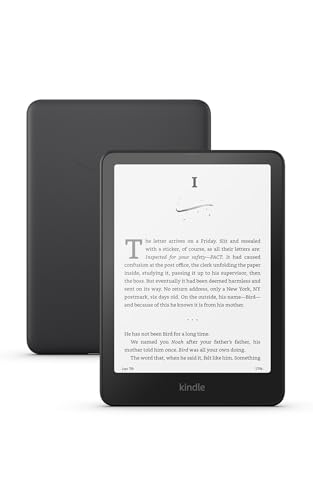
The Kindle Paperwhite is the benchmark for reading-first devices in the budget tier. Its 7-inch glare-free display reads like paper in bright sunlight and stays comfortable at night thanks to an adjustable warm light that shifts the screen from white to amber. Page turns are 20 percent faster than the previous generation, which makes flipping through long books feel smooth. The IPX8 waterproof rating means it can survive a splash at the pool or a drop into the bath, and the battery is rated for up to 12 weeks per charge when reading about half an hour a day. With 16 GB of storage, it holds thousands of ebooks plus a healthy Audible library.
Specs:
- Display: 7-inch glare-free E Ink, 300 ppi
- Storage: 16 GB
- Lighting: Adjustable front light with warm light control
- Waterproofing: IPX8 rated
- Battery life: Up to 12 weeks per charge (reading-based rating)
- Connectivity: Wi-Fi, USB-C charging
- Extras: Audible playback over Bluetooth headphones or speakers
Choose the Paperwhite if novels and nonfiction are your main reading, you read outdoors or in bed, and you want the largest, most comfortable dedicated reading screen in this group.
Kindle (16 GB)

The standard Kindle is the smallest and lightest dedicated e-reader in this roundup, and for many readers it is all the device they need. The 6-inch glare-free display has the same sharp 300 ppi resolution as the Paperwhite, and the front light is brighter at its maximum setting than the previous generation. It is compact enough to slip into a jacket pocket and light enough to hold one-handed for long sessions without wrist strain. Battery life is rated at up to six weeks per charge, and 16 GB of storage covers thousands of books. It lacks warm light adjustment and waterproofing, so it sits a step below the Paperwhite, but as a pure, simple book reader it is hard to fault.
Specs:
- Display: 6-inch glare-free E Ink, 300 ppi
- Storage: 16 GB
- Lighting: Built-in front light, brighter at maximum than prior model
- Waterproofing: Not rated
- Battery life: Up to 6 weeks per charge (reading-based rating)
- Connectivity: Wi-Fi, USB-C charging
- Weight class: Lightest and most compact Kindle in the lineup
Choose the standard Kindle if you want the most portable book reader, read mostly indoors, and do not need warm light or waterproofing.
Amazon Fire HD 8
The Fire HD 8 is the pick for readers who split time between books, magazines, comics, and streaming. Its 8-inch HD color display handles illustrated titles, graphic novels, and magazine layouts that an E Ink screen cannot show in color. The Kindle app is built in, so your Amazon library is one tap away, and other reading apps are available from Amazon’s Appstore. Battery life is rated at up to 13 hours of mixed use, which translates to several days of evening reading between charges. The 64 GB configuration plus a microSD slot expandable up to 1 TB gives you room for books, audiobooks, and downloaded video. The trade-off is a glossy LCD screen, which reflects more light outdoors than E Ink.
Specs:
- Display: 8-inch HD IPS touchscreen, 1280 x 800 at 189 ppi
- Processor: Hexa-core 2.0 GHz
- Memory: 4 GB RAM (64 GB configuration)
- Storage: 64 GB, expandable up to 1 TB via microSD
- Battery life: Up to 13 hours of mixed use
- Charging: USB-C
- Generation: 12th generation, 2024 release
Choose the Fire HD 8 if you read a mix of books, magazines, and comics in color, and want one budget device that also handles video and light apps.
Samsung Galaxy Tab A9
The Galaxy Tab A9 is the most capable all-rounder here, running full Android with the Google Play Store, so Kindle, Kobo, Libby, and every other reading app are available side by side. The 8.7-inch display is a comfortable size for books and two-column PDFs, and the slim metal body feels a step up from typical budget tablets. Dual speakers with Dolby Atmos make audiobooks and read-aloud sessions sound fuller. With 64 GB of storage plus microSD expansion up to 1 TB, there is space for a large offline library. Like all LCD tablets it needs charging far more often than an e-reader, but for readers who want one device for every reading source, it is the flexible option.
Specs:
- Display: 8.7-inch TFT LCD, 1340 x 800
- Processor: MediaTek Helio G99 octa-core
- Memory: 4 GB RAM
- Storage: 64 GB, expandable up to 1 TB via microSD
- Audio: Dual speakers with Dolby Atmos
- Operating system: Android with Google Play Store access
- Model: SM-X110 (Wi-Fi)
Choose the Tab A9 if you read across multiple stores and library apps and want a proper Android tablet that still works well as a dedicated reader.
Lenovo Tab M9
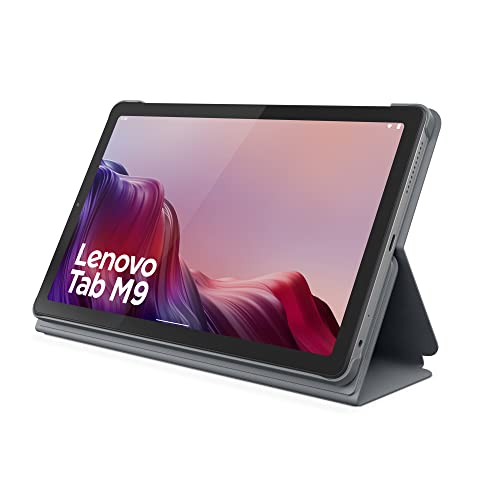
The Lenovo Tab M9 is a 9-inch Android tablet aimed squarely at media and reading, with a TÜV-certified eye care display and a dedicated Reading Mode that softens the screen for long sessions. The 9-inch HD panel is a little larger than the Tab A9’s, which helps with PDFs and magazine pages. Dual speakers with Dolby Atmos cover audiobook listening, and the battery is rated for up to 13 hours of video playback, so reading stretches are well covered. The folio case included in the box doubles as a stand, which is handy for hands-free reading at a table. Performance is entry-level, so heavy multitasking is not its strength, but for reading apps, browsing, and video it is a sensible budget pick.
Specs:
- Display: 9-inch HD IPS, 1340 x 800, TÜV eye care certified
- Processor: MediaTek Helio G80 octa-core
- Memory: 3 GB RAM
- Storage: 32 GB, expandable via microSD
- Battery: 5,100 mAh, up to 13 hours of video playback
- Audio: Dual speakers with Dolby Atmos
- Operating system: Android 12 or later
- Included: Folio case in the box
Choose the Tab M9 if you want a slightly larger reading screen, an included stand case, and a reading mode designed for longer, eye-friendly sessions.
How to Choose
Start with the screen. E Ink displays on the two Kindles are glare-free, readable in direct sunlight, and sip power, but they are black and white and refresh slowly, so they suit books and text far better than magazines or comics. LCD tablets show color and handle page layouts, PDFs, and apps smoothly, but reflect light outdoors and need regular charging.
Next, think about where your books come from. If your library lives in the Kindle store, the Kindles and the Fire HD 8 are the natural fit. If you borrow from a public library through Libby, buy from several stores, or read in many apps, a full Android tablet such as the Tab A9 or Tab M9 avoids lock-in.
Battery expectations differ sharply. Both Kindles are rated in weeks, while the LCD tablets are rated in hours of active use. Frequent travelers who read daily often prefer an e-reader for this reason alone.
Size and weight matter for long sessions. The standard Kindle is the easiest to hold one-handed. The Paperwhite’s 7-inch page shows more text per screen. The 8- to 9-inch tablets are better for PDFs, comics, and magazines, but are two-handed devices for most readers.
Finally, check storage and expansion. All five devices hold far more text ebooks than most people will ever read, but audiobooks, comics, and downloaded magazines take real space, so the microSD slots on the Fire HD 8, Tab A9, and Tab M9 are worth having if your library is media-heavy.
Who Should Skip
Skip the dedicated Kindles if you mainly read magazines, comics, cookbooks, or PDFs, since black-and-white E Ink and slower refresh will frustrate you; pick one of the color tablets instead. Skip the LCD tablets if you read outdoors for hours, are sensitive to screen glare, or dislike charging a device every few days; an e-reader fits you better. Skip the Fire HD 8 if you rely on Google Play apps, because Fire tablets use Amazon’s Appstore instead. And skip every device here if you need fast performance for demanding games or heavy multitasking, since all five are built for reading first.
FAQ
Is an e-reader or a tablet better for reading books?
For plain books, an e-reader is usually better: the glare-free E Ink screen is easier on the eyes, works in bright sunlight, and runs for weeks per charge. A tablet is better when you need color, PDFs, magazines, or several reading apps on one device.
Can these tablets read library books?
Yes. The Kindles can receive Libby loans sent to Kindle in supported regions. The Fire HD 8, Galaxy Tab A9, and Lenovo Tab M9 can run the Libby app directly, along with other library and bookstore apps, which makes the Android tablets the most flexible for borrowing.
How much storage do I need for reading?
Text ebooks are small, so 16 GB holds thousands of them. Storage only becomes a concern with audiobooks, comics, and magazines, which are much larger files. If you download a lot of those, choose a tablet with a microSD slot or the larger Fire HD 8 configuration.
Do any of these work well for reading in bed?
Yes. The Paperwhite’s adjustable warm light is the most comfortable option for nighttime reading, and the standard Kindle’s front light also avoids shining light directly at your face. The tablets all offer night or eye comfort modes that reduce blue light, though their screens stay brighter overall.
Final Verdict
For pure book reading on a budget, the Kindle Paperwhite is the top recommendation: the biggest glare-free screen here, warm light, waterproofing, and battery life measured in weeks. The standard Kindle is better if low weight and simplicity matter most. For color content and apps, the Fire HD 8 suits Kindle households, the Galaxy Tab A9 is the strongest all-round Android option, and the Lenovo Tab M9 adds a larger eye-care display and an included stand case.








Write Your Review
No reviews yet. Be the first to share your experience!