
Our Short List of 3

- Best for: Anyone who wants a big-screen convertible for work, study, and media at a desk.
- Display: 16-inch WUXGA touchscreen, 360-degree hinge
- Processor: Intel Core i5-1335U
- Memory and storage: 8GB RAM, 512GB SSD
- Extras: Backlit keyboard, fingerprint reader, Windows 11 Home
- Best for: Students and commuters who want a light, capable convertible for everyday use.
- Display: 14-inch FHD touchscreen, 1920 by 1080, micro-edge
- Processor: Intel Core 5 120U, 10 cores, up to 5.0 GHz
- Memory and storage: 8GB DDR4 RAM, 512GB SSD
- Extras: Backlit keyboard, fingerprint reader, 5MP camera with privacy shutter, Wi-Fi 6E

- Best for: Budget-conscious buyers who want strong multitasking without paying for a premium screen.
- Display: 14-inch FHD touchscreen, 360-degree hinge
- Processor: AMD Ryzen 5 5500U
- Memory and storage: 16GB RAM, 512GB SSD
- Extras: Windows 11 Home, AMD Radeon graphics
All 4 Picks at a Glance
| Product | Specs | Action |
|---|---|---|
| 1. Lenovo Yoga 7i 16-Inch 2-in-1 — Best Large-Screen All-Rounder |
| Check price on Amazon |
| 2. HP Envy x360 14 — Best Compact Everyday Convertible |
| Check price on Amazon |
| 3. Lenovo IdeaPad Flex 5 14 — Best Budget-Friendly 2-in-1 |
| Check price on Amazon |
 4. Samsung Galaxy Book4 360 — Best Display and Stylus Experience |
| Check price on Amazon |
Key takeaways
- Find the best 2in 1 laptops on sale, from the Lenovo Yoga 7i and HP Envy x360 to the Galaxy Book4 360, compared on display, battery life, stylus and value.
Introduction
Finding the best 2in 1 laptops on sale takes a little patience, because the deal is only good if the laptop underneath it is actually worth owning. A convertible laptop has to do two jobs well: work as a normal laptop with a full keyboard, and fold back into a tablet, tent, or stand mode when you want to read, sketch, or watch video hands-free. The models below all do that, and each one is currently listed on Amazon US, where discounts on laptops rotate often enough that checking the listing before you buy is always worth it.
This guide focuses on four convertibles that cover the most common needs. There is a large-screen all-rounder, a compact everyday machine, a budget-friendly workhorse, and a premium-feeling model with a superb AMOLED display. Every pick is a genuine 2-in-1 with a touchscreen and a 360-degree hinge, not a standard laptop with a touch panel bolted on. Before we get to the picks, here is how to judge a convertible deal so you do not pay for features you will never use.
How to Choose a 2-in-1 Laptop on Sale
Start with the screen, not the discount
The screen is the part you look at all day, and on a 2-in-1 it is also the part you touch. A 14-inch display keeps the machine light enough to carry everywhere, while a 15.6-inch or 16-inch panel gives you more room for split-screen work and media. Resolution matters too: a full HD panel is fine for documents and streaming, but a brighter, higher-resolution display makes a real difference if you edit photos or spend long hours reading. If you plan to use a stylus, check whether one is included in the box or sold separately, and whether the screen supports pressure-sensitive input.
Check the hinge and the weight
A convertible lives or dies by its hinge. It should rotate smoothly through the full 360 degrees and hold the screen steady in tent and stand modes without wobbling when you tap the display. Weight matters just as much. A machine around three pounds is easy to carry in a bag all day, while anything much heavier starts to feel like a burden, especially when you hold it in tablet mode. If you plan to use tablet mode often, favour the lighter models in this guide.
Make sure the everyday specs are right
For most people, 8GB of memory is the minimum for smooth everyday use, and 16GB is the safer choice if you keep many browser tabs open or run heavier software. A 512GB solid-state drive gives you room for apps, documents, and media without constantly managing storage. Battery life claims vary, so look for machines with at least a full workday of light use, and remember that bright touchscreens and powerful processors drain the battery faster. A backlit keyboard and a fingerprint reader are small extras that make daily use noticeably nicer.
Read the listing carefully before you buy
Laptop listings on Amazon often bundle several configurations under one product page, and third-party sellers sometimes open the box to upgrade memory or storage. That is not necessarily a problem, but it means you should confirm the exact processor, memory, storage, and screen size in the listing you are buying, check who the seller is, and read the return policy. A deal on a configuration with less memory or a smaller drive than you expected is not a deal at all.
Think about what you will actually do with it
A student who takes notes by hand needs a good stylus and a screen that stays put in tablet mode. A creator who sketches or edits photos needs colour accuracy and a bright panel. A general user who mainly browses, streams, and writes documents can save money on a simpler machine and spend the difference on accessories. Match the laptop to the job, and the discount becomes a bonus rather than the reason you bought it.
Top Picks
1. Lenovo Yoga 7i 16-Inch 2-in-1 — Best Large-Screen All-Rounder
- Best for: Anyone who wants a big-screen convertible for work, study, and media at a desk.
- Display: 16-inch WUXGA touchscreen, 360-degree hinge
- Processor: Intel Core i5-1335U
- Memory and storage: 8GB RAM, 512GB SSD
- Extras: Backlit keyboard, fingerprint reader, Windows 11 Home
Anyone who wants a big-screen convertible for work, study, and media at a desk.
The Lenovo Yoga 7i is the pick for anyone who wants a big screen without giving up portability. Its 16-inch WUXGA touchscreen gives you plenty of room for documents side by side, and the 360-degree hinge lets it fold flat for sketching or prop up in tent mode for video. The Intel Core i5-1335U processor handles everyday work, streaming, and light creative tasks without fuss, and the 8GB of memory and 512GB solid-state drive cover the basics comfortably.
Lenovo’s Yoga line has a long track record with convertible hinges, and this model feels solid in every mode. The backlit keyboard is comfortable for long typing sessions, the fingerprint reader makes signing in quick, and the slim storm grey chassis looks understated rather than flashy. At around four pounds it is heavier than the smaller convertibles here, but for a 16-inch machine it carries well, and the larger display is worth the trade-off if you spend most of your time at a desk or a table.
Pros: Large, roomy touchscreen; proven Yoga hinge; fingerprint reader and backlit keyboard included.
Cons: 8GB of memory limits heavy multitasking; heavier than the 14-inch picks.
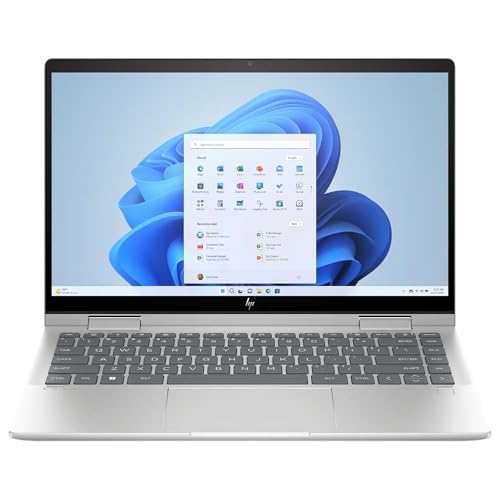
2. HP Envy x360 14 — Best Compact Everyday Convertible
- Best for: Students and commuters who want a light, capable convertible for everyday use.
- Display: 14-inch FHD touchscreen, 1920 by 1080, micro-edge
- Processor: Intel Core 5 120U, 10 cores, up to 5.0 GHz
- Memory and storage: 8GB DDR4 RAM, 512GB SSD
- Extras: Backlit keyboard, fingerprint reader, 5MP camera with privacy shutter, Wi-Fi 6E
Students and commuters who want a light, capable convertible for everyday use.
The HP Envy x360 14 is the most portable pick in this guide, and the one most people should start with. Its 14-inch full HD touchscreen is bright and responsive, the Intel Core 5 120U processor with ten cores keeps everyday tasks moving, and the 8GB of DDR4 memory and 512GB solid-state drive are a sensible match for the machine’s size and purpose. It weighs about three and a third pounds, so it disappears into a bag, and the natural silver finish looks clean without drawing attention.
What makes this Envy stand out is how complete it feels for daily use. The backlit keyboard is good for typing in dim rooms, the fingerprint reader is built in, and the True Vision 5MP camera with a privacy shutter is a thoughtful touch for video calls. Wi-Fi 6E and Bluetooth 5.3 keep connections fast and current. One thing to note: this particular Amazon listing is sold by a third-party seller that opens the box to customise the configuration, so check the listing details and the seller’s terms before you buy, and confirm you are getting the specification described here.
Pros: Light and easy to carry; strong all-round specification; good camera and security features.
Cons: 8GB of memory is not upgradeable on this configuration; the listing is sold by a third-party customiser, so read it carefully.
3. Lenovo IdeaPad Flex 5 14 — Best Budget-Friendly 2-in-1
- Best for: Budget-conscious buyers who want strong multitasking without paying for a premium screen.
- Display: 14-inch FHD touchscreen, 360-degree hinge
- Processor: AMD Ryzen 5 5500U
- Memory and storage: 16GB RAM, 512GB SSD
- Extras: Windows 11 Home, AMD Radeon graphics
Budget-conscious buyers who want strong multitasking without paying for a premium screen.
The Lenovo IdeaPad Flex 5 is the value pick of this group, and it shows that a good convertible does not have to cost a fortune. Its 14-inch full HD touchscreen folds back a full 360 degrees, and the AMD Ryzen 5 5500U processor, paired with 16GB of memory, handles multitasking better than many more expensive machines. The 512GB of storage is generous for the category, and Windows 11 Home is included.
Sixteen gigabytes of memory is the headline here. At this end of the market, many convertibles still ship with 8GB, and the extra memory makes the Flex 5 noticeably smoother when you have a browser full of tabs, a document open, and a video call running at the same time. The storm grey chassis is simple and sturdy, and the machine is light enough to carry without thinking about it. The screen is a standard full HD panel rather than a high-brightness or high-resolution one, so it is best suited to indoor use, but for lectures, libraries, and living rooms that is rarely a problem.
Pros: 16GB of memory at a budget-friendly level; capable Ryzen processor; generous 512GB storage.
Cons: Standard-brightness display; no fingerprint reader on this configuration.
4. Samsung Galaxy Book4 360 — Best Display and Stylus Experience
- Best for: Creators, note-takers, and media lovers who want the best screen and stylus in this group.
- Display: 15.6-inch FHD AMOLED touchscreen, S Pen included
- Processor: Intel Core 7 150U, 10 cores, up to 5.0 GHz
- Memory and storage: 16GB LPDDR5 RAM, 512GB SSD
- Extras: Fingerprint reader, backlit keyboard, Thunderbolt 4, Wi-Fi 6E, 68Wh battery
Creators, note-takers, and media lovers who want the best screen and stylus in this group.
The Samsung Galaxy Book4 360 is the premium pick in this guide, and its screen is the reason. The 15.6-inch full HD AMOLED touchscreen delivers deep blacks and vivid colours that make movies, photos, and artwork look genuinely better than on a standard LCD panel. The S Pen is included, so you can take handwritten notes and sketch straight out of the box, and the fingerprint reader adds quick, secure sign-in.
Under the screen, the Intel Core 7 150U processor with 16GB of LPDDR5 memory and a 512GB solid-state drive keeps everything responsive, and the 68Wh battery is rated for long days away from a charger. At 3.22 pounds and just over half an inch thick, it is remarkably slim for a 15.6-inch machine, and the two Thunderbolt 4 ports give you fast, flexible connectivity for docks and external displays. The backlit keyboard is comfortable, and the 1080p webcam with AI noise cancelling is well suited to video calls. If you own a Samsung phone, the connected features such as Quick Share and using the phone as a webcam are a bonus.
Pros: Outstanding AMOLED touchscreen; S Pen included; slim and light for its screen size; strong battery.
Cons: Soldered memory cannot be upgraded later; premium positioning means discounts matter more.
Comparison Table
| Laptop | Screen | Processor | Memory | Storage | Weight |
|---|---|---|---|---|---|
| Lenovo Yoga 7i 16 | 16-inch WUXGA touch | Intel Core i5-1335U | 8GB | 512GB SSD | Around 4 lbs |
| HP Envy x360 14 | 14-inch FHD touch | Intel Core 5 120U | 8GB DDR4 | 512GB SSD | 3.35 lbs |
| Lenovo IdeaPad Flex 5 14 | 14-inch FHD touch | AMD Ryzen 5 5500U | 16GB | 512GB SSD | Light, portable |
| Samsung Galaxy Book4 360 | 15.6-inch FHD AMOLED touch | Intel Core 7 150U | 16GB LPDDR5 | 512GB SSD | 3.22 lbs |
FAQ
What is the best 2-in-1 laptop on sale right now?
There is no single best answer, because it depends on how you will use it. For most people, the HP Envy x360 14 is the safest all-round choice thanks to its size, weight, and complete feature set. If you want the biggest screen, the Lenovo Yoga 7i is the better fit. If your budget is tight, the IdeaPad Flex 5 gives you 16GB of memory for less. And if the display and stylus matter most, the Galaxy Book4 360 is the standout.
Are 2-in-1 laptops good for students?
Yes, they are one of the best choices for students. The touchscreen and tablet mode are genuinely useful for handwritten notes, annotating slides, and reading textbooks, while the full keyboard handles essays and research. A 14-inch model is usually the best balance of screen size and portability for carrying between classes, and a machine with 8GB of memory or more will handle typical coursework without slowing down.
Do I need a stylus with a 2-in-1 laptop?
Not necessarily. If you only plan to tap and scroll, your fingers are enough. A stylus becomes valuable if you take handwritten notes, sketch, sign documents, or annotate PDFs regularly. The Galaxy Book4 360 in this guide includes the S Pen in the box, while the other picks work with compatible active pens that are usually sold separately, so check compatibility before buying one.
How much memory and storage should a 2-in-1 laptop have?
For everyday use, 8GB of memory and a 256GB solid-state drive are the minimum worth considering. The picks in this guide all have 512GB of storage, which is a comfortable amount for most people, and two of them have 16GB of memory, which is the better choice if you multitask heavily or plan to keep the laptop for several years. Storage can often be expanded with external drives or cloud storage, but memory is usually fixed, so buy the memory you need up front.
Should I buy a 2-in-1 laptop on sale or wait for a bigger discount?
Laptop discounts on Amazon rotate regularly, and the best deals often appear around major sale events and back-to-school season. If you need a laptop now, a current discount on a model that fits your needs is a good reason to buy, because waiting carries no guarantee that the same configuration will be cheaper later. If your current machine still works fine, waiting for a sale event can save you more, but set a clear budget and a shortlist first so you can act quickly when the discount appears.
Conclusion
The best 2in 1 laptops on sale are the ones that fit your daily life first and carry a discount second. The HP Envy x360 14 is the best all-rounder for most buyers, the Lenovo Yoga 7i suits anyone who wants a larger screen, the IdeaPad Flex 5 is the smart budget choice with its 16GB of memory, and the Samsung Galaxy Book4 360 is the pick for anyone who values a beautiful display and a proper stylus. Whichever you choose, confirm the exact configuration on the listing, check the seller and return policy, and make sure the screen, weight, and battery match how you will actually use it. A convertible you enjoy using every day is worth far more than a slightly bigger discount on the wrong machine.
Disclosure: As an Amazon Associate, we earn from qualifying purchases.


Write Your Review
No reviews yet. Be the first to share your experience!