
Key takeaways
- Ten 27-inch gaming monitors with 200Hz panels, from 1080p AOC and ZZA models to 1440p LG, KOORUI and SANSUI picks, compared by listing specs for a 200 budget.
For a 27-inch screen on a 200-dollar budget, the QHD 200Hz IPS models from LG, KOORUI, Amzfast and SANSUI are the strongest all-round buys here, because 2560 x 1440 looks noticeably sharper than 1080p at this size. If you mainly want smooth motion for esports or a console and want to spend less, the two AOC panels, the ZZA and the Westinghouse stay at 1920 x 1080. One warning: the LG 27G610A-B has sat above the 200 ceiling at times, so confirm the current listing price. Everything below comes from listing titles and published specifications.
Quick picks
As an Amazon Associate we earn from qualifying purchases at no extra cost to you.




- Cheapest way into 200Hz: AOC 27G4H (IPS) or AOC C27G4H2 (curved VA), both 1080p
- Most connections: SANSUI and Amzfast models list two HDMI and two DisplayPort inputs
- Best desk ergonomics: LG 27G610A-B, with tilt, height, swivel and pivot
- Widest colour claim: KOORUI G2721P at 95% DCI-P3 and Amzfast at 96% DCI-P3
- Built-in speakers: Westinghouse and Amzfast
Side-by-side comparison
| Model | Key point from title | Best for |
|---|---|---|
| AOC 27G4H | 1080p, IPS, 200Hz, G-SYNC Compatible | Budget esports |
| AOC C27G4H2 | 1080p, curved VA, 200Hz, DP 1.4 | Dark-room gaming |
| ZZA 27 Inch Curved | 1080p, 1800R VA, 200Hz | FPS and racing |
| Westinghouse 27 Inch Curved | 1080p, 1500R, built-in speakers | Simple all-in-one desk |
| SANSUI ES-G27C1Q | 1440p, curved 1500R, DP cable included | Cheapest QHD |
| SANSUI Fast IPS 1440p | 400 nits, 10-bit, ErgoStand | Bright rooms |
| KOORUI G2721P | 1440p Fast IPS, 95% DCI-P3 | Colour-aware gaming |
| Amzfast AMZG27F5Q | 1440p Fast IPS, speakers, 4 ports | Multi-device desks |
| LG 27GS75Q-B | 180Hz (O/C 200Hz), G-SYNC Compatible | NVIDIA GPU owners |
| LG 27G610A-B | 200Hz, DisplayHDR 400, full stand | Ergonomics first |
The 1080p group
AOC 27G4H
The title lists a 27-inch IPS panel at 1920 x 1080 and 200Hz, with HDR10, an earphone out, VESA mount support and a 3-year warranty. It also advertises G-SYNC compatibility, though the listing spells it “Compatble”, so confirm the wording on the page. A 0.3ms response figure is a manufacturer claim, not something we can verify.
Pros
- IPS panel at this size
- Three-year warranty stated
Cons
- 1080p looks softer at 27 inches
- Typo in the title is worth double-checking
Who it’s for: Esports players with a modest graphics card.
AOC C27G4H2
This one is a curved VA panel, also 1080p at 200Hz, with Adaptive-Sync, DP 1.4, HDMI 2.0, an earphone out and a 3-year warranty. VA panels usually trade wider viewing angles for deeper blacks, which suits a single seated viewer. Compared with its IPS sibling, the trade is contrast versus viewing angle, so decide which matters in your room.
Pros
- Both DisplayPort 1.4 and HDMI 2.0
- Curve helps immersion
Cons
- VA looks different off-axis
- Same 1080p sharpness limit
Who it’s for: Players who like a curved screen and dim rooms.
ZZA 27 Inch Curved Monitor
ZZA lists a 1800R curve, 1080p, 200Hz, a VA panel with 4000:1 contrast, 120% sRGB, FreeSync, HDR and low blue light, with HDMI and DisplayPort. The title name-checks FPS and racing games. Little else is stated, so look at the listing for the stand’s adjustability and warranty terms.
Pros
- Tighter 1800R curve is listed
- Both HDMI and DisplayPort
Cons
- Lesser-known brand, so check warranty
- Stand details are not in the title
Who it’s for: Budget racing and shooter fans.
Westinghouse 27 Inch Curved Gaming Monitor
A 1500R curved 1080p panel at 200Hz with built-in speakers, 3000:1 contrast, 118% sRGB, an eyecare mode, FreeSync, VESA mounting, DisplayPort and HDMI. The speakers are the differentiator among the 1080p picks, though the title gives no power rating.
Pros
- Speakers included for casual audio
- Familiar consumer brand name
Cons
- Lowest contrast figure among the curved VA models
- Speaker quality unknown
Who it’s for: A first gaming monitor for a bedroom or dorm.
The 1440p group
SANSUI ES-G27C1Q Curved
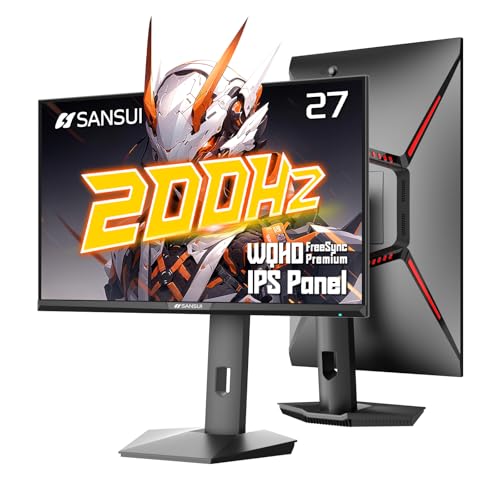
The title shows a 2560 x 1440 curved 1500R panel at 200Hz with MPRT 1ms, two HDMI 2.0 and two DP 1.4 inputs, FreeSync, 5000:1 contrast, 120% sRGB and HDR, and a DisplayPort cable in the box. Four inputs is generous at this price. HDR on a panel like this is usually a label more than a visual upgrade.
Pros
- QHD with four video inputs
- DP cable included
Cons
- Curved panel suits one viewer, not a shared screen
- HDR claims deserve skepticism
Who it’s for: Shoppers wanting 1440p for the least money.
SANSUI Fast IPS 1440p (200Hz / 180Hz)
This listing shows 1440p Fast IPS, “200Hz 180Hz” (ambiguous, so check which applies), 1ms, FreeSync Premium, 400 nits brightness, 130% sRGB, 10-bit colour, HDR, an ErgoStand, VESA mount, and two DP 1.2 plus two HDMI inputs. DP 1.2 is older than the 1.4 on other models, which may limit top refresh rates.
Pros
- 400 nits suits bright rooms
- Adjustable stand listed
Cons
- DP 1.2 ports on the title
- Dual refresh figures are unclear
Who it’s for: Sunlit desks that need a brighter screen.
KOORUI 27 Inch 1440p G2721P
KOORUI lists 1440p Fast IPS at 200Hz, 1ms, HDR400, Adaptive Sync and 95% DCI-P3, with HDMI 2.0 and DP 1.4 and VESA mounting. The DCI-P3 figure is the main draw for anyone who also edits photos casually. It pitches itself at PC, console and dual-screen use.
Pros
- Wide-gamut claim at 95% DCI-P3
- DP 1.4 for full refresh
Cons
- Only one HDMI and one DP listed
- No stand adjustments in the title
Who it’s for: Gamers who also do light photo work.
Amzfast 27 Inch AMZG27F5Q
The listing combines WQHD Fast IPS at 200Hz, built-in speakers, 1ms, FreeSync, HDR400, 132% sRGB, 96% DCI-P3, VESA 100×100 and two HDMI 2.0 plus two DP 1.4 inputs. That mix of speakers and four ports is unusual at this tier. The brand is new, so confirm return and warranty terms.
Pros
- Four inputs and speakers together
- High colour-gamut claims
Cons
- Unfamiliar brand
- Colour numbers are manufacturer claims
Who it’s for: One monitor shared between a PC, console and laptop.
LG 27GS75Q-B UltraGear
LG lists QHD IPS at 180Hz (O/C 200Hz), 1ms, G-SYNC Compatible, FreeSync, HDR10, and a tilt, height and pivot stand, with HDMI and DisplayPort. The 200Hz figure needs overclocking, so treat 180Hz as the real baseline. A recognised brand makes support easier.
Pros
- G-SYNC Compatible and FreeSync
- Height-adjustable stand
Cons
- 200Hz only via overclock
- No swivel listed
Who it’s for: NVIDIA graphics card owners who value brand support.
LG 27G610A-B UltraGear
A QHD IPS 200Hz panel with 1ms, FreeSync Premium, VESA DisplayHDR 400, HDMI and DisplayPort, and a stand that tilts, adjusts height, swivels and pivots. It is the only model here with full stand movement in the title. It tends to price above the 200 cap, so verify before you add it to a cart.
Pros
- Full-motion stand
- Certified DisplayHDR 400 label
Cons
- May exceed the 200 limit
- No built-in speakers listed
Who it’s for: Buyers who want ergonomics and are willing to stretch the budget slightly.
How we chose these
We worked only from Amazon listing titles, published specifications, manufacturer documentation and buyer reviews, and we kept to the items whose titles say 27 inches. Nobody on the team used or measured these units. Where a title was ambiguous, like the SANSUI refresh figures, or contained a typo, we say so and point you to the listing instead of guessing.
What to look for in a 27-inch monitor on a tight budget
Resolution against your graphics card
At 27 inches, 1080p works out to roughly 82 pixels per inch, while 1440p reaches roughly 109. The higher density makes text noticeably cleaner, but it needs about 78% more pixels drawn every frame. If your graphics card struggles at 1080p in the games you play, a QHD panel will make that worse.
Panel type
IPS gives steadier colour from the side. VA lists higher contrast, useful in a dark room, but the curve and viewing angle make it a poorer fit for sharing the screen. Contrast numbers in titles come from the maker, so treat them as direction, not a measurement.
Ports and bandwidth
Refresh rate depends on the cable as much as the panel. HDMI 2.0 generally cannot carry 1440p at the full 200Hz, so use DisplayPort 1.4 for that. A checklist before ordering: does your graphics card have DisplayPort, is the cable included, and does the listing name the DP version?
Worked example: matching refresh rate to your frame rate
Say your PC averages 110 frames per second at 1440p in your main game. A 200Hz monitor will not improve on that; a 144Hz or 165Hz limit would be plenty. In that case, pick the better panel, the LG 27GS75Q-B or KOORUI, over the highest refresh number. If instead you average 220 frames at 1080p, a 200Hz AOC makes full use of its panel. A middle case is 150 frames at 1440p: a 200Hz monitor still helps a little, but the sharper picture of the QHD IPS models is the bigger gain, so spend on the panel, not the refresh number.
Size and desk distance
A 27-inch screen is about 24 inches wide. Sit roughly an arm’s length away, around 24 to 30 inches, and the whole screen fits your view without turning your head. Closer than that and the corners of a flat 1080p panel start to feel far away, which is where a curve or a higher resolution earns its keep. Measure your desk depth before ordering, and check whether the stand foot or the VESA mount fits your setup.
Mistakes buyers make
The first is paying for a refresh rate the hardware cannot reach. The second is trusting 1ms or HDR claims as if they were guarantees; titles repeat manufacturer marketing, and a 400-nit HDR label does not make a monitor look like a true HDR display. Third, forgetting the cable: some listings include DisplayPort, others do not. Fourth, ignoring the stand, since a fixed-height stand can force a poor posture. Finally, assuming a price seen last week still holds, which matters most on the LG 27G610A-B.
Verdict
If you can stay under 200, the KOORUI G2721P or the Amzfast AMZG27F5Q give the most 1440p features per listing title. Pick the AOC 27G4H if 1080p is enough and you want the simplest budget IPS, and consider the LG 27G610A-B only if its price fits your cap on the day you buy.
Common questions
Is a 1440p monitor worth it over 1080p at 27 inches?
For most desk setups, yes. A 27-inch panel at 1920 x 1080 spreads fewer pixels across the same area, so text and fine detail look softer when you sit close. The QHD (2560 x 1440) models here cost a little more but give a visibly crisper desktop. The catch is graphics load: a 1440p monitor asks more of your PC or console, so a modest graphics card may not reach 200 frames per second in demanding games. If you play mostly esports titles or want the cheapest option, 1080p still makes sense.
Do I need a 200Hz monitor, or is 144Hz enough?
Only if your hardware can feed it. A 200Hz panel shows its advantage only when the game renders close to 200 frames per second, which is realistic in lighter esports titles but rare in newer, heavier games. Consoles typically cap at 60 or 120 frames, so 200Hz adds little there. That said, every monitor on this list is listed at 200Hz or close to it, so you are not paying much extra for headroom you may grow into later.
What is the difference between IPS and VA panels on these monitors?
IPS panels, like the AOC 27G4H and the LG models, generally keep colour and brightness more consistent when you view them from an angle. VA panels, such as the AOC C27G4H2 and the ZZA, list higher contrast ratios (3000:1 to 5000:1 in the titles), which helps in dark rooms, but they can look different from the sides. Pick IPS for mixed work and gaming, and VA if you mostly play in a dim room and like deep blacks.
Are the built-in speakers on the Westinghouse and Amzfast any good?
The listings only say speakers are built in; they do not describe power or quality, so check the product page. As a general rule, small monitor speakers are fine for system sounds and casual video but thin for music and games. If audio matters, plan on headphones or desk speakers, and treat built-in speakers as a backup. Both AOC models list an earphone out jack, which gives you a simple headphone option.
Will these monitors work with a PlayStation or Xbox?
Most list HDMI inputs, and the AOC titles say “Console Ready”, so a console should connect. What you actually get depends on the console and the HDMI version on the monitor: HDMI 2.0 ports, listed on several models, handle 1440p at 60 or 120Hz in most cases, but not every combination. Check the listing for the exact port version and the console’s supported modes before buying.
Related guides
- How To Check Amazon Price History Before Buying
- How Amazon Lightning Deals Work
- Jbl Vs Bose Bluetooth Speakers








Write Your Review
No reviews yet. Be the first to share your experience!