
Our Short List of 3

- Best for: Anyone who works with documents, spreadsheets, and long web pages for most of the day.
- 8K DPI sensor tracks on most surfaces, including glass
- Quiet Clicks for less click noise than the earlier model
- MagSpeed scroll wheel moves through long documents quickly
- Battery lasts up to 70 days on a full charge

- Best for: Remote workers who share their home with family, pets, or street noise and need real quiet on calls.
- Up to 30 hours of battery life on a single charge
- 3 minute charge gives up to 3 hours of playback
- Two processors control 8 microphones for noise canceling
- Auto NC Optimizer adjusts noise canceling to the surroundings
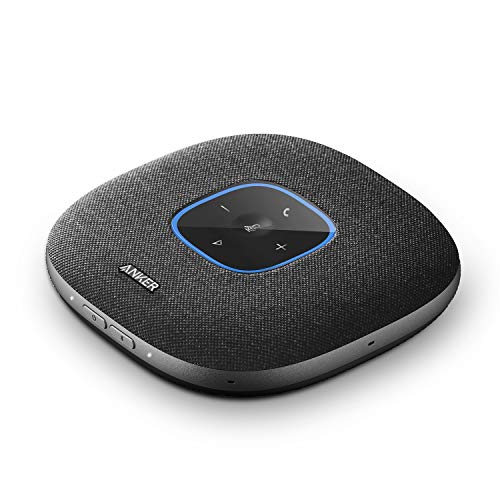
- Best for: Anyone who takes calls from a desk and wants to speak naturally without wearing a headset all day.
- 6 microphones with 360 degree voice pickup
- Up to 24 hours of call time on a single charge
- Smart Voice Enhancement for clearer calls
- Bluetooth 5 and USB-C connections
All 5 Picks at a Glance
| Product | Specs | Action |
|---|---|---|
| Logitech MX Master 3S Wireless Mouse |
| Check price on Amazon |
| Sony WH-1000XM5 Wireless Noise Canceling Headphones |
| Check price on Amazon |
| Anker PowerConf S3 Speakerphone |
| Check price on Amazon |
 Ember Temperature Control Smart Mug 2 |
| Check price on Amazon |
 Nulaxy C3 Laptop Stand |
| Check price on Amazon |
Our Top Picks
- Nulaxy Full Aluminum Laptop Stand1 Count (Pack of 1)11.5 x 8.3 x 2.3 inches1.8 poundsCheck on Amazon
The real decision when buying a gift for someone who works from home is not how impressive the box looks on the day it arrives. It is whether the thing earns a place on a desk that already holds a laptop, a charger, and a coffee cup, and whether it still gets used on an ordinary Tuesday months later, long after the wrapping paper is gone. A good remote work gift removes one small daily friction: a sore wrist, a noisy call, a drink gone cold, a screen that sits too low.
This guide is for anyone shopping for a partner, a teammate, a parent, or a friend who works from a kitchen table or a spare room, and for managers putting together a welcome kit for a new hire. Every pick below comes from the name and the listed details on its Amazon page, so you can check the fit, the size, and the connection type before you buy.
Quick Picks
As an Amazon Associate we earn from qualifying purchases
| Product | Best for | Key spec from title |
|---|---|---|
| Logitech MX Master 3S | Long days of spreadsheets and documents | 8K DPI sensor, tracks on glass |
| Sony WH-1000XM5 | Blocking out household noise on calls | 30-hour battery, Auto NC Optimizer |
| Anker PowerConf S3 | Hands-free video meetings at the desk | 6 mics, 24H call time |
| Ember Temperature Control Smart Mug 2 | Keeping coffee warm through long meetings | 14 oz, app-controlled |
| Nulaxy C3 Laptop Stand | Raising a laptop screen to a comfortable height | Fits 10 to 16 inch laptops |
How to Choose
Match the gift to the workday, not the desk
Start by thinking about how the person actually spends their hours. Someone who lives on video calls needs better audio more than they need another gadget, while someone who writes or builds spreadsheets all day will feel the difference of a comfortable mouse within a week. A gift that fits the workday gets used every day, and a gift that only fits the desk gets moved to a drawer. Ask yourself which part of their day feels hardest: the calls, the typing, the focus, or the comfort. Then pick the item that answers that one thing clearly, instead of buying something clever that solves a problem they never had.
Check the fit before you buy
Remote work gear fails as a gift when it does not fit the setup it lands in. A laptop stand only works if the laptop falls inside its size range, and a mouse only works if the computer has the connection it needs, whether that is Bluetooth or a USB receiver. Check the operating system too, since some accessories list Windows, macOS, Linux, and Chrome OS while others cover fewer. Measure the desk as well: a speakerphone needs a flat spot near the laptop, and a mug needs a coaster-sized space beside the keyboard. A few minutes checking sizes and connections saves the awkward return that follows a well-meant but unusable gift.
Favor things that disappear into the routine
The best remote work gifts are the ones the recipient stops noticing because they simply work. Look for long battery life so the item is not always on a charger, and for a setup that takes minutes rather than an afternoon of installing software and reading manuals. A mouse that charges over USB-C, headphones that pair with a phone and a laptop, or a mug that holds its temperature without being asked all share the same quality: they ask nothing of the person using them. If a gift needs daily fiddling, a special cable, or a new habit to be useful, it will spend more time in a drawer than on the desk.
Buy the version that lasts
A gift for a home office should be built to survive daily use, not just to look good in a photo. Aluminum stands hold up better than thin plastic ones, a mug with a scratch-resistant coating keeps its finish, and a mouse with a rechargeable battery avoids a drawer full of spares. Read the listing for what is in the box, such as a charging cable, a receiver, or a travel case, because a missing cable can delay the first use by days. It also pays to check the warranty and whether the brand sells the item in a color the recipient would like, since a gift that feels personal gets kept far longer than one that feels generic.
The 5 Best Options
Logitech MX Master 3S Wireless Mouse
- Best for: Anyone who works with documents, spreadsheets, and long web pages for most of the day.
- 8K DPI sensor tracks on most surfaces, including glass
- Quiet Clicks for less click noise than the earlier model
- MagSpeed scroll wheel moves through long documents quickly
- Battery lasts up to 70 days on a full charge
Anyone who works with documents, spreadsheets, and long web pages for most of the day.
This standard edition is shaped for right-handed use, so confirm the recipient does not need a left-handed mouse before buying.
The MX Master 3S is the gift for the remote worker who spends the whole day pointing, clicking, and scrolling through documents. Its sculpted shape fills the palm and supports the thumb, so long sessions feel less tiring than they do with the flat mouse that came in the laptop box. The quiet clicks keep shared living spaces peaceful during early calls, and the scroll wheel flies through long pages and then stops on a single line. It pairs with up to three devices, which suits anyone who switches between a work laptop and a personal machine.
Watch out for: This standard edition is shaped for right-handed use, so confirm the recipient does not need a left-handed mouse before buying.
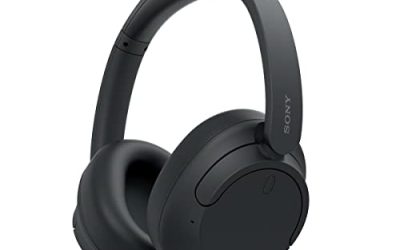
Sony WH-1000XM5 Wireless Noise Canceling Headphones
- Best for: Remote workers who share their home with family, pets, or street noise and need real quiet on calls.
- Up to 30 hours of battery life on a single charge
- 3 minute charge gives up to 3 hours of playback
- Two processors control 8 microphones for noise canceling
- Auto NC Optimizer adjusts noise canceling to the surroundings
Remote workers who share their home with family, pets, or street noise and need real quiet on calls.
These are over-ear headphones that cover the ears fully, so they feel warm in a hot room and are larger to store than earbuds.
The WH-1000XM5 is the gift for the remote worker whose home is never quiet: children in the next room, a neighbor mowing the lawn, a partner on another call. Its noise canceling uses two processors and eight microphones to hush the background, and the Auto NC Optimizer adjusts the effect to the room and the fit. Calls sound clear through beamforming microphones that focus on the voice, and the soft ear cushions make long meetings easy to sit through. With a long battery and quick charging, these headphones are ready for a full day of back-to-back calls.
Watch out for: These are over-ear headphones that cover the ears fully, so they feel warm in a hot room and are larger to store than earbuds.
Anker PowerConf S3 Speakerphone
- Best for: Anyone who takes calls from a desk and wants to speak naturally without wearing a headset all day.
- 6 microphones with 360 degree voice pickup
- Up to 24 hours of call time on a single charge
- Smart Voice Enhancement for clearer calls
- Bluetooth 5 and USB-C connections
Anyone who takes calls from a desk and wants to speak naturally without wearing a headset all day.
The speakerphone is made for voice calls rather than music, so it will not replace a dedicated music speaker for listening.
The PowerConf S3 is the gift for the remote worker who is tired of leaning into a laptop microphone and asking everyone to repeat themselves. Six microphones pick up voices from around the desk, and the built-in voice enhancement cleans up echo and background noise so the other side of the call hears every word. It connects by Bluetooth or USB-C, works with the main meeting platforms, and its battery runs for a full day of calls without a charger. The included travel case makes it easy to carry to a coffee shop or a co-working space.
Watch out for: The speakerphone is made for voice calls rather than music, so it will not replace a dedicated music speaker for listening.
Ember Temperature Control Smart Mug 2
- Best for: Coffee and tea drinkers who stretch one cup across a long morning of calls.
- 14 fluid ounce capacity in stainless steel
- Holds the set temperature between 120 and 145 degrees Fahrenheit
- Defaults to 135 degrees Fahrenheit without the app
- Up to 80 minutes of heat on battery, all day on the charging coaster
Coffee and tea drinkers who stretch one cup across a long morning of calls.
The mug is hand wash only and must not go in the dishwasher, and it needs its charging coaster nearby for all-day warmth.
The Ember Mug 2 is the gift for the remote worker whose coffee always goes cold halfway through a meeting. It holds a drink at the exact temperature chosen in the app, between 120 and 145 degrees Fahrenheit, and without the app it simply holds the last setting, so it works even for someone who never opens the companion software. The battery keeps a drink warm for up to 80 minutes away from the coaster, and on the charging coaster it stays warm all day. The LED shows when the drink has reached the chosen temperature, and the mug wakes when hot liquid is poured in.
Watch out for: The mug is hand wash only and must not go in the dishwasher, and it needs its charging coaster nearby for all-day warmth.
Nulaxy C3 Laptop Stand
- Best for: Anyone working from a laptop on a flat desk who wants a better screen height without buying a monitor.
- Fits laptops from 10 to 16 inches
- Made from 5 mm aluminum alloy
- Supports laptops weighing up to 22 pounds
- Detachable three-part design for storage
Anyone working from a laptop on a flat desk who wants a better screen height without buying a monitor.
The listing warns that typing directly on the raised laptop can feel wobbly, so pair it with an external keyboard and mouse for the best experience.
The Nulaxy C3 is the gift for the remote worker whose laptop sits flat on the desk and forces their neck down all day. This aluminum riser lifts the screen to a more comfortable height, and the open-back design lets air flow under the laptop so it runs cooler during long sessions. It comes apart into three pieces for storage and goes back together in one step, which suits anyone who packs the desk away at the end of the day. The solid aluminum build holds heavier laptops steady, and rubber pads keep both the stand and the laptop from sliding.
Watch out for: The listing warns that typing directly on the raised laptop can feel wobbly, so pair it with an external keyboard and mouse for the best experience.
Which One Fits Your Situation
The teammate who lives on video calls
If the person you are shopping for spends most of the day in meetings, the Anker PowerConf S3 is the pick. It frees them from a headset, picks up their voice clearly from anywhere at the desk, and works with the meeting platforms they already use. Pair it with the Sony WH-1000XM5 when their home is noisy and they also need quiet between calls, since the two cover opposite sides of the same problem.
The friend with a sore neck and aching wrist
If long days at a laptop have left someone rubbing their neck or shaking out their hand, choose the Nulaxy C3 Laptop Stand together with the Logitech MX Master 3S. The stand raises the screen so the neck stays straighter, and the sculpted mouse supports the hand through hours of clicking and scrolling. Together they fix the two most common posture complaints of a laptop-only desk.
The coffee lover who loses track of time
If the recipient starts every day with a fresh cup and forgets it during the first meeting, the Ember Temperature Control Smart Mug 2 is the obvious gift. It keeps the drink at the temperature they chose until the cup is empty, and it needs no attention beyond sitting on its coaster. This is the kind of gift that earns a thank-you weeks later, when the recipient realizes they have not had a cold cup since it arrived.
The new hire starting from an empty desk
If you are welcoming someone who is setting up a home office from scratch, build the gift around the Logitech MX Master 3S and the Nulaxy C3 Laptop Stand. The two together turn any table into a workable desk on the first day, and both are useful from the very first hour. Add the Anker PowerConf S3 if the new hire will join team calls right away, since good call audio makes a strong first impression.
Common Mistakes
- Buying a gift that needs a connection or a port the recipient does not have, such as a USB receiver for a laptop with no spare port.
- Choosing a laptop stand without checking the laptop size, so a 17 inch machine overhangs a stand made for smaller laptops.
- Picking a headset or headphones for someone who hates wearing anything on their ears during long calls.
- Giving a smart mug to someone who drinks cold brew or iced coffee all day and will never use the heating feature.
- Forgetting that a gift with a battery, a coaster, or a receiver needs its accessories in the box, so check the included items before ordering.
Frequently Asked Questions
What is the best gift for someone who just started working from home?
Start with the Logitech MX Master 3S and the Nulaxy C3 Laptop Stand, since the two together turn any table into a comfortable desk. A good mouse and a raised screen fix the posture and wrist strain that new remote workers feel first. Add the Anker PowerConf S3 if the new hire joins video calls every day, because clear call audio matters from the first week.
Are tech gifts a safe choice if I do not know their laptop?
They are safe when you check the listing for size and connection details first. The Nulaxy C3 lists a 10 to 16 inch range, the MX Master 3S works with Windows, macOS, Linux, and Chrome OS, and the PowerConf S3 connects by Bluetooth or USB-C. When any detail is unclear, choose a gift that does not depend on the laptop at all, such as the Ember Mug 2.
How much should I spend on a remote worker gift?
Spend what fits the relationship and the role the gift will play, not a fixed amount. An item such as a laptop stand or a smart mug suits a teammate or a friend, while a manager welcoming a new hire might combine a mouse and a stand. The gifts here range from desk upgrades to premium headphones, so you can match the budget without buying something that will sit unused.
What should I avoid giving a remote worker?
Avoid gifts that add clutter or demand a new habit, such as novelty desk toys or gear that needs daily charging and constant attention. Skip anything that only works with one specific laptop model or operating system unless you are sure of the match. The safest gifts solve a problem the person already has, like cold coffee, a low screen, or noisy calls, rather than inventing a new one.

Write Your Review
No reviews yet. Be the first to share your experience!