
Our Short List of 3
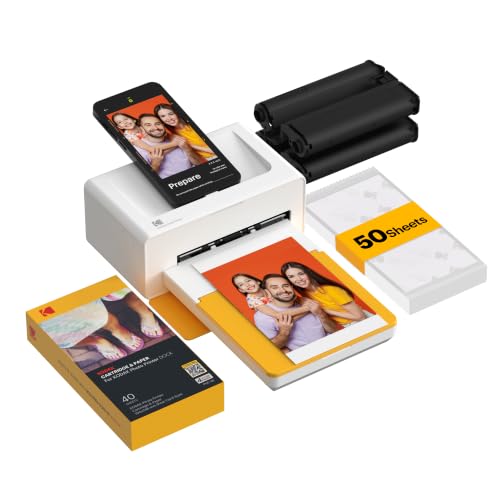
- Print technology: 4PASS dye-sublimation with lamination layer
- Print size: 4×6 inches
- Connectivity: Bluetooth plus phone docking with charging
- Starter supplies: Paper and cartridge included in the box (bundle dependent)

- Print technology: Thermal dye-sublimation with laminated finish
- Print size: 4×6 inches
- Resolution: 300 x 300 dpi
- Connectivity: Built-in Wi-Fi hotspot, up to 5 simultaneous devices; USB

- Print technology: ZINK Zero Ink (heat-activated dye in the paper)
- Print size: 2×3 inches, peel-and-stick backing
- Resolution: 313 x 512 dpi
- Connectivity: Bluetooth; USB-C charging
All 4 Picks at a Glance
| Product | Specs | Action |
|---|---|---|
| KODAK Dock Plus 4PASS |
| Check price on Amazon |
| Liene M100 4×6 Photo Printer |
| Check price on Amazon |
| Canon IVY 2 Mini Photo Printer |
| Check price on Amazon |
 Epson PictureMate PM-400 |
| Check price on Amazon |
Key takeaways
- Compare the best budget photo printers for home use, from 4x6 dye-sub models to a pocket ZINK printer, with honest notes on running costs and fading.
Disclosure: As an Amazon Associate, I earn from qualifying purchases.
Most photos now live and die on a phone screen. A dedicated photo printer changes that for very little money: school projects, fridge prints, scrapbooks, wallet photos for grandparents, and last-minute gifts all become things you can make at home in about a minute per print. The budget end of this market is genuinely good, because the core technologies — dye-sublimation and ZINK — are mature and the hardware is simple.
The catch is that the printer itself is the cheap part. What you really buy into is a paper-and-ink system, and the cost of each print, the sizes you are locked into, and how long prints resist fading matter far more than the sticker on the box. This guide compares five budget photo printers across three technologies — three dye-sublimation models, one pocket ZINK printer, and one compact inkjet — so you can pick the system that fits how you actually print, instead of just the cheapest machine on the shelf.
How to Choose a Budget Photo Printer
Start with the honest math: the cost per print is the real price. Every printer below uses proprietary paper and ink sold as a set, and a cheap printer with expensive refills costs more within a year than a pricier printer with cheaper refills. Before buying, price the refill packs for any model you shortlist and divide by the sheet count. Dye-sublimation sets tend to be predictable because each cartridge is matched to a fixed number of sheets — you never run out of one color early. ZINK paper has the ink built into the sheet itself, which is convenient but usually the most expensive way to print per photo, especially since the prints are small. Inkjet is the flexible middle ground: standard photo paper and a single cartridge, with costs that vary depending on coverage.
Next, understand the technology. Dye-sublimation printers lay down yellow, magenta, and cyan dye in passes, then seal the print under a clear protective layer. That coating makes prints water-resistant, fingerprint-resistant, and noticeably more fade-resistant than typical inkjet output — dye-sub prints are the ones to choose for albums and keepsakes you want to last. Inkjet printers spray liquid ink onto coated paper; the best compact models produce excellent detail and larger sizes, but prints are more vulnerable to light and humidity over time unless you use quality paper and store them away from windows. ZINK (Zero Ink) paper contains dye crystals that heat activates. There is nothing to refill and the printers are tiny, but colors are less accurate and prints are the most prone to shifting and fading — treat ZINK as fun, disposable printing, not archiving.
Then be realistic about size. Four of the five printers here top out at 4×6 inches, and the pocket model prints only 2×3 stickers. That is fine for snapshots, but if you want 5×7 enlargements for frames, only the inkjet pick below can do it. Dedicated photo printers also print nothing else — no documents, no labels, no homework. If you need an all-rounder, a general inkjet printer is a different purchase.
Finally, check how the printer connects. Models with their own Wi-Fi hotspot work anywhere without a router and let several phones connect at once, which is great for parties. Bluetooth-only models pair with one phone at a time. App quality varies more than hardware quality in this category: cropping tools, borders, collage layouts, and how often the app nags you to register an account all differ, and a clunky app is the most common reason these printers end up in a drawer.
Canon SELPHY CP1500
The SELPHY CP1500 is the benchmark budget dye-sublimation printer, and the one to beat for plain 4×6 snapshots. It prints borderless postcard-size photos with smooth, lab-like color, and the dye-sub overcoat means finished prints shrug off splashes and fingerprints. It connects over Wi-Fi to phones and computers, accepts SD cards and USB drives, and has a color screen for picking shots without a phone. An optional rechargeable battery (sold separately) turns it into a genuinely portable party printer.
Specs
- Print technology: Dye-sublimation with protective overcoat layer
- Print size: 4×6 inches (smaller sizes with optional cassettes)
- Resolution: 300 x 300 dpi
- Speed: About 41 seconds per 4×6 print
- Connectivity: Wi-Fi, USB, SD card slot; optional battery pack
Pros
- Excellent, fade-resistant prints with a durable finish
- Predictable running costs from matched ink and paper sets
- Screen and card slot let you print without a phone
- Compact body with an optional battery for portability
Cons
- 4×6 is the maximum size, full stop
- Battery and extra paper cassettes cost extra
- Print speed is leisurely when you have a stack to get through
Who it suits: Families who want the most reliable, longest-lasting 4×6 prints at home and value predictable refill costs over raw speed.
KODAK Dock Plus 4PASS
- Print technology: 4PASS dye-sublimation with lamination layer
- Print size: 4×6 inches
- Connectivity: Bluetooth plus phone docking with charging
- Starter supplies: Paper and cartridge included in the box (bundle dependent)
The Kodak Dock Plus combines a phone dock with Bluetooth printing, so your phone charges on top of the printer while you send photos wirelessly. Its 4PASS dye-sublimation process lays down color in layers and finishes with a laminating pass, producing glossy 4×6 prints that resist water and fingerprints. Bundles that include a starter stack of paper make it one of the easiest models to give as a gift, because the first prints cost nothing extra to make.
Pros
Cons
Who it suits: Gift buyers and casual users who want the simplest possible setup — set the phone down, pick a photo, get a print.
Liene M100 4×6 Photo Printer
- Print technology: Thermal dye-sublimation with laminated finish
- Print size: 4×6 inches
- Resolution: 300 x 300 dpi
- Connectivity: Built-in Wi-Fi hotspot, up to 5 simultaneous devices; USB
The Liene M100 takes a different approach to connectivity: instead of joining your home network, it broadcasts its own Wi-Fi hotspot, so phones connect directly to the printer anywhere — a kitchen counter, a dorm room, or a party venue with no router in sight. Up to five devices can connect at once, which makes it the natural choice for events. Output is dye-sublimation at 300 x 300 dpi with the same protective finish as its rivals, and the magnetic paper cassette clips neatly to the body for storage.
Pros
Cons
Who it suits: Households and party hosts where several people print from their own phones, and anyone whose home Wi-Fi setup is unreliable.
Canon IVY 2 Mini Photo Printer
- Print technology: ZINK Zero Ink (heat-activated dye in the paper)
- Print size: 2×3 inches, peel-and-stick backing
- Resolution: 313 x 512 dpi
- Connectivity: Bluetooth; USB-C charging
The IVY 2 is the pocket option: a rechargeable printer barely bigger than a phone that produces 2×3-inch prints on sticky-backed ZINK paper. There is no ink anywhere — the color lives in the paper — so there is nothing to leak and nothing to replace except paper packs. Prints peel and stick for journals, lockers, laptops, and scrapbook pages. Just go in with the right expectations: these are small, casual prints, and ZINK colors run softer and less accurate than dye-sub or inkjet output.
Pros
Cons
Who it suits: Teens, journalers, and scrapbookers who want instant sticker prints anywhere and care more about fun and portability than archival quality.
Epson PictureMate PM-400
- Print technology: Inkjet (MicroPiezo print head)
- Print sizes: 4×6 and 5×7 inches, borderless
- Resolution: Up to 5760 x 1440 dpi
- Speed: About 36 seconds per borderless 4×6 print
The PictureMate PM-400 is the inkjet in this lineup, and it earns its place by breaking the 4×6 ceiling: it prints borderless photos at both 4×6 and 5×7 inches, which matters if any of your prints go into frames. It uses a single multi-ink cartridge paired with standard Epson photo paper, sold together in print packs, and it has a tilting color screen plus memory card slots for printing straight from a camera card. It is the least portable pick here, but the most capable as a small home photo lab.
Pros
Cons
Who it suits: Hobbyists and scrapbookers who want frameable 5×7 prints at home and are happy to trade portability for size and detail.
Comparison Table
| Printer | Technology | Max print size | Connectivity | Best for |
|---|---|---|---|---|
| Canon SELPHY CP1500 | Dye-sublimation | 4×6 in | Wi-Fi, USB, SD card | Long-lasting everyday 4×6 prints |
| KODAK Dock Plus 4PASS | Dye-sublimation | 4×6 in | Bluetooth, phone dock | Easiest setup and gifts |
| Liene M100 | Dye-sublimation | 4×6 in | Own Wi-Fi hotspot, USB | Groups printing from many phones |
| Canon IVY 2 | ZINK | 2×3 in | Bluetooth | Pocket sticker prints |
| Epson PictureMate PM-400 | Inkjet | 5×7 in | Wi-Fi, USB, SD card | Larger prints and fine detail |
FAQ
Which technology makes prints that last the longest?
Dye-sublimation, thanks to the clear protective layer sealed over the color. Prints from the SELPHY, Kodak, and Liene resist water, fingerprints, and fading far better than inkjet or ZINK output, which makes dye-sub the right choice for albums and keepsakes.
What is the cheapest way to print photos at home?
Judge by the refill pack, not the printer. Divide the pack cost by its sheet count for each model you are considering. Matched dye-sub sets are usually the most predictable, bundled inkjet print packs are close behind, and small ZINK sheets are typically the most expensive per print.
Can these printers print documents as well as photos?
No. Dedicated photo printers only handle their own photo paper sizes, and most cannot feed plain paper at all. If you also need documents, homework, or shipping labels, you need a general-purpose printer alongside or instead.
Why do my prints look different from my phone screen?
Phone screens are backlit and brighter than any print, so photos often come out darker on paper. Brighten the image slightly in the app before printing, and remember that ZINK printers shift colors the most, while dye-sub and inkjet stay closer to what you see.
Conclusion
For most people, the Canon SELPHY CP1500 is the budget photo printer to buy: durable dye-sub prints, predictable refill costs, and the flexibility of Wi-Fi, card slots, and an optional battery. The Kodak Dock Plus is the friendlier gift, the Liene M100 is the one to share at gatherings, the Canon IVY 2 owns the pocket sticker niche, and the Epson PictureMate PM-400 is the pick when 4×6 is simply not big enough. Whichever you choose, price the refill packs first — in this category, the second hundred prints cost more than the printer, and that is where the smart money is saved.

Write Your Review
No reviews yet. Be the first to share your experience!