
Key takeaways
- Compare the best budget webcams for streaming, from 1080p and 60fps picks to a 2K option, with autofocus, stereo mics, and privacy covers compared.
- Top Pick: NexiGo N60 1080P Webcam
- Runner-up: NexiGo N660P (Gen 2) 1080P 60FPS Webcam
- Also consider: Logitech C920s HD Pro Webcam
The best budget webcam for streaming is the Logitech C920s: it records clean 1080p video, focuses automatically, and corrects dim room lighting without any setup work. Streamers who want smoother motion should look at the NexiGo N660P Gen 2, which streams 1080p at 60 frames per second, and anyone who wants extra sharpness for facecam close-ups can step up to the 2K Anker PowerConf C200. Every pick below plugs in over USB, works with OBS and the major streaming platforms, and includes a built-in microphone, so a basic streaming setup needs nothing else to get started.
As an Amazon Associate, we earn from qualifying purchases.
Quick Answer
For most new streamers, the Logitech C920s is the safest budget pick: it records 1080p at 30 frames per second, focuses automatically, and corrects dim lighting. If smooth motion matters more, the NexiGo N660P Gen 2 streams 1080p at 60 frames per second, while the Anker PowerConf C200 adds a sharper 2K sensor for close-up shots.
Table of Contents
- NexiGo N60 1080P Webcam
- NexiGo N660P (Gen 2) 1080P 60FPS Webcam
- Logitech C920s HD Pro Webcam
- Logitech C922x Pro Stream Webcam
- Anker PowerConf C200 2K Webcam
- How to Choose
- Who Should Skip
- FAQ
- Final Verdict
NexiGo N60 1080P Webcam

The NexiGo N60 is the entry point of this group, a budget-tier camera built around a 2MP CMOS sensor that records Full HD 1080p video at 30 frames per second. Its wide 110-degree field of view fits a streamer plus plenty of room background, which suits casual streams, group calls, and anyone broadcasting from a small desk who wants the scene to feel open rather than cropped tight. The fixed-focus lens keeps everything at typical desk distances in acceptable focus, and the built-in noise-canceling microphone reduces background sounds such as fans and keyboard clicks. NexiGo also provides software control for adjusting the image and applying digital zoom, and a privacy cover is included in the box.
Specs
- Resolution: Full HD 1080p (1920 x 1080) at 30fps
- Sensor: 2MP CMOS, 1/2.7 inch
- Lens: 3.6mm fixed-focus glass lens
- Field of view: 110 degrees
- Microphone: built-in noise-canceling microphone
- Connection: USB 2.0, plug and play with no drivers
- Extras: privacy cover, software control, digital zoom
- Compatibility: Windows, macOS, Linux, Chrome OS, Android
NexiGo N660P (Gen 2) 1080P 60FPS Webcam

Frame rate is what separates the N660P Gen 2 from most budget cameras. It streams 1080p at 60 frames per second, so hand gestures, fast head movement, and reaction shots look noticeably smoother on Twitch or YouTube than they do at 30 frames per second. Autofocus replaces the fixed lens of the cheaper N60, keeping the picture sharp as you lean toward or away from the screen, and dual built-in microphones pick up voice from a natural seating position. Software control lets you fine-tune the image and zoom digitally, and a clip-on privacy cover is included. For gameplay streamers who show a facecam window over fast-moving games, this is the most streaming-focused design in the budget tier.
Specs
- Resolution: 1080p (1920 x 1080) at 60fps
- Focus: autofocus
- Microphone: dual built-in microphones
- Connection: USB, plug and play
- Extras: privacy cover, software control, digital zoom
- Compatibility: Windows and macOS; works with OBS, Zoom, Skype, FaceTime, Teams, and Twitch
- Model number: N660P
Logitech C920s HD Pro Webcam

The C920s has been the default recommendation in this category for years, and the published specification sheet explains why. It records 1080p at 30 frames per second through a full HD glass lens, with autofocus and a 78-degree diagonal field of view that frames one person plus a modest amount of background. Dual stereo microphones capture voice from both sides of the camera, and Logitech’s HD light correction adjusts exposure automatically when a room is dim or backlit. An attachable privacy shutter covers the lens between streams, and the universal clip fits laptop screens, external monitors, or a tripod. Streamers who want a camera that simply works with every platform and streaming app will find the fewest surprises here.
Specs
- Resolution: 1080p at 30fps; 720p at 30fps
- Field of view: 78 degrees diagonal
- Focus: autofocus
- Lens: full HD glass lens
- Microphone: dual stereo microphones
- Light correction: HD light correction
- Extras: attachable privacy shutter, tripod-ready universal clip
- Connection: USB-A
- Model number: 960-001257
Logitech C922x Pro Stream Webcam

The C922x is Logitech’s streaming-specific step up from the C920 line. It offers two useful modes: 1080p at 30 frames per second for maximum detail, or 720p at 60 frames per second for smoother motion during fast gameplay. The 78-degree field of view and autofocus match the C920s, as do the dual stereo microphones and HD light correction, but the C922x adds a tabletop tripod in the box, which makes it easier to angle the camera from a desk instead of the top of a monitor. It sits at the top of the budget tier and edges into mid-range territory, and it suits streamers who split time between talking segments, where 1080p looks best, and action games, where the 60fps mode looks better.
Specs
- Resolution: 1080p at 30fps or 720p at 60fps
- Field of view: 78 degrees
- Focus: autofocus
- Microphone: dual stereo microphones
- Light correction: HD light correction
- Extras: tabletop tripod included
- Connection: USB
- Model number: 960-001176
Anker PowerConf C200 2K Webcam
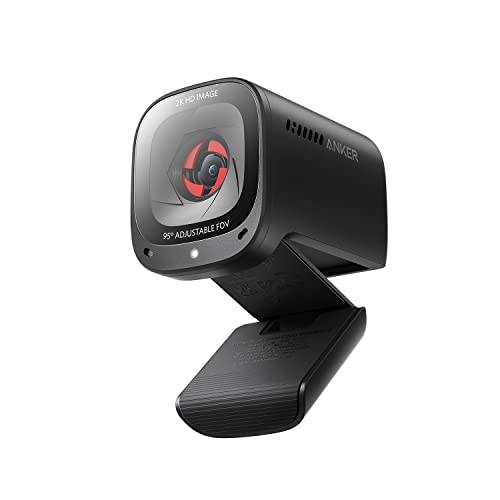
The PowerConf C200 is the sharpest camera in this roundup. Its sensor captures 2K video at 30 frames per second, which gives streamers extra resolution to crop into a facecam window or record clips without the softness that 1080p cropping produces. The field of view adjusts between 65 degrees for a tight solo frame, 78 degrees for a standard shot, and 95 degrees when two people share the frame. Dual stereo microphones use AI noise canceling to keep voice clear, low-light correction brightens dim rooms, and a built-in privacy cover flips over the lens when the camera is off. It connects over USB-C, so newer laptops may not need an adapter. This is the mid-range pick for streamers who record as much as they broadcast live.
Specs
- Resolution: 2K at 30fps; also supports 1080p and 720p
- Field of view: adjustable 65, 78, or 95 degrees
- Focus: autofocus
- Microphone: dual stereo microphones with AI noise canceling
- Light correction: low-light correction
- Extras: built-in privacy cover
- Connection: USB-C
- Model number: A3369
How to Choose
Start with frame rate, because it changes how a stream feels more than raw resolution does. A 30fps camera is fine for talking streams, podcasts, and video calls, while 60fps suits gameplay and fast movement. The NexiGo N660P Gen 2 is the only pick here that streams 1080p at 60fps; the C922x reaches 60fps only at 720p.
Next, match the field of view to your setup. A wide 110-degree lens like the NexiGo N60 shows a whole room, which can look messy on camera. The 78-degree framing of the Logitech models is the standard streamer shot, and the C200 lets you switch widths in software instead of moving the camera.
Focus type matters if you move around. Autofocus models keep you sharp when you lean in to read chat or hold products up to the lens. Fixed-focus cameras cost less and work well when you sit at a steady distance.
Check the microphone plan. Every camera here has built-in mics that are adequate for starting out, but a dedicated USB microphone will sound better than any of them, so treat the built-in mic as a starter or backup. Finally, confirm the connection: most of these cameras use USB-A, while the C200 uses USB-C, and all five work with OBS, Streamlabs, Zoom, and Teams without extra drivers.
Who Should Skip
Skip this entire category if you already own a recent smartphone or a mirrorless camera with clean HDMI output, since both can outperform budget webcams when paired with capture software. Skip the fixed-focus NexiGo N60 if you move around a lot on camera or stream in a dim room, because it has no light correction feature listed. Skip the 2K Anker C200 if you only stream to platforms that send outgoing video at 1080p or lower and never record clips, since the extra resolution will rarely reach your audience. And skip every model here if your streams rely on heavy background blur or replacement effects, because that processing depends on your computer and software, not on the camera.
FAQ
Is 1080p enough for streaming, or do I need 2K or 4K?
For live streaming, 1080p is enough for nearly everyone, because major platforms compress outgoing video and most viewers watch in a small player window. A 2K camera such as the Anker PowerConf C200 helps mainly when you crop into the frame for facecam layouts or record videos for later editing.
Does 60fps make a real difference on a webcam?
Yes, for movement. At 60 frames per second, gestures, head turns, and reactions look smoother and blend better with 60fps gameplay footage. For seated talking streams and meetings, 30fps looks fine and uses less bandwidth and processing power.
Can I use one of these webcams with OBS and Streamlabs?
Yes. All five cameras in this guide are plug-and-play USB devices that appear as standard video sources in OBS Studio, Streamlabs, XSplit, and conferencing apps on Windows and macOS, with no drivers to install.
Do I still need a separate microphone for streaming?
Not to get started. Each pick has a built-in microphone that handles voice chat and casual streams. A dedicated USB microphone is the most common first upgrade for streamers, because it improves audio more than a camera upgrade improves video.
Final Verdict
For most people, the Logitech C920s is the budget webcam to buy: dependable 1080p video, autofocus, stereo microphones, and automatic light correction in a camera that works everywhere. Choose the NexiGo N660P Gen 2 if 1080p at 60fps matters for gameplay, the C922x if you want both 1080p detail and a 720p 60fps mode with a tripod included, and the Anker PowerConf C200 if the sharper 2K sensor and switchable field of view fit a recording workflow. The NexiGo N60 remains the lowest-tier option for casual streams and calls where fixed focus and a wide angle are acceptable trade-offs.






Write Your Review
No reviews yet. Be the first to share your experience!