
The best GTX 1660 Ti laptops in 2026 are usually used Lenovo Legion Y540, Acer Predator Helios 300, and HP Omen 15 models, with the right choice depending more on screen quality, cooling, RAM, storage, and condition than on the GPU name alone.
Our top picks
 ASUS ROG Strix G Gaming Laptop
- NVIDIA GeForce GTX 1660 Ti 6GB GDDR6 (Base:…
- Intel Core i5-9300H Quad-core Processor
- 120Hz 15.6” 1920x1080 IPS Type Display
 ROG Zephyrus G15
- NVIDIA GeForce GTX 1660 Ti 6GB GDDR6 with…
- AMD Ryzen 7 4800HS processor (up to 4.2GHz)
- 15.6” 144Hz IPS-Type Full HD (1920x1080) display
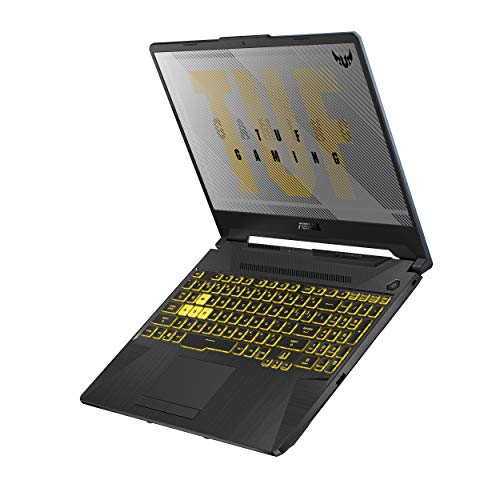 ASUS TUF Gaming A15 Gaming Laptop
- NVIDIA GeForce GTX 1660 Ti 6GB GDDR6 with…
- AMD Ryzen 7 4800H Processor (up to 4.2…
- 15.6" 144Hz Full HD IPS-Type Display
| Product | Key specs | |
|---|---|---|
| ASUS ROG Strix G Gaming Laptop | NVIDIA GeForce GTX 1660 Ti 6GB GDDR6 (Base:… Intel Core i5-9300H Quad-core Processor 120Hz 15.6” 1920x1080 IPS Type Display | Check price |
| ROG Zephyrus G15 | NVIDIA GeForce GTX 1660 Ti 6GB GDDR6 with… AMD Ryzen 7 4800HS processor (up to 4.2GHz) 15.6” 144Hz IPS-Type Full HD (1920x1080) display | Check price |
| ASUS TUF Gaming A15 Gaming Laptop | NVIDIA GeForce GTX 1660 Ti 6GB GDDR6 with… AMD Ryzen 7 4800H Processor (up to 4.2… 15.6" 144Hz Full HD IPS-Type Display | Check price |
 Razer Blade 15 Gaming Laptop i7-10750H NVIDIA Razer Blade 15 Gaming Laptop i7-10750H NVIDIA | More Power Supercharger: The NVIDIA GeForce GTX 1660 Ti graphics… More Frames: Incredible performance paired with the fast… | Check price |
As an Amazon Associate we earn from qualifying purchases at no extra cost to you.
Quick picks by buyer situation
| Buyer situation | Best-fit type or model family | Why it fits | What to check first |
|---|---|---|---|
| Lowest sensible used price | ASUS TUF Gaming FX505 with GTX 1660 Ti | Often affordable and upgradeable | Screen brightness, hinge condition, and cooling noise |
| Best overall balance | Lenovo Legion Y540 | Good keyboard, practical cooling, and common replacement parts | Battery health and whether both RAM slots are populated |
| Higher sustained gaming performance | Acer Predator Helios 300 PH315-52 | Strong cooling and usually a high-refresh display | Fan noise, temperatures, and bulky 230 W charger |
| Better-looking work-and-gaming machine | HP Omen 15-dc series | Less aggressive design and generally good screen options | Exact panel, hinge wear, and thermal paste condition |
| Large-screen preference | Dell G5 5590 | Solid 15.6-inch chassis with useful port selection | Weight, display variant, and battery degradation |
What the GTX 1660 Ti can still do
The mobile GTX 1660 Ti remains a capable 1080p gaming GPU, but it is not equivalent to a modern RTX laptop GPU. It has 6 GB of GDDR6 VRAM and supports hardware acceleration for many creative applications, but it lacks dedicated ray-tracing and DLSS hardware. At 1080p, many games from the late 2010s and early 2020s run well at high settings, while newer demanding releases may require medium settings, reduced textures, or an upscaling option.
Performance varies substantially with the laptop’s power limit and cooling. A well-cooled 80 W to 90 W configuration can outperform a thinner, lower-power version. The processor also matters: a Core i5-9300H or Ryzen 5 4600H is adequate for most gaming, while a Core i7-9750H or Ryzen 7 4800H is more useful for video editing, compiling, and multitasking.
Screen quality is the biggest hidden difference
Many GTX 1660 Ti laptops were sold with several panel options. A 15.6-inch 1920-by-1080 screen may have a 60 Hz, 120 Hz, 144 Hz, or 240 Hz refresh rate, but refresh rate alone does not indicate image quality. Some inexpensive 120 Hz panels have narrow viewing angles, muted colors, and brightness around 250 nits. A better 144 Hz IPS panel is usually a much more satisfying choice for both games and everyday work.
For gaming, aim for an IPS display with at least 120 Hz and a response time that does not produce obvious ghosting. For photo work or frequent outdoor use, look for approximately 300 nits or more and near-complete sRGB coverage. Many older gaming panels cover only about 60% to 65% of sRGB, which can make colors look dull. Confirm the exact panel through the laptop’s service tag, model suffix, or a photograph of the Windows display settings; a listing that says only “Full HD” is not enough.
Head-to-head: the leading used-market choices
Lenovo Legion Y540
The Legion Y540 is the safest all-round recommendation when condition and price are comparable. Its keyboard is comfortable, the chassis provides practical ventilation, and many versions include two RAM slots and space for both an M.2 SSD and a 2.5-inch drive. The 15.6-inch model typically weighs about 2.3 kg before its charger.
Its main weakness is inconsistency between configurations. Some units have a disappointing 60 Hz display, while others have a much better 144 Hz panel. Check for flex around the display hinge, worn keyboard keycaps, and a battery that no longer holds a useful charge.
Acer Predator Helios 300 PH315-52
The Helios 300 is a strong pick for someone who plays demanding games for long sessions. Its larger cooling system can sustain performance better than many thinner competitors, and common configurations include a 144 Hz 1080p IPS display, 16 GB of RAM, and a 512 GB SSD. It is heavier at roughly 2.5 kg and can become loud under load.
Inspect the fans carefully. A rattling fan, sudden temperature spikes, or a laptop that throttles after several minutes may turn a good bargain into a repair project. The performance mode may also produce considerable noise, so this model is less attractive for quiet offices or shared rooms.
HP Omen 15-dc series
The Omen 15 offers a more restrained design than many gaming laptops and can be a good hybrid machine for study or office use. Versions with a 144 Hz IPS panel are preferable, and the chassis generally provides accessible storage and memory upgrades. Weight is commonly around 2.4 kg.
Do not assume every Omen 15 has the same display or cooling arrangement. Some configurations use slower panels, and heavily used units may have worn hinges or a battery that has lost much of its original capacity. It is a good choice when appearance and everyday usability matter as much as peak gaming performance.
ASUS TUF Gaming FX505
The FX505 can offer the lowest entry price among recognizable GTX 1660 Ti laptops. It is relatively easy to find, and many units support memory and storage upgrades. However, build quality and screen quality are more variable than on the Legion or Helios.
Choose one with a confirmed IPS panel, intact hinge covers, and no keyboard-deck cracking. Its cooling system can cope with the GPU, but dust buildup and aging thermal compound can lead to high temperatures. It is best for buyers who are comfortable checking or maintaining an older machine.
Dell G5 5590 and MSI GL65 9SD
The Dell G5 5590 is sturdy and commonly has a useful selection of ports, but it is heavy, with some configurations approaching 2.7 kg before the power adapter. The MSI GL65 9SD is another performance-focused option, often with a 144 Hz screen and accessible internals. Both can be worthwhile, but model-specific display and battery differences are significant, so they should be purchased only after verifying the exact configuration.
Specifications worth targeting in 2026
| Component | Acceptable | Preferred | Why it matters |
|---|---|---|---|
| Memory | 16 GB DDR4 | 16 GB in dual-channel, or 32 GB for creative work | Dual-channel memory improves minimum frame rates and multitasking |
| Storage | 512 GB NVMe SSD | 1 TB NVMe SSD, with a second drive bay if available | Modern games can consume 80 GB to more than 150 GB each |
| Display | 1080p IPS at 120 Hz or higher | 144 Hz IPS, 300 nits or more, strong sRGB coverage | Improves motion clarity and general image quality |
| CPU | Core i5-9300H or Ryzen 5 4600H | Core i7-9750H or Ryzen 7 4800H | Helps with frame-time consistency and productivity workloads |
| Weight | Up to about 2.7 kg | About 2.2 kg to 2.5 kg | Important if the laptop travels regularly |
Used-market value and a simple ownership calculation
In 2026, GTX 1660 Ti laptops commonly appear in the general used market around $450 to $750, depending on region, condition, display, memory, storage, and seller warranty. Units below that range may be excellent bargains, but often need a battery, SSD, extra RAM, fan, or thermal service. A clean laptop with a 144 Hz screen, 16 GB of RAM, and a 512 GB or 1 TB SSD can justify the upper part of the range.
Consider two machines: one priced at $475 with 8 GB of RAM and a 256 GB SSD, and another at $600 with 16 GB and a 1 TB SSD. If the first needs $45 of additional RAM and $65 of storage, its effective cost is $585 before installation. The $600 machine may therefore be the better value, even though its advertised price is higher. Compare the finished configuration rather than the initial number.
Cooling, maintenance, and durability realities
The parts most likely to show age are the battery, fans, hinges, keyboard, and storage drive. Dust restricts airflow, while dried thermal compound can raise temperatures and reduce sustained clock speeds. A practical maintenance routine is:
- Check battery health in Windows and compare its full-charge capacity with the original design capacity.
- Run a game or graphics benchmark for 15 to 20 minutes and watch for crashes, severe throttling, or abnormal fan sounds.
- Inspect the vents and clean them with the laptop powered off; do not allow compressed air to spin fans freely at extreme speed.
- Replace thermal compound only if temperatures are clearly excessive and you are comfortable opening the chassis.
- Keep at least 15% of the SSD empty to reduce slowdowns and leave room for updates.
A common mistake is buying a laptop with 8 GB of single-channel memory because the GPU appears attractive. Another is assuming a 144 Hz label guarantees a bright, color-accurate screen. Ask for photographs, confirm the exact panel and ports, and test every USB port, the keyboard, speakers, webcam, Wi-Fi, charging connector, and display hinge before the return period ends.
Final verdict
For most shoppers, the Lenovo Legion Y540 with a verified 144 Hz IPS screen, 16 GB of dual-channel RAM, and at least a 512 GB SSD is the best GTX 1660 Ti laptop balance. Choose the Acer Predator Helios 300 if long gaming sessions and cooling matter more than portability, the HP Omen 15 if you want a quieter-looking multipurpose machine, and the ASUS TUF FX505 only when its lower price compensates for its more variable screen and build quality. In every case, prioritize condition and the exact display configuration over a small difference in processor model.









Write Your Review
No reviews yet. Be the first to share your experience!