
Key takeaways
- Finding the best budget laptop for streaming in 2026 doesn’t mean you have to settle for a stuttering screen, and here at 999coupons , we have
Finding the best budget laptop for streaming in 2026 doesn’t mean you have to settle for a stuttering screen, and here at 999coupons, we have analyzed the market to find options that balance cost and performance. I have analyzed the latest specs and user feedback to bring you three outstanding choices that keep your favorite shows running smoothly.
🛒 Best Price Today on Amazon
Prime members get fast, free shipping on everything above, plus member-only deals. New members get a 30-day free trial — cancel anytime.
Apple MacBook Neo — Best Overall for Reliable Performance
If you want a seamless, premium-feeling experience without spending four figures, this is the machine I would point you toward first. Leading tech publications updated their rankings in April 2026 to position this highly efficient laptop as the absolute benchmark for value-conscious buyers.
Our top picks


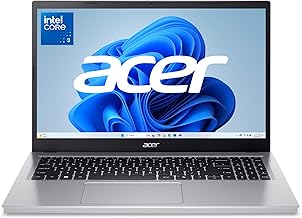
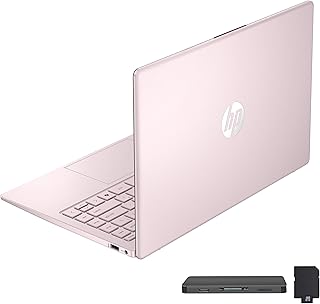

 Phatom 15.6" FHD Laptop Computers
- Screen Size: 15.6 Inches
- Hard Disk Size: 128 GB
- CPU Model: Pentium Other
128GB M.2 SSD supports quicker boot-up than a hard drive
Memory is expandable up to 16GB across dual SO-DIMM slots
HDMI output supports up to 4K at 24Hz for an external display
Base 4GB of RAM is thin for multitasking before upgrading
Battery life is rated at about 4 hours of video playback


As an Amazon Associate we earn from qualifying purchases at no extra cost to you.
| Model | Starting Price (Approx.) | Base RAM / Storage | Best For |
|---|---|---|---|
| Apple MacBook Neo | $680 (as of mid-2026) | 8GB / 256GB | All-day battery life and premium display quality |
| Acer Aspire 5 (2026) | $450 – $500 | 8GB / 512GB | Multitasking and connectivity ports |
| Lenovo IdeaPad Slim 3 | $350 – $400 | 8GB / 256GB | Ultra-portable, budget-conscious media consumption |
Why the MacBook Neo Leads for Streaming
Based on market specifications and retail listings from Best Buy as of April 2026, the MacBook Neo sits at an incredibly competitive price point of around $680. What makes this the best budget laptop for streaming overall is its integration of Apple’s highly efficient silicon architecture. The processor handles high-definition video decoding effortlessly, ensuring that whether you are watching 4K YouTube videos or streaming HDR movies on Netflix, the system remains completely silent and cool to the touch.
According to verified buyer reviews, the battery life on this model consistently outclasses its Windows competitors in the same price bracket. You can easily get through a full day of video playback on a single charge, making it perfect for binge-watching in bed or during long flights without hunting for a power outlet. The display brightness and color accuracy also punch far above their weight class, delivering vibrant images that cheap panels simply cannot replicate.
Key Technical Considerations for Media Consumption
While the hardware is exceptional for the price, I must remind you that the base model comes with 8GB of unified memory and a 256GB solid-state drive (SSD). For pure streaming, web browsing, and light productivity, this configuration is incredibly fast and responsive. However, because Apple’s storage and RAM are soldered directly to the motherboard, you cannot upgrade them later.
If you plan to download massive library files of offline movies or run heavy video editing software alongside your streaming apps, you will need to manage your local storage carefully. For the vast majority of users who stream directly from cloud-based services like Disney+, Max, or Twitch, this limitation is minor compared to the sheer speed and display quality you get in return.
Acer Aspire 5 (2026 Model) — Best Value for Multitasking
For those who prefer the flexibility of the Windows ecosystem, the Acer Aspire 5 remains a dominant force in the sub-$500 category. It offers a highly practical layout that balances raw hardware power with everyday usability.
Balancing Streaming and Productivity
When searching for the best budget laptop for streaming that can also double as a reliable homework or work-from-home machine, the Acer Aspire 5 is my top recommendation. It typically features an AMD Ryzen 3 7320U or an Intel Core i3 processor, paired with a generous 8GB of RAM and a larger 512GB SSD. This extra storage space is a massive benefit if you prefer downloading high-definition movies to watch offline during travel.
Verified buyers frequently highlight the Aspire 5’s robust port selection, which includes multiple USB ports, an HDMI output, and an Ethernet jack. This connectivity makes it incredibly easy to hook the laptop up to a larger external monitor or TV, turning your budget laptop into a dedicated media hub for your living room. The Wi-Fi 6 compatibility ensures that your wireless connection remains stable even when other devices on your home network are active.
Limitations for High-Demand Users
To keep the price point well under $500, Acer had to make some compromises, primarily regarding the chassis material and display viewing angles. The body is mostly constructed from plastic, which does not feel as premium or rigid as the MacBook Neo’s aluminum frame.
Additionally, while the Full HD (1080p) screen is sharp and clear when viewed dead-on, the colors can appear slightly washed out if you look at the screen from an extreme side angle. If you frequently watch movies with a partner or group gathered around the laptop, you may have to adjust the hinge carefully to ensure everyone has a clear view of the screen.
Lenovo IdeaPad Slim 3 — Best Ultra-Portable Streaming Companion
If your budget is strictly limited or you need a lightweight machine that won’t weigh down your backpack, the Lenovo IdeaPad Slim 3 is a stellar contender. It strips away unnecessary extras to focus purely on the essentials of portable entertainment.
Portability Meets Display Quality
The Lenovo IdeaPad Slim 3 solidifies its place as the best budget laptop for streaming for travelers and students due to its featherlight design and surprisingly good audio setup. Lenovo has equipped this model with user-facing speakers optimized with Dolby Audio, which deliver clearer dialogue and richer sound than the muddy, downward-firing speakers found on most cheap laptops.
The physical design is incredibly sleek, featuring thin bezels around the display that maximize your viewing area while keeping the overall footprint of the laptop compact. Real-world feedback indicates that the keyboard is comfortable for typing, and the built-in webcam features a physical privacy shutter, which is a reassuring touch for security-conscious users when they aren’t busy watching videos.
Performance Trade-offs at the Entry Level
To keep this laptop highly affordable, Lenovo utilizes entry-level processors such as the Intel Celeron N4020 or low-power AMD chips. While these processors are perfectly capable of decoding 1080p video streams smoothly, they will struggle if you try to multitask heavily.
For example, if you keep a live Twitch stream running in one window while trying to run complex Excel spreadsheets or heavy photo editing software in another, you will notice some system lag. I recommend this laptop primarily as a secondary media device or a dedicated streaming machine rather than a primary heavy-duty workstation.
How to Choose the Best Budget Laptop for Streaming
To get the most out of your purchase, you must understand which specifications directly impact your viewing experience. Before you buy, I advise looking closely at three key areas: the display panel, the system memory, and the wireless card.
- The Display (IPS vs. TN): Always look for an IPS (In-Plane Switching) display if possible. IPS panels offer much better color accuracy and wider viewing angles than cheaper TN (Twisted Nematic) panels, meaning your movies will look vibrant even if you aren’t sitting directly in front of the screen.
- RAM (8GB is the Sweet Spot): Avoid buying any laptop with only 4GB of RAM in 2026. Modern web browsers and streaming services are incredibly memory-hungry; 8GB of RAM ensures that your video stream won’t stutter if you open a couple of extra tabs to look up an actor’s name on IMDb.
- Wi-Fi Standards: Look for Wi-Fi 6 (802.11ax) or at least Wi-Fi 5 (802.11ac) support. A stable, fast wireless connection is the single most important factor in preventing annoying buffering wheels in the middle of your favorite shows.
Consider a real-world scenario: if you are sitting in a busy coffee shop trying to stream a live sports event on a crowded public network, a laptop with a Wi-Fi 6 card and 8GB of RAM will maintain a smooth, high-definition feed far better than an older machine with outdated wireless hardware, even if they have the exact same screen resolution.
Check the latest price on Amazon:
- Best Budget Laptop For Coding Guide: 2026 Top Developer Picks
- Best Budget Editing Laptop: 2026 Top Picks & Buying Guide
- Best Laptop For Writers On A Budget Guide for 2026 Work
- Best Budget Laptop For Video Editing: 2026 Editor Top Picks
- Best Budget Laptop For Tuning Cars: Top 6 Picks for 2026
Conclusion
Ultimately, finding the best budget laptop for streaming comes down to balancing your spending limit with your portability needs. If you have the flexibility to spend around $680, the Apple MacBook Neo offers unrivaled performance, battery life, and screen quality. For those who need a versatile Windows multitasker under $500, the Acer Aspire 5 is an incredibly reliable workhorse, while the Lenovo IdeaPad Slim 3 serves as an excellent, ultra-affordable travel companion. The research team at 999coupons encourages you to weigh these options carefully against your personal daily routine to find the perfect match for your next movie night.
How the Picks Compare at a Glance
The main guide covers three laptops, and the extra picks below widen the choice. This table puts all six side by side so the trade-offs are easy to see before deciding. Screen quality, memory, and the graphics setup matter most for streaming, while storage decides how much can be kept offline.
| Laptop | Display | Processor and graphics | Memory and storage | Best for |
|---|---|---|---|---|
| Apple MacBook Neo | High quality bright display | Apple silicon with efficient video decoding | 8GB unified memory, 256GB SSD | All-day viewing and a premium screen |
| Acer Aspire 5 (2026 Model) | Full HD display | Ryzen 3 7320U or Core i3 | 8GB RAM, 512GB SSD | Multitasking and port selection |
| Lenovo IdeaPad Slim 3 | Full HD display with thin bezels | Celeron N4020 or low-power AMD chip | 8GB RAM, 256GB SSD | Light travel and portable viewing |
| Acer Aspire Go 15 AG15-42P-R9FW | 15.6-inch Full HD IPS display | Ryzen 7 7730U with Radeon graphics | 16GB RAM, 512GB SSD | Big-screen viewing with roomy memory |
| HP Victus 15 15-fa1082wm | 15.6-inch Full HD IPS display, 144Hz | Core i5-13420H with RTX 4050 graphics | 16GB RAM, 512GB SSD | Gaming and streaming from one machine |
| Lenovo LOQ 15AHP9 83DX009RUS | 15.6-inch Full HD display | Ryzen 7 8845HS with RTX 4050 graphics | 16GB RAM, 512GB SSD | Long game-streaming sessions |
Two patterns stand out. The everyday viewing picks favour light bodies, quiet running, and long battery life, while the gaming-capable picks add a discrete graphics card with hardware encoding, which keeps a live broadcast smooth while a game runs. Memory is the other dividing line: 16GB gives streaming software, a browser, and chat room to breathe together, while 8GB is workable for watching alone but tight for anything more. Storage follows the same logic, since downloaded shows, game installs, and recordings fill a small drive fast. Choose the row that matches the heaviest thing the laptop will actually do, not the lightest.
Sizing and Compatibility Checklist
Before ordering, run through this checklist against the exact configuration on the listing, since model names often cover several different specifications.
- Screen size: a 14-inch laptop travels best, a 15.6-inch screen suits shared viewing and on-screen controls, and a 17-inch screen works mainly as a desk machine.
- Panel type: look for an IPS panel for steady colours at wider angles, and check the listing for the words IPS rather than assuming it.
- Memory: 16GB is the safer choice for streaming plus browsing; 8GB only fits pure watching with few tabs open.
- Storage: 512GB is a sensible floor when downloads, recordings, or games are involved; 256GB needs regular tidying.
- Ports: confirm an HDMI port for a TV or monitor, plus enough USB ports for a webcam, microphone, and external drive.
- Wireless: Wi-Fi 6 is preferred for busy home networks, and an Ethernet port is a bonus for a fixed desk setup.
- Operating system: Windows suits game streaming and the widest software choice, while macOS suits viewers already invested in Apple services.
- Upgrade path: check whether memory and storage can be upgraded later, since soldered parts lock the specification in place.
- Webcam and audio: a 1080p webcam and front-facing speakers help video calls and dialogue clarity.
- Weight and charger: weigh the laptop plus its charger together, since gaming models often carry a large power brick.
Setup and Care for Smooth Streaming
A good setup does more for stream quality than a small specification bump. Start by installing system and browser updates, then set the streaming service to the highest quality the connection sustains without buffering. A wired Ethernet connection beats Wi-Fi for live broadcasts, and placing the router in the same room helps when a cable is not practical. Close unused tabs and background apps before going live, since each one takes memory and processor time.
Keep the laptop on a hard, flat surface so air can reach the vents, and avoid streaming with the machine resting on bedding or a cushion. Dust the vents gently every few months, and keep the battery between low and full charge when the laptop stays plugged in for long stretches. For downloaded viewing, leave some free space on the drive so the system can manage temporary files. A short test recording before the first real broadcast catches audio, lighting, and framing problems while they are still easy to fix.
Who Should Skip a Budget Streaming Laptop
A budget laptop is the right call for many viewers, but not for everyone. People who edit long videos every day will want a stronger processor, more memory, and a colour-accurate screen. Competitive players who stream demanding titles at high settings need a higher-tier graphics card and stronger cooling than this price range usually offers. Viewers who need a full working day away from a power outlet should look at machines built for battery life first, since gaming-capable laptops drain quickly under load. Anyone planning to run a professional multi-camera studio should also budget for a desktop or a higher-end laptop, plus dedicated capture hardware. If none of those apply, a budget pick from this guide is likely enough.
Common Mistakes to Avoid
The most common error is buying a laptop with only 4GB of memory, which struggles once a browser, a streaming app, and chat are open together. The next is accepting a dim TN panel to save a little, then finding films look washed out from the side. Another frequent mistake is ignoring the encoder: for live game streaming, a discrete graphics card with hardware encoding matters more than a slightly faster processor, because encoding on the processor alone causes stutter. Buyers also forget to check the exact configuration, and end up with a slower processor or smaller drive than the model name suggested. Thin, powerful-looking laptops with weak cooling are another trap, since they slow down partway through a long session. Finally, many shoppers overlook weight and fan noise, which matter a lot when the laptop sits on a lap or near a microphone.
More Picks Worth Considering
These three extra picks fill gaps in the main guide: a roomy everyday viewer, and two gaming-capable laptops for people who want to broadcast gameplay as well as watch.
Acer Aspire Go 15 AI Ready Laptop AG15-42P-R9FW
The Aspire Go 15 suits viewers who want a large, clear screen and memory to spare without stepping up to a gaming machine. Its 15.6-inch HD IPS display keeps colours steady from wider angles, which helps when two people share the screen for a film night. The Ryzen 7 7730U processor and 16GB of memory handle streaming apps, browser tabs, and light office work at the same time, while the 512GB SSD leaves space for downloaded shows and files. Wi-Fi 6 keeps the wireless connection steady on a home network. What does not fit: this laptop has integrated Radeon graphics rather than a discrete card, so it is not the right choice for playing demanding games while broadcasting them live. It also lacks the high refresh display and stronger cooling of a gaming laptop. For watching films, catching up on series, and video calls, though, it covers the essentials well.
HP Victus 15 Gaming Laptop 15-fa1082wm

The Victus 15 is the pick for viewers who also want to play games and broadcast them. Its Intel Core i5-13420H processor and RTX 4050 graphics card bring hardware encoding, which takes the encoding work off the processor and keeps gameplay smoother while streaming. The 144Hz Full HD IPS display makes motion look fluid, and 16GB of memory with a 512GB SSD gives room for a game library, recordings, and streaming software running side by side. A backlit keyboard helps during night sessions. What does not fit: the Victus 15 is heavier and louder under load than the slim everyday laptops in the main guide, and battery life drops sharply when gaming unplugged, so it works best kept near a power outlet. The fan noise can intrude on quiet viewing unless headphones are used. For a game-streaming setup on a tight budget, it is a step up.
Lenovo LOQ 15AHP9 83DX009RUS

The LOQ 15AHP9 is built for longer sessions where steady performance matters more than slimness. Its Ryzen 7 8845HS processor and RTX 4050 graphics handle a game, streaming software, chat, and browser tabs together, with hardware encoding keeping the stream smooth. The 15.6-inch Full HD display runs at a fast refresh rate, 16GB of memory avoids the slowdowns that plague smaller memory configurations, and the 512GB SSD holds games and recordings. Cooling gets more attention here than in thin everyday laptops, which helps performance hold up across a long broadcast. What does not fit: this is a gaming machine first, so it is bulkier and heavier than a travel laptop, and its fans are audible during demanding play. Viewers who only watch films and shows will find its graphics power unnecessary. For regular game streaming, it is one of the most balanced budget choices.
Buyer Questions
Do I need a gaming laptop just to watch streaming services? No. Watching films and shows needs a good screen, enough memory, and a stable connection, and the everyday picks in the main guide cover that. A gaming laptop only becomes useful when playing and broadcasting games from the same machine.
How much memory do I need for live streaming? 16GB is the sensible minimum once streaming software, a game, a browser, and chat run together. 8GB can work for watching alone, but it leaves little headroom and causes stutter when more apps open.
What is hardware encoding, and why does it matter? Hardware encoding uses a dedicated part of the graphics card to compress the video feed, so the main processor stays free for the game and other apps. Without it, the processor does both jobs and the stream can drop frames.
Is Wi-Fi enough for streaming, or do I need a cable? Wi-Fi 6 is usually fine for watching, and for casual broadcasts from a room with a strong signal. A wired Ethernet connection is steadier for regular live streaming, since it avoids interference and signal drops.
Can a budget laptop stream in high definition? Yes, for watching and for most broadcasts, provided the screen, memory, and connection are up to it. The main limits at this level are weak cooling on long sessions and low memory, not the streaming services themselves.









Write Your Review
No reviews yet. Be the first to share your experience!