
Key takeaways
- Compare the best office chairs for back pain, from budget mesh chairs with adjustable lumbar support to premium ergonomic picks for long workdays at home.
- Top Pick: HON Ignition 2.0 Mid Back Task Chair
- Runner-up: SIHOO M18 Ergonomic Office Chair
- Also consider: Gabrylly Ergonomic Office Chair (GY01)
Table of Contents
- Quick Answer
-
- HON Ignition 2.0 Mid Back Task Chair
-
- SIHOO M18 Ergonomic Office Chair
-
- Gabrylly Ergonomic Office Chair (GY01)
-
- Steelcase Series 1 Office Chair
-
- Herman Miller Aeron Chair, Size B
- How to Choose an Office Chair for Back Pain
- Who Should Skip These Chairs
- FAQ
- Final Verdict
- Product and ASIN Reference
If your lower back aches by mid-afternoon, the chair is usually part of the problem. A flat backrest, a seat that is too deep, and fixed armrests all push your spine out of its natural curve, and the strain builds hour after hour. The fix is a chair that supports the lumbar curve, lets you change position, and fits your body size.
The five chairs below were picked for one job: reducing back strain during long home-office days. They range from budget mesh chairs with adjustable lumbar pads to premium ergonomic models with dynamic backrests, and each one lists the published specifications that matter for back support, so you can match a chair to your body and your desk.
As an Amazon Associate, we earn from qualifying purchases.
Quick Answer
For most people with back pain, the HON Ignition 2.0 is the strongest all-round pick thanks to its adjustable lumbar support, synchro-tilt, and seat-depth adjustment. On a budget, the SIHOO M18 adds an adjustable lumbar pad and headrest for far less. The Herman Miller Aeron is the premium choice, with a mesh seat and PostureFit back support.
1. HON Ignition 2.0 Mid Back Task Chair
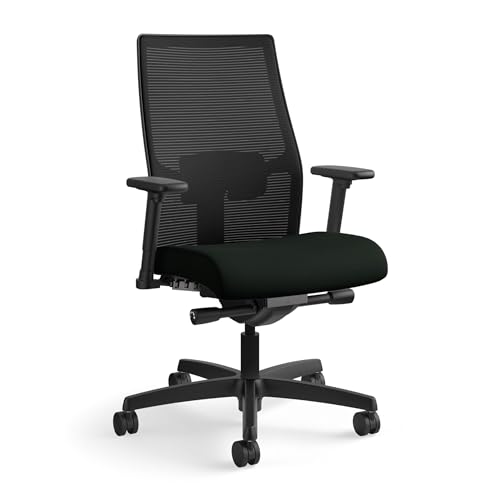
The Ignition 2.0 comes from a commercial office-furniture maker, and it shows in the adjustment list. The lumbar support moves to meet your lower back, the seat depth adjusts so the waterfall edge does not press behind your knees, and the advanced synchro-tilt keeps the backrest and seat moving in a ratio that supports your spine as you recline. For back pain, that combination matters more than padding thickness.
The mesh mid-back keeps air moving during long sessions, and the arms adjust for both height and width, which helps keep shoulders relaxed instead of hunched. It is a mid-range chair that covers the adjustments a back-pain sufferer actually uses, without the premium price tier of the contract brands below.
Specs
- Back style: Mesh mid-back
- Lumbar support: Adjustable
- Tilt: Advanced synchro-tilt control
- Arms: Height and width adjustable
- Seat: Adjustable seat depth and seat height (about 17.1 to 21.5 inches)
- Weight capacity: 300 lb
- Model number: HONI2MM2AMC10BT
- Tier: Mid-range
2. SIHOO M18 Ergonomic Office Chair

The SIHOO M18 is the budget entry here, and it still includes the two features that matter most for back pain: an adjustable lumbar support and an adjustable headrest. The high-back mesh design supports the full spine, and the wide cushioned seat suits larger frames better than most chairs in this tier.
The tilt locks in position, so you can set a slight recline and keep it, and the 2D armrests adjust up, down, forward, and back. The published capacity is generous for the tier. If your current chair is a basic task chair with no lumbar adjustment at all, the M18 is the lowest-cost step up that still changes how your back is supported.
Specs
- Back style: High-back mesh
- Lumbar support: Adjustable
- Headrest: Adjustable
- Arms: 2D adjustable
- Tilt: Tilt lock with rocking function
- Weight capacity: 330 lb
- Model number: M18-M148
- Tier: Budget
3. Gabrylly Ergonomic Office Chair (GY01)

The Gabrylly GY01 is a big-and-tall mesh chair with a wide cushion and a headrest, built for larger users who find standard chairs too narrow. A seat that is too small concentrates pressure and forces you to perch, which is a common hidden cause of back fatigue; the wider seat pan here gives your hips room to sit back against the lumbar support properly.
The flip-up arms are a practical touch for home offices: push them up and the chair slides fully under the desk, which saves space in a spare-room setup. The backrest tilts and locks between upright and a relaxed recline. This is the budget-tier pick for taller or broader users who need the extra width more than extra adjustments.
Specs
- Back style: High-back mesh
- Lumbar support: Built-in back support with wide cushion seat
- Headrest: Included
- Arms: Flip-up armrests
- Tilt: 90 to 120 degrees with tilt lock
- Weight capacity: 300 lb
- Model number: GY01
- Tier: Budget
4. Steelcase Series 1 Office Chair
The Series 1 is Steelcase’s value chair, and its back uses the company’s LiveBack flexor system: the backrest flexes and conforms as you shift posture, instead of holding one fixed curve all day. For back pain, that dynamic support is the point — your spine changes position constantly, and a backrest that moves with it spreads the load.
The controls are weight-activated, so the recline resistance adjusts to your body without constant knob-turning. The 4D arms on this configuration adjust in four directions, and the published weight capacity is unusually high for a chair this compact, which makes it a strong premium pick for smaller home offices where a full-size executive chair would not fit.
Specs
- Back style: 3D Microknit with LiveBack flexor system
- Lumbar support: Included (LUM configuration)
- Arms: 4D adjustable
- Controls: Weight-activated recline
- Weight capacity: 400 lb
- Model number: 435A00-5T29-5S25-6205-4ARM-LUM-CC (Graphite)
- Tier: Premium
5. Herman Miller Aeron Chair, Size B

The Aeron is the long-running benchmark for ergonomic seating, and this fully loaded Size B version pairs a Pellicle mesh seat and back with a PostureFit support that braces the sacral and lumbar region. The mesh suspension removes the pressure points a foam seat creates, which many back-pain sufferers prefer during very long sitting days.
This configuration adds fully adjustable arms, a tilt limiter, and forward tilt — the last one helps when you lean into keyboard work without sliding out of the lumbar support. Size B is the medium of three sizes and fits most adults. It sits firmly in the premium tier, and the sizing system means you should confirm the size chart before ordering rather than assuming one size fits all.
Specs
- Seat and back: 8Z Pellicle mesh suspension
- Lumbar support: PostureFit sacral/lumbar support
- Arms: Fully adjustable
- Tilt: Tilt limiter with forward tilt
- Size: Size B (Medium), one of three sizes
- Dimensions: 16.75 x 27 x 41 inches
- Weight capacity: 300 lb
- Model number: HER-HML1269 SC
- Tier: Premium
How to Choose an Office Chair for Back Pain
Start with the lumbar support. A fixed bump in the backrest only helps if it lands exactly on your lumbar curve. Adjustable lumbar height or depth, as on the HON and SIHOO picks, fits far more body types. Dynamic systems like the Steelcase LiveBack and Herman Miller PostureFit take a different route and adapt as you move.
Match the seat depth to your legs. When you sit fully back, you should be able to fit two or three fingers between the seat edge and the back of your knees. A seat that is too deep pushes you to slouch forward off the backrest, which undoes the lumbar support. Adjustable seat depth, offered on the Ignition 2.0, solves this for households sharing one chair.
Check the tilt, not just the padding. Thick foam feels good in a showroom and packs down within a year. A synchro-tilt or weight-activated recline that lets you shift between upright and a slight recline keeps your spine loaded in different positions through the day, which matters more for back comfort than cushion softness.
Size the chair to your body. Capacity and dimensions are published for every pick above. Larger users should look at the wide-seat Gabrylly and the 330 lb-rated SIHOO; petite users should check the minimum seat height so their feet rest flat, since dangling feet pull the pelvis out of position.
Who Should Skip These Chairs
Skip this whole category if your back pain is new, severe, or comes with numbness or pain radiating down a leg — a chair is not a diagnosis, and those symptoms need a medical professional first. Also skip these chairs if you mostly work from a sofa or bed with a laptop tray; a task chair only helps at a desk with your screen near eye level.
Gamers who want a reclining racing-style chair with a footrest will find these task chairs too upright and businesslike. And if your workspace is a dining table you clear every evening, the larger premium models are bulky to move daily; a compact chair like the Series 1, or a simpler budget mesh chair, fits that routine better.
FAQ
Can an office chair actually fix back pain?
No chair fixes a medical condition. What a well-fitted chair does is remove the mechanical strain caused by poor support: it holds the lumbar curve, keeps your feet flat, and lets you change posture. Many people find desk-related aching eases once those basics are right, but persistent pain should be checked by a clinician.
Is mesh or foam better for a bad back?
Mesh, as on the Aeron, SIHOO, and Gabrylly, spreads pressure evenly and stays cool, but offers no cushioning to sink into. Foam seats feel softer at first and can suit lighter users. For back support specifically, the backrest design and lumbar adjustment matter more than the seat material, so choose by fit first.
How high should the lumbar support sit?
It should press gently into the small of your back, roughly at belt level, filling the natural inward curve of the lumbar spine. If it pushes at your mid-back or your pelvis, it is positioned wrong. That is why adjustable-height lumbar supports, like the ones on the HON and SIHOO chairs, are easier to get right.
How long does an ergonomic chair take to feel right?
Give it one to two weeks of daily use. If you have been slouching in an unsupportive chair for years, sitting with proper lumbar contact can feel oddly firm at first. Adjust one setting at a time — seat height first, then lumbar position, then arm height — so you can tell which change helped.
Final Verdict
For most home workers with back pain, the HON Ignition 2.0 is the pick: adjustable lumbar support, seat-depth adjustment, and a proper synchro-tilt at a mid-range tier. The SIHOO M18 and Gabrylly GY01 cover tighter budgets, with the Gabrylly suiting bigger frames. If the budget stretches, the Steelcase Series 1 adds a flexing backrest in a compact frame, and the Herman Miller Aeron remains the premium mesh benchmark. Match the size and capacity to your body first; that decision matters more than any single feature.






Write Your Review
No reviews yet. Be the first to share your experience!