
Key takeaways
- Time-Lapse Parking Mode: Records continuously at 1-2 frames per second to save power and storage. You get a full timeline but not smooth video. Useful for long airport parking stays.
- Motion and Impact Detection: Uses the image sensor and G-sensor to wake and record when someone walks close or bumps the car. Most affordable dash cams use this, but it can miss events that start outside the detection zone.
- Buffered Parking Mode: The best dash cams with parking mode record continuously in a loop while parked but only save the file when an event is detected. The saved clip includes 10-20 seconds *before* the impact. This is critical for hit-and-runs because you see the vehicle approaching, not just the jolt.
The best dash cams with parking mode in 2026 are the BlackVue DR970X-2CH, Viofo A139 Pro, Thinkware U1000, Garmin Dash Cam 67W, and Vantrue N4 Pro, because they combine buffered recording, reliable hardwire voltage-cutoff, and true low-light sensors rather than just motion detection while parked.
If you park on the street, in an open lot, or leave your car overnight without supervision, a standard dash cam that only records while driving will not help you. Parking mode is the feature that keeps the camera guarding your vehicle after you turn off the ignition, and the difference between good and bad implementation comes down to how it is powered, triggered, and stored.
Our top picks

As an Amazon Associate we earn from qualifying purchases at no extra cost to you. Ratings are shown as listed on Amazon.
How Parking Mode Is Triggered
Not all parking modes work the same way, and the activation method determines whether you actually capture an incident.
3 Common Parking Mode Types
- Time-Lapse Parking Mode: Records continuously at 1-2 frames per second to save power and storage. You get a full timeline but not smooth video. Useful for long airport parking stays.
- Motion and Impact Detection: Uses the image sensor and G-sensor to wake and record when someone walks close or bumps the car. Most affordable dash cams use this, but it can miss events that start outside the detection zone.
- Buffered Parking Mode: The best dash cams with parking mode record continuously in a loop while parked but only save the file when an event is detected. The saved clip includes 10-20 seconds *before* the impact. This is critical for hit-and-runs because you see the vehicle approaching, not just the jolt.
For reliable evidence, prioritize buffered parking mode with both motion and G-sensor triggers. Cameras like the BlackVue DR970X-2CH, Thinkware U1000, and Viofo A139 Pro offer buffered modes, while entry-level single-channel models typically offer only time-lapse or impact-only.
Do You Need a Hardwire Kit?
Yes, if you want parking mode to work for more than a few minutes. A dash cam plugged into a 12V cigarette lighter or USB port loses power when most cars turn off the ignition. Parking mode requires a constant power source.
There are two ways to provide it:
- Hardwire Kit to Fuse Box (Most Common): A three-wire kit connects to ACC (switched power), BATT (constant power), and ground. This lets the camera know when the car is parked and switch modes automatically. Installation takes 15-30 minutes and usually taps a fuse like the dome light or accessory circuit. No cutting is required if you use add-a-fuse taps.
- External Dash Cam Battery Pack: A dedicated lithium iron phosphate (LiFePO4) battery pack charges while you drive and powers the camera while parked without touching the car battery at all. Brands like BlackVue (Power Magic Ultra Battery) and Thinkware (iVolt) make packs that provide 15-25 hours of parking recording and recharge in about an hour of driving.
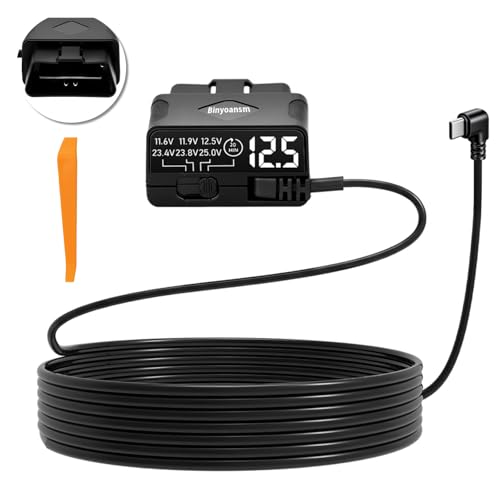
An OBD-II power cable is a plug-and-play alternative for some cars, but it often lacks adjustable voltage cutoff and is not recommended for long-duration parking.
Spec Comparison: Top Dash Cams With Parking Mode
Use this table to see how power, storage, and sensor choices affect parking performance. All models below support parking mode via hardwiring.
| Model | Channels / Resolution | Parking Modes | Power Type | Max Storage | Low-Light Sensor | Weight (Front Unit) |
|---|---|---|---|---|---|---|
| BlackVue DR970X-2CH | 2CH / 4K UHD Front + Full HD Rear | Buffered Motion + Impact, Time-Lapse, Energy Saving | Supercapacitor | 512GB microSD | STARVIS 2 IMX678 | 113g |
| Viofo A139 Pro 2CH | 2CH / 4K Front + 1080p Rear | Buffered Motion + Impact, Time-Lapse, Low Bitrate | Supercapacitor | 512GB microSD | STARVIS 2 IMX678 + HDR | 118g |
| Thinkware U1000 | 2CH / 4K Front + 2K Rear | Buffered Motion + Impact, Time-Lapse, Energy Saving 2.0 | Supercapacitor | 512GB microSD | Super Night Vision 2.0 | 128g |
| Garmin Dash Cam 67W | 1CH / 1440p + 180-degree lens | Motion + Impact (requires constant power cable) | Supercapacitor + small Li-ion for safe shutdown | 512GB microSD | Garmin Clarity HDR | 82g |
| Vantrue N4 Pro | 3CH / 4K Front + 1080p Inside + 1080p Rear | Motion + Impact, Low Bitrate, Time-Lapse | Supercapacitor | 512GB microSD | STARVIS 2 IMX678 + Novatek 96529 | 148g |
Supercapacitors are standard on all quality parking-mode cameras in 2026. They withstand heat up to 70-80°C and avoid the swelling and failure risk of lithium-ion batteries inside a hot windshield.
Which Dash Cam Should You Choose? A Decision Matrix
Match your parking situation to the right feature set instead of buying on resolution alone.
| Your Situation | Priority Features | Best Fit Type |
|---|---|---|
| Street parking overnight, risk of hit-and-run | Buffered recording, 4K front, adjustable G-sensor, rear camera | BlackVue DR970X-2CH or Thinkware U1000 |
| Apartment lot with many passersby, need to reduce false alerts | Energy saving mode, sensitivity zones, time-lapse option | Thinkware U1000 with Energy Saving 2.0 |
| Rideshare / needs interior coverage while parked | 3-channel, infrared interior, low-bitrate parking | Vantrue N4 Pro |
| Want smallest footprint + voice control | Single channel, 180-degree wide view, compact mount | Garmin Dash Cam 67W |
| Best value for true 4K + buffered mode | 4K STARVIS 2, HDR, 512GB support, low price range | Viofo A139 Pro |
Low-Light Recording: What Actually Matters at Night
Marketing often claims “night vision,” but two hardware factors determine whether you can read a license plate at 2 a.m. under a streetlight.
- Sensor Size and STARVIS 2: Sony STARVIS 2 sensors (IMX678, IMX675) capture 2-3 times more light per pixel than older STARVIS sensors. Cameras without this sensor rely on software brightening that creates noisy, blurred plates when a car moves.
- HDR vs. WDR: High Dynamic Range (HDR) combines multiple exposures to balance headlight glare and dark shadows. Without HDR, plates wash out completely when headlights hit them. For parking lots, HDR is more important than raw 4K.
For dark garages, look for a camera with a sub-2.0 aperture (F1.6 – F1.8) on the front lens. The Garmin 67W and Thinkware U1000 use F1.7 and F1.8 respectively, which helps in unlit areas. An interior infrared camera, like on the Vantrue N4 Pro, is the only way to capture faces inside a dark car.
Storage, Loop Recording, and How Long Parking Clips Are Kept
Parking mode can fill a card quickly if configured poorly. All dash cams use loop recording, overwriting the oldest file when full, but they protect event files from being overwritten.
Calculation that explains why card size matters:
A 4K front + 1080p rear dash cam in low-bitrate parking mode uses about 250-350 MB per hour. In time-lapse mode (1 fps), it uses about 120-180 MB per hour. On a 64GB card (roughly 59GB usable), that is only 16-20 hours before loop overwrite begins. Protected event files (typically 30 seconds to 1 minute per impact) are locked and will eventually fill the card if not formatted.
- Minimum for parking mode: 128GB high-endurance microSD (rated for 10,000+ hours of continuous recording). Standard microSD cards wear out in 6-12 months of 24/7 use.
- Recommended for multi-day parking: 256GB or 512GB high-endurance card. This provides 3-7 days of time-lapse coverage before overwrite.
- File system tip: Format the card in the camera itself every 30 days, not on a computer, to maintain the correct allocation and prevent corrupted event folders.
Battery Protection: The Setting That Prevents a Dead Battery
A hardwire kit must have an adjustable low-voltage cutoff. Without it, the camera will drain your car battery until the car will not start.
- Voltage Cutoff: Most kits offer 11.8V, 12.0V, 12.2V, and 12.4V options. For a standard 12V lead-acid battery, set it to 12.0V or 12.2V. Setting it to 11.8V gives longer recording but risks a slow crank in cold weather. For AGM batteries common in newer cars, 12.2V is safer.
- Timer Cutoff: Set a time limit of 6, 12, or 24 hours. Even if voltage is still good, the camera will shut off after the timer expires. A good starting point is 12 hours for daily drivers and 24-48 hours if you leave the car at an airport.
Example: A dash cam drawing 300mA (0.3A) at 12V consumes about 3.6W. Over 24 hours, that is 86Wh. A typical 60Ah car battery holds about 720Wh, but only 30-40% is usable before voltage drops too low. Without cutoff, the camera could consume 12% of usable capacity in one day, plus the car’s own parasitic draw of 30-50mA. This is why voltage and timer cutoffs are not optional.
If your car has a start-stop system or is a hybrid, an external battery pack is strongly recommended instead of relying on the starter battery.
Ownership Realities and Common Mistakes
Parking mode reliability drops more often from installation and maintenance issues than from the camera itself.
- What wears first: The microSD card, not the camera. High heat and constant overwriting degrade memory cells. Replace high-endurance cards every 18-24 months even if they still work. Keep a spare formatted card in the glove box.
- Suction vs. Adhesive Mount: Suction mounts vibrate and can trigger false G-sensor events. 3M adhesive mounts reduce vibration and hold better in summer heat.
- G-sensor sensitivity: Setting it to maximum creates hundreds of locked files from doors slamming or trucks passing. Start at medium sensitivity and test by nudging the car. You want it to trigger on a shopping cart bump, not on wind.
- Wi-Fi and Cloud drains battery: Features like BlackVue Cloud keep the camera’s Wi-Fi and LTE module awake, increasing parking draw by 40-60%. If you need multi-day parking, disable cloud while parked.
- Cleaning: Clean the windshield inside and outside where the lens looks through weekly. A film of interior haze reduces night clarity more than sensor specs. Use isopropyl alcohol on the glass, not on the lens itself.
- Legal check: Some regions restrict continuous recording of public streets while parked. Turn on privacy masking or motion-zone cropping if your camera offers it.
How to Set Up Parking Mode Correctly
- Install the hardwire kit with the correct fuse types (use a multimeter or fuse tester to confirm constant vs. switched power).
- In the camera menu or app, set voltage cutoff to 12.0V or 12.2V and timer to 12 hours for initial testing.
- Enable buffered recording if available. Set motion detection to low/medium to avoid filling the card with pedestrians.
- Test it: Turn off the car, walk in front of the camera after 30 seconds, then gently push the car to trigger the G-sensor. Check the app to confirm both a motion file and an impact-locked file were saved with pre-event footage.
- After one week, review how many files were locked and how much battery voltage dropped overnight (many apps show this). Adjust sensitivity and cutoff accordingly.
Finding Deals on Parking-Mode Dash Cams
Prices for the best dash cams with parking mode typically fall into general market ranges: single-channel 1440p models from 180 to 250, 2-channel 4K models from 300 to 450, and 3-channel 4K models from 350 to 500, with hardwire kits adding 20 to 40 and battery packs 200 to 350. On 999coupons.com you can compare coupon offers for official brand stores and authorized electronics retailers to find bundle savings on camera + hardwire kit + high-endurance card, which is almost always cheaper than buying separately.
Frequently Asked Questions
Will parking mode drain my car battery?
It will if installed without a voltage cutoff, but a properly configured hardwire kit prevents drain by shutting off at 12.0V-12.2V or after a set time. For cars parked longer than two days, use an external battery pack instead of the car battery.
Can I use parking mode without hardwiring?
Only if your 12V outlet stays powered after the ignition is off, which is rare. Even then, most outlets do not provide stable low-voltage protection. A hardwire kit or battery pack is the reliable method.
How long will a dash cam record while parked?
With a 256GB card in time-lapse mode, about 40-60 hours before loop overwrite. In buffered event mode, it records continuously but only saves triggered clips, so it can guard the car for the full cutoff timer (12-48 hours) without filling the card.
Does parking mode work through a tinted windshield?
Yes, but infrared interior cameras will not see through metallic window tint. Front and rear cameras work normally behind tint, though heavy ceramic tint at night may slightly reduce clarity. Mount the lens in a clear area or cutout if your tint has a dark visor strip.








Write Your Review
No reviews yet. Be the first to share your experience!