
Key takeaways
- Pro: WiFi 6 and Bluetooth 5.4 set it apart from most budget rivals
- Pro: Android 16 means longer support window and newer security patches
- Con: RAM specification is inflated by virtual memory
Finding a capable tablet without spending more than a laptop is one of the most common purchase dilemmas we see on this site. The buyers in question are parents who need a screen for their kids’ school apps, students who want a second display for PDFs and note-taking, or anyone who simply prefers a large touch interface for streaming and web browsing. The catch is that the budget tablet segment is flooded with listings that inflate RAM numbers, omit Google certification, or pair decent hardware with a dim, low-resolution panel that makes daily use frustrating.
What separates a worthwhile cheap tablet from a disposable one comes down to three things: whether the software stack is real (Google Mobile Services, a recent Android version, Widevine L1 for protected streaming), whether the display resolution is high enough to read text comfortably, and whether the battery capacity matches the screen size. We compared published specs, listed prices, and owner feedback across eight budget options in this guide to identify which models deliver on those fundamentals and which ones cut corners that matter. This roundup reflects the market as of 2026.
As an Amazon Associate we earn from qualifying purchases at no extra cost to you. Product prices and availability are accurate as of the date shown and are subject to change.





Quick Picks
| Product | Best for | Price |
|---|---|---|
| Android 16 Tablet 10 Inch | Maximum spec-per-dollar | $79.99 |
| ECOPAD 10.1 Inch Tablet | Big-screen streaming | $65.99 |
| Vyrolinia 7 Inch Tablet | Lowest price with Netflix | $38.99 |
| Amazon Fire HD 8 | Amazon ecosystem reliability | $129.99 |
| ZZB 10 inch Tablet | Connectivity on a budget | $54.97 |
| ICONLINK Android 16 Tablet | Light productivity bundle | $62.99 |
| Android 14 Tablet 7 inch | Portable media playback | $40.99 |
| Lenovo Tab One | Brand-name battery life | $139.99 |
How We Picked
We evaluated each tablet on four criteria that matter most in the sub-$140 range. First, software legitimacy: a recent Android version and confirmed Google Mobile Services mean access to the Play Store and security patches, while Widevine L1 unlocks HD streaming on Netflix and Prime Video. Second, display quality: resolution above 800p on a panel larger than seven inches makes reading and video comfortable. Third, connectivity: WiFi 6 and Bluetooth 5.x indicate a newer platform rather than a recycled older chipset. Fourth, honest hardware: we flagged listings whose RAM claims rely on virtual expansion rather than physical memory, because owners consistently report performance gaps when the marketing number does not match the silicon.
The 8 Best Cheapest Tablet in 2026
Android 16 Tablet 10 Inch — $79.99
On paper, nothing else at this price touches these numbers: a 10-inch IPS display, Android 16, WiFi 6, and Bluetooth 5.4. Owner feedback confirms the screen is bright enough for indoor streaming and the connectivity pair delivers noticeably faster file transfers than older standards. The catch is the “24GB RAM” figure, which almost certainly includes virtual memory layered on top of a smaller physical allocation. If you understand that distinction, the tablet is a solid value for casual browsing, video calls, and light multitasking. Skip it if you rely on confirmed RAM benchmarks before purchasing, or if you need a device you can trust for demanding apps without a performance caveat.
- Pro: WiFi 6 and Bluetooth 5.4 set it apart from most budget rivals
- Pro: Android 16 means longer support window and newer security patches
- Con: RAM specification is inflated by virtual memory
ECOPAD 10.1 Inch Tablet — $65.99
This tablet covers the essentials for anyone who wants a large screen under $70. The 1280×800 IPS panel is crisp enough for reading and video, the 6000mAh battery sustains a full evening of streaming, and Google Mobile Services are confirmed in the listing. The 12GB RAM figure combines 4GB physical with 8GB virtual, so expect smooth performance on lighter tasks rather than heavy multitasking. Bluetooth 5.0 is functional but older than what newer budget rivals offer. It is a good pick for a shared family device or a bedroom streaming screen. Skip it if you plan to pair modern accessories or need confirmed high-RAM performance.
- Pro: 6000mAh battery paired with a large screen gives real all-evening endurance
- Pro: GMS certification ensures full Play Store access out of the box
- Con: Bluetooth 5.0 lags behind newer standards found at similar prices
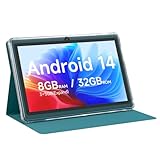
Vyrolinia 7 Inch Tablet — $38.99
At under $40, this is the most affordable entry on the list, and it earns its place by including Widevine L1, which unlocks HD playback on YouTube and Netflix. The 8GB RAM claim uses 3GB physical plus 5GB virtual, adequate for single-app streaming on a small 1024×600 panel. A protective case is bundled, adding tangible value for a device likely to be handled by children. The 7-inch screen is genuinely cramped for reading long-form text, and the dual-band WiFi label is reassuring but the 32GB physical storage fills fast. Skip it if you need a device for schoolwork or productivity; this one is built for one-handed video consumption.
- Pro: Widevine L1 enables HD streaming apps at the lowest price point here
- Pro: Protective case included in the box saves an extra purchase
- Con: 7-inch 1024×600 display is too small for comfortable document reading
Amazon Fire HD 8 — $129.99
The Fire HD 8 is the most recognizable name in this roundup and carries brand-level reliability that budget no-names cannot match. Amazon’s ecosystem means Kindle, Prime Video, and Audible integrate seamlessly, and the device benefits from a known support track record. The 4GB RAM and 8-inch HD display are adequate for media consumption but not for heavy browsing tabs. The major limitation is Fire OS: no Google Play Store means you rely on the Amazon Appstore, and Widevine L1 support for some apps is inconsistent across Fire tablets. Skip it if you need full Google services or Android flexibility; buy it if you are already deep in Amazon subscriptions and want a device that simply works.
- Pro: Amazon’s build quality and update cadence far exceed no-name rivals
- Pro: Best-in-class integration for Prime Video, Kindle, and Alexa
- Con: Fire OS restricts app selection compared to full Android tablets
ZZB 10 inch Tablet — $54.97
This listing packs WiFi 6 and 5G-band WiFi into a sub-$60 tablet with a 10-inch IPS display, which is unusual at this price tier. The 8GB RAM figure likely uses virtual expansion similar to competitors, and the 32GB physical storage means you will rely on the 1TB SD card slot for any meaningful app library. Android 15 provides a reasonably current experience. The dual-camera setup (2MP front, 8MP rear) is functional for video calls but not a selling point. It suits buyers who prioritize connectivity and screen size over brand reassurance. Skip it if you want confirmed physical RAM or a device you can trust for more than light usage.
- Pro: WiFi 6 at under $60 is a genuine connectivity advantage
- Pro: 10-inch IPS screen keeps the experience comfortable for video and reading
- Con: 32GB physical storage is restrictive without an SD card immediately
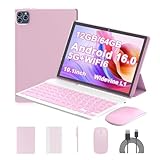
ICONLINK Android 16 Tablet — $62.99
The standout value here is the bundle: a 10-inch tablet with a keyboard case, mouse, and stylus for $62.99 transforms it into a lightweight laptop substitute for students or casual workers. Android 16, WiFi 6, Bluetooth 5.3, and a five-core 2.0GHz processor give it a modern platform story. The 1280×800 IPS display is serviceable but not exceptional. The physical RAM is 3GB with 9GB virtual, so multitasking performance will be modest. This is the best pick for anyone who needs typing capability without buying accessories separately. Skip it if you want a slim, tablet-only form factor; the keyboard adds bulk and the screen resolution limits fine-text work.
- Pro: Keyboard, mouse, and stylus included at no extra cost
- Pro: Android 16 and WiFi 6 indicate a genuinely recent platform
- Con: 3GB physical RAM limits concurrent app performance
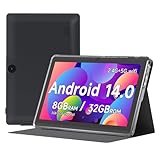
Android 14 Tablet 7 inch — $40.99
This navy-colored 7-inch tablet mirrors the Vyrolinia in many ways: 8GB RAM (3GB physical plus 5GB virtual), Widevine L1, a protective case, and a compact form factor. The 3000mAh battery is modest for a screen this small but should survive an evening of streaming. A quad-core processor is sufficient for single-app use. Owner feedback notes the screen is adequate for video but cramped for reading. The GMS confirmation means full Play Store access. Skip it if you need all-day battery life away from an outlet or if the 1024×600 resolution bothers you during text-heavy tasks.
- Pro: Widevine L1 and GMS together unlock HD streaming and the full Play Store
- Pro: Case included protects a device likely to be handled roughly
- Con: 3000mAh battery requires more frequent charging than larger rivals
Lenovo Tab One — $139.99
The most expensive entry here, but it is the only one from a major brand with a dedicated processor spec (MediaTek Helio G85), a stated 12.5-hour YouTube streaming figure, and a folio case included. The 8.7-inch HD display and 4GB physical RAM are honest numbers rather than marketing-inflated ones, which builds buyer confidence. The 64GB storage is usable without immediate expansion. The downside is clear: at $140, you are paying a premium for brand trust and stated endurance, and the display resolution does not exceed budget rivals with 10-inch panels. Skip it if your ceiling is under $100; buy it if reliability and a known chipset matter more than raw spec sheets.
- Pro: 12.5-hour streaming endurance with a confirmed MediaTek chipset
- Pro: Physical 4GB RAM is honest; no virtual-memory padding
- Con: Highest price in this roundup with no display-resolution advantage
Buying Guide
Decoding RAM and Storage Claims
Most budget tablets in this range advertise combined RAM (physical plus virtual) in their product titles. A “12GB RAM” figure that is actually 4GB physical plus 8GB software-allocated swap will not perform like 12GB of real memory. Check the listing description or owner forums for the physical RAM number. Storage follows the same logic: “64GB ROM with 1TB expansion” means 64GB onboard and a microSD slot for the rest. Prioritize physical numbers over combined claims.
Why Widevine L1 and GMS Matter
Widevine is the DRM system that governs video quality on streaming apps. Without L1 certification, Netflix and Prime Video cap playback at 480p regardless of your screen resolution. Google Mobile Services certification confirms the tablet has passed the compatibility suite for the Play Store, Gmail, Maps, and other core apps. A tablet can run Android without GMS and still open the Play Store via sideload, but updates and compatibility become unreliable. Look for both labels in the listing.
Screen Size and Resolution Balance
Resolution and size must scale together. A 10-inch panel at 1280×800 delivers roughly 149 pixels per inch, which is adequate for reading. A 7-inch panel at the same resolution yields about 212 PPI and looks sharper, but the smaller canvas limits multitasking. Below 1024×600, text becomes pixelated on any size. If your primary use is video, larger screens with lower PPI are acceptable. If you read documents or browse long articles, aim for the highest resolution available at your target size.
Our Verdict
The ECOPAD 10.1 Inch Tablet is our top overall pick: it balances a large, adequately resolved display, a generous battery, Google certification, and a price under $70 without the obvious marketing exaggerations that plague some competitors. For the absolute lowest entry point, the Vyrolinia 7 Inch Tablet at $38.99 is the best cheapest tablet that still unlocks HD streaming and includes a protective case, making it ideal for a child or a dedicated bedside media screen. However, if you need typing capability without buying a separate keyboard, the ICONLINK Android 16 Tablet wins on bundle value at $62.99.
FAQ
Are tablets under $80 reliable enough for daily use?
They are reliable for single-task use: streaming, browsing one tab at a time, video calls, and simple games. Multi-tab browsing, file management, and app-heavy multitasking will strain the virtual-RAM configurations typical at this price. If your use case is narrow, the savings are real; if you need to juggle several apps daily, step up to the Lenovo or Fire HD 8 tier where physical RAM is confirmed.
What is the difference between Android 15 and Android 16 on a budget tablet?
The version number reflects the security and feature baseline the device shipped with. A higher version generally means a longer window before the manufacturer stops pushing patches, plus access to newer Android-level features. On budget hardware, the practical difference day to day is small, but starting at Android 16 versus Android 14 buys you roughly two additional years of relevant support.
Do I need WiFi 6 on a cheap tablet?
Only if your home router already supports WiFi 6 and you plan to transfer large files or stream from a local media server. For standard streaming and browsing, WiFi 5 is sufficient and the difference is negligible. WiFi 6 on a budget tablet often indicates a newer SoC, which correlates with better overall component quality.
Can I trust the “1TB expandable” claims?
They refer to microSD card capacity, not built-in storage. Most budget tablets ship with 32GB or 64GB onboard and accept cards up to 1TB for media files. Apps and system updates install on the internal storage, which cannot be expanded on Android 13 and later without special configuration. Buy the largest onboard storage your budget allows and treat the SD slot as a media library.








Write Your Review
No reviews yet. Be the first to share your experience!